

Easiest way to improve your literature review? Include both supporting and opposing arguments on a given topic.
So, how do you find them?
Ask Google Scholar and it only gives you a citation count.
But Scite will show you papers that support or oppose a given argument: x.com
So, how do you find them?
Ask Google Scholar and it only gives you a citation count.
But Scite will show you papers that support or oppose a given argument: x.com

1. Go to scite(dot)ai and log in to your account. Scite offers a 7-day free trial.
In the search bar, paste the title of the paper you want to look up.
Scite will give you citation types: supporting, mentioning, contrasting, and unclassified. x.com
In the search bar, paste the title of the paper you want to look up.
Scite will give you citation types: supporting, mentioning, contrasting, and unclassified. x.com

2. Filter the citations by supporting or contrasting.
And Scite will show you the papers containing supporting/contrasting citations.
Not just that, it will give you the exact passage where supporting/contrasting citations are mentioned in those papers. x.com
And Scite will show you the papers containing supporting/contrasting citations.
Not just that, it will give you the exact passage where supporting/contrasting citations are mentioned in those papers. x.com

3. You can also install the Scite extension in Chrome.
Go to Chrome Web Store, look up Scite, and add it to your browser. x.com
Go to Chrome Web Store, look up Scite, and add it to your browser. x.com

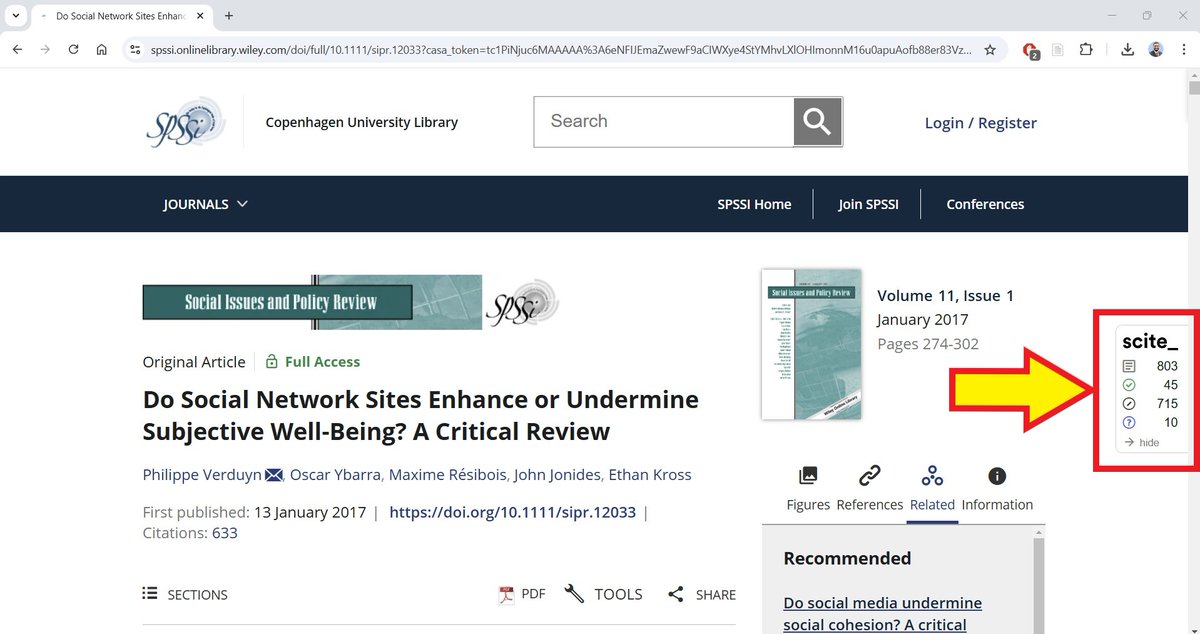
4. Now whenever you look up a paper, Scite will you smart citations to the right of your screen. x.com
Want to learn more about how to supercharge your academic writing with AI?
I am doing a 4-hour webinar on 25 Jan.
2,100+ academics have attended this webinar.
Use "SUPER25" for a 25% discount.
Registration details👇
eventbrite.dk
I am doing a 4-hour webinar on 25 Jan.
2,100+ academics have attended this webinar.
Use "SUPER25" for a 25% discount.
Registration details👇
eventbrite.dk

Found this thread helpful?
1. Scroll to the top and repost the first post to share it with your friends.
2. Follow me for more threads on how to use AI apps for academic purposes.
1. Scroll to the top and repost the first post to share it with your friends.
2. Follow me for more threads on how to use AI apps for academic purposes.
Loading suggestions...