

GOOGLE just got MASSIVE upgrade
Gemini is now inside Google Chrome!
Here're 5 powerful features of Chrome, you don't want to miss
Gemini is now inside Google Chrome!
Here're 5 powerful features of Chrome, you don't want to miss
1/ Access Gemini in Chrome
- Type '@gemini' in the address bar, followed by your prompt.
- Chrome will launch Gemini with the prompt and an answer ready.
- Type '@gemini' in the address bar, followed by your prompt.
- Chrome will launch Gemini with the prompt and an answer ready.

2/ Theme Generator
Quickly generate custom themes based on a subject, mood, visual style and color that you choose — no need to become an AI prompt expert!
Steps:
1. Go to “Customize Chrome" side panel
2. Click “Change theme” and then “Create with AI.”
Quickly generate custom themes based on a subject, mood, visual style and color that you choose — no need to become an AI prompt expert!
Steps:
1. Go to “Customize Chrome" side panel
2. Click “Change theme” and then “Create with AI.”

3/ Tab Organizer
Chrome will suggest and create tab groups based on your open tabs.
Step 1. Right-click a tab
Step 2. Select "Organize Similar Tabs" or click the drop-down arrow left of your tabs.
Chrome will suggest and create tab groups based on your open tabs.
Step 1. Right-click a tab
Step 2. Select "Organize Similar Tabs" or click the drop-down arrow left of your tabs.

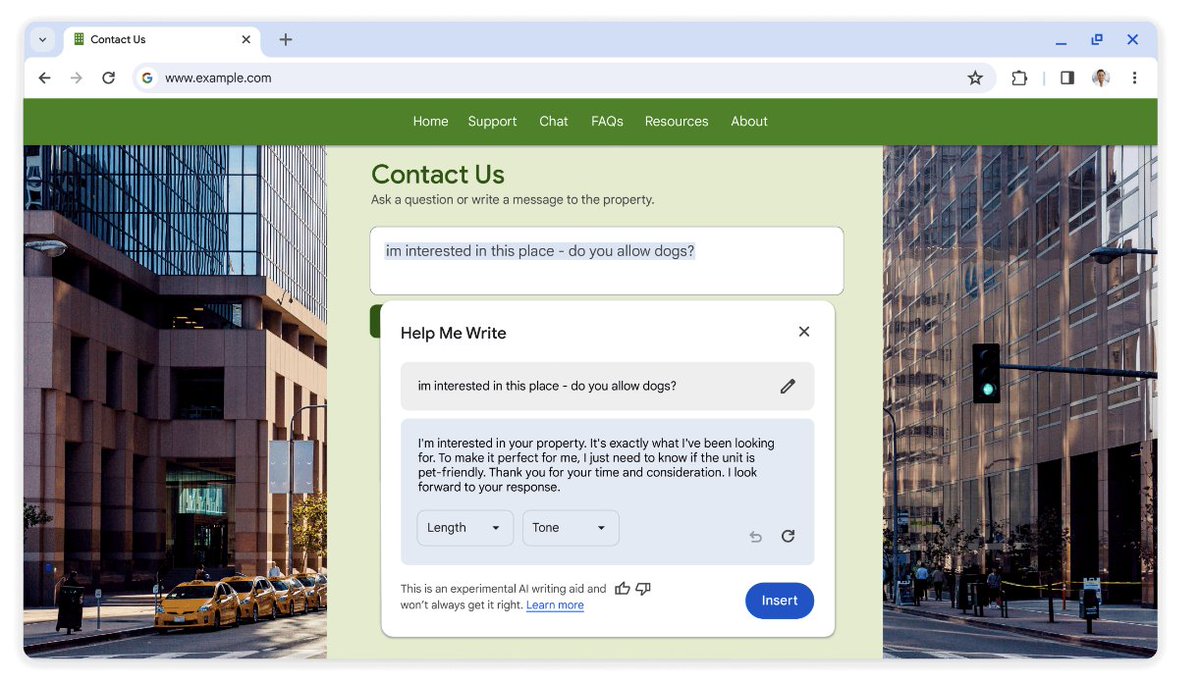
4/ Writing Assistant
Write with confidence online using Chrome.
Steps:
1. Right-click any text box or field in Chrome.
2. Select "Help me write" to start the writing process with our AI.
Write with confidence online using Chrome.
Steps:
1. Right-click any text box or field in Chrome.
2. Select "Help me write" to start the writing process with our AI.
5/ Get started with AI in Chrome
Steps
1. On your computer, open Chrome.
2. Select Settings, then Experimental AI.
3. Turn on Try out experimental AI features.
Steps
1. On your computer, open Chrome.
2. Select Settings, then Experimental AI.
3. Turn on Try out experimental AI features.

Get updates on AI and No-Code tools with tutorials.
Read and Join the "AI Toast" community of 13000 readers for FREE:
aitoast.beehiiv.com
Read and Join the "AI Toast" community of 13000 readers for FREE:
aitoast.beehiiv.com

That's a wrap!
Hope you enjoyed reading this post.
Hope you enjoyed reading this post.
Loading suggestions...