

Many traders in the initial stage blow their capital due to improper position. sizing and then they say "Trading is Gambling!"
With this learning thread on POSITION SIZING and RISK MANAGEMENT we will help you to avoid the biggest blunder that the traders do in the initial phase!
With this learning thread on POSITION SIZING and RISK MANAGEMENT we will help you to avoid the biggest blunder that the traders do in the initial phase!
We often receive direct messages from our friends who find themselves stuck in trades, experiencing losses of up to 70% of their trading capital.
After the market closes, they ask us whether it was a correct trade or not.
Heavy position sizing doesn't let you sleep peacefully.
After the market closes, they ask us whether it was a correct trade or not.
Heavy position sizing doesn't let you sleep peacefully.
We have created a position sizing excel model which can guide you in taking proper quantity in any trades without risking huge capital.
We will split this thread into three parts:
1/ Analyze the trade
2/ Calculate the position sizing
3/ Execute your plan
We will split this thread into three parts:
1/ Analyze the trade
2/ Calculate the position sizing
3/ Execute your plan
1/ Analyze the trade:
Firstly based on any of your trading setup, plan out entry and exit levels for any trade.
There will be two types of exit levels: Stoploss (very important) and target
Firstly based on any of your trading setup, plan out entry and exit levels for any trade.
There will be two types of exit levels: Stoploss (very important) and target
Why Stoploss is the most important in trading?
Stoploss is very important in trading as the loss booked in case of Stoploss getting hit is always the least. You won't regret ever in trading if the trades goes against you completely.
Also, Stoploss defines the risk in any trades.
Stoploss is very important in trading as the loss booked in case of Stoploss getting hit is always the least. You won't regret ever in trading if the trades goes against you completely.
Also, Stoploss defines the risk in any trades.
Once you have identified entry price, stoploss levels then you can move onto the Position Sizing Excel model that we created for you. It is very easy to use and is handy as well.
2/ Calculate the position sizing:
This is how the excel model look like. We will explain usage of all cells here and we will share the link of this at the end.
This is how the excel model look like. We will explain usage of all cells here and we will share the link of this at the end.

Input Cells -
Total Capital: In this cell, user needs to give their current capital as an input. Based on this the position sizing of any trades will be decided along with the percentage risk.
Total Capital: In this cell, user needs to give their current capital as an input. Based on this the position sizing of any trades will be decided along with the percentage risk.
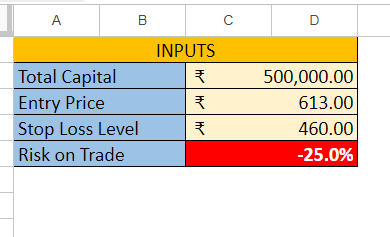
Entry Price and Stoploss level: Input the levels that was finalized in first part.
Risk on Trade: This is formula driven cell which calculates risk in any trade irrespective of position sizing.
Risk on Trade: This is formula driven cell which calculates risk in any trade irrespective of position sizing.
Now coming to the output of this excel model which is Position Sizing.
This is entirely formula driven output that will derive value based on the input given by the user. Let's understand meaning of all the cells.
This is entirely formula driven output that will derive value based on the input given by the user. Let's understand meaning of all the cells.
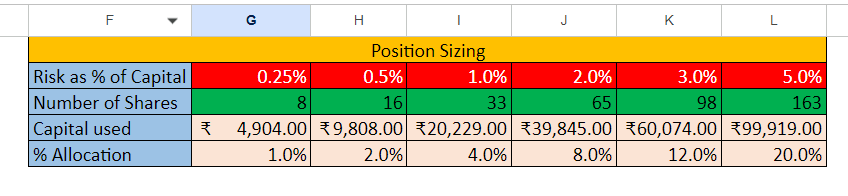
Risk as % of Capital: This defined total risk % based on the capital that you have. For conservative traders they can risk 0.25% of the capital and for risky traders they can risk upto 5% of the capital in any trade.
We don't suggest any trades to go beyond 5% risk limit.
We don't suggest any trades to go beyond 5% risk limit.
Number of Shares that can be traded: Depending on the % risk the number of shares is calculated. For example, for the input given and if any traders want to take 1% of the risk then max 33 quantity can be traded by the traders.
As the risk increases, the quantity also increases.
As the risk increases, the quantity also increases.
Capital used: Depending on the number of shares traded, total capital used can be calculated using number of shares multiplied by the entry level.
% Allocation: It defined how much % of capital is allocated in a single trade depending on total capital.
% Allocation: It defined how much % of capital is allocated in a single trade depending on total capital.
3/ 3/ Execute your plan
Let's understand how to use this position sizing tool with an example.
For example, Total capital is Rs 5L. Entry Price is 500 and Stoploss is 450
If a trades want to take 2% risk in that trade of the total capital then the trader should buy 200 shares.
Let's understand how to use this position sizing tool with an example.
For example, Total capital is Rs 5L. Entry Price is 500 and Stoploss is 450
If a trades want to take 2% risk in that trade of the total capital then the trader should buy 200 shares.

By doing this, even if Stoploss is hit then a trader will lose on 2% of the capital that you can calculate once.
Also the capital allocation in that trade will be 20%. Remaining capital can be used in other trader using same allocation formula.
Also the capital allocation in that trade will be 20%. Remaining capital can be used in other trader using same allocation formula.
Link to access Position Sizing Excel Tool:
This google sheet is only for view purpose and a trader can download it in excel in their system or copy it in their google drive to use it.
docs.google.com
This google sheet is only for view purpose and a trader can download it in excel in their system or copy it in their google drive to use it.
docs.google.com

This is the end of the learning thread. We hope that we have added value in your trading with our small efforts.
If you found this useful, please RT the first tweet
For live trading and stock market related updates, you can join our Telegram Channel⤵️
telegram.me
If you found this useful, please RT the first tweet
For live trading and stock market related updates, you can join our Telegram Channel⤵️
telegram.me

Loading suggestions...