

Here is one of the most popular function types in excel
and there are many different methods available…
Here's the 7 Lookup functions in Excel 🔍
A lookup function allows you to get an exact value from a range, based off of inputs.
and there are many different methods available…
Here's the 7 Lookup functions in Excel 🔍
A lookup function allows you to get an exact value from a range, based off of inputs.
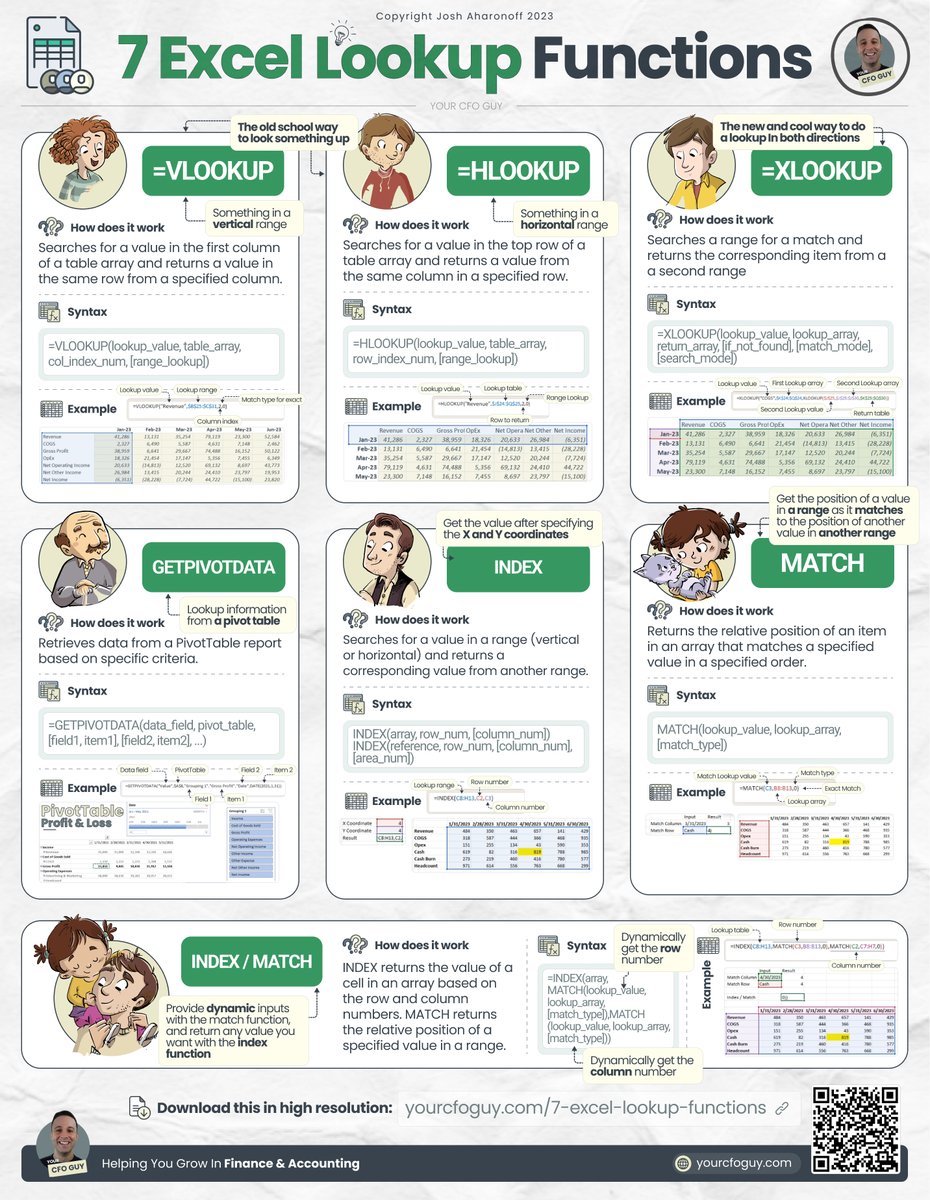
1️⃣ =VLOOKUP
Everyone has heard of a VLOOKUP function…
and many are still using it…even though there are much better functions available
This works by taking a range of data, and finding your lookup value by analyzing a VERTICAL range
Everyone has heard of a VLOOKUP function…
and many are still using it…even though there are much better functions available
This works by taking a range of data, and finding your lookup value by analyzing a VERTICAL range

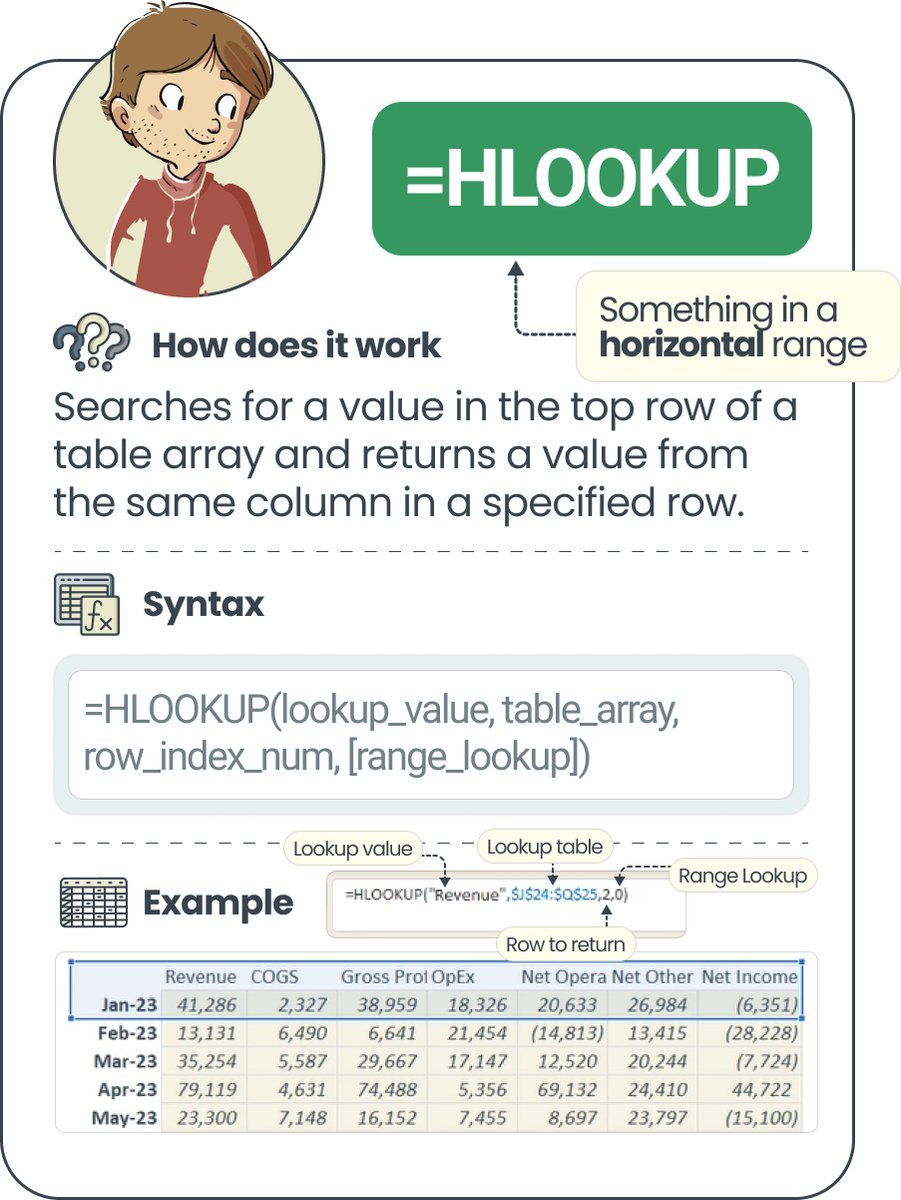
2️⃣ =HLOOKUP
This is pretty much the same as VLOOKUP, only you can now search HORIZONTALLY.
just like VLOOKUP, I feel that HLOOKUP is unnecessary, and limited in it’s functionality
This is pretty much the same as VLOOKUP, only you can now search HORIZONTALLY.
just like VLOOKUP, I feel that HLOOKUP is unnecessary, and limited in it’s functionality
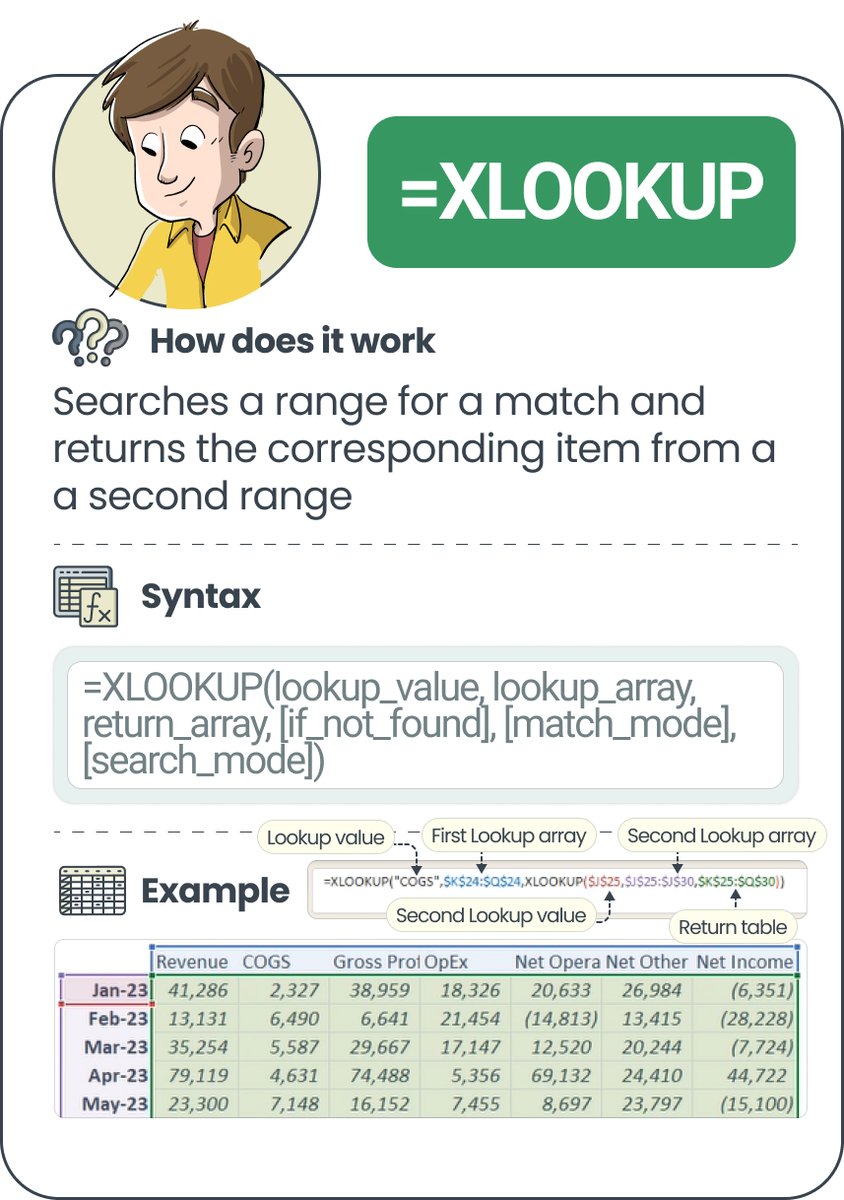
3️⃣ =XLOOKUP
Over the last few years Microsoft released XLOOKUP - your solution to all of your woes with VLOOKUP and HLOOKUP.
Now, instead of being bound to just one direction, you can specify a range on both an X and Y axis to find your lookup value.
Over the last few years Microsoft released XLOOKUP - your solution to all of your woes with VLOOKUP and HLOOKUP.
Now, instead of being bound to just one direction, you can specify a range on both an X and Y axis to find your lookup value.
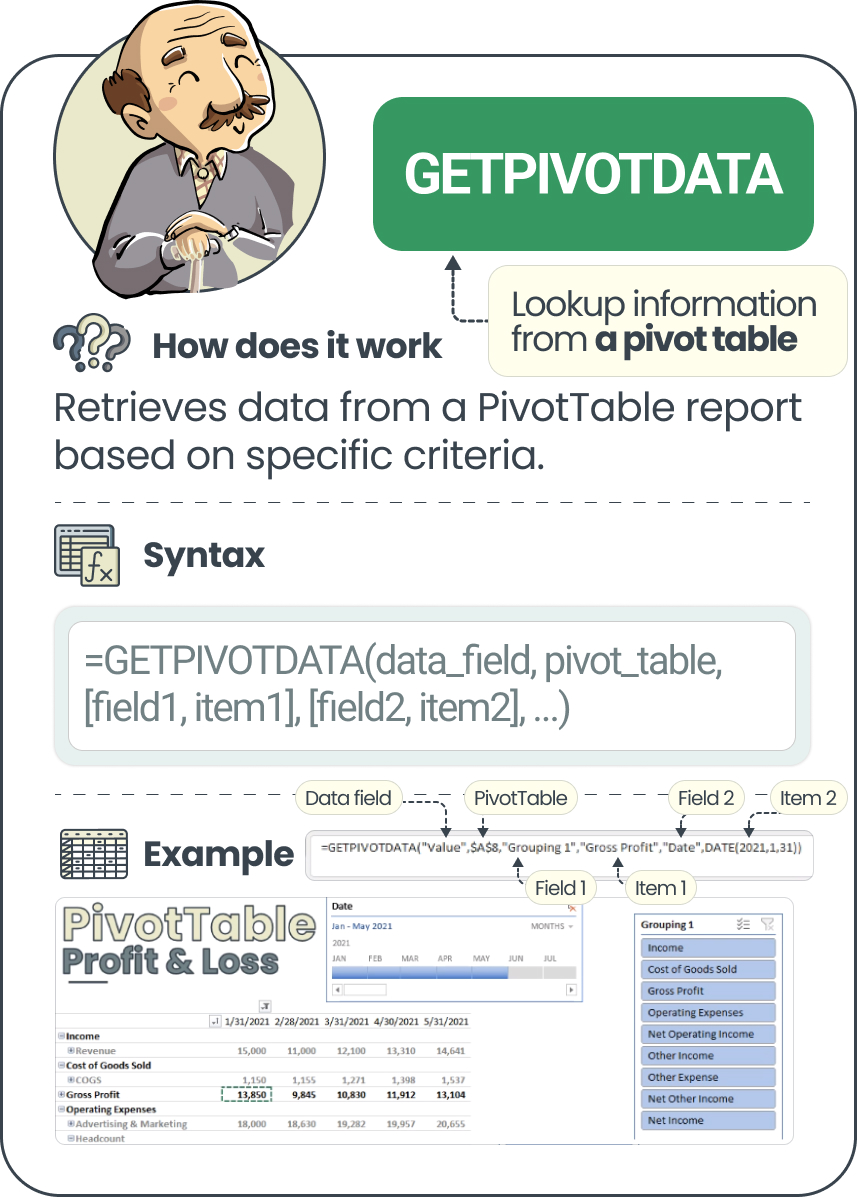
4️⃣ =GETPIVOTDATA
Many aren’t familiar with this one…but it’s super useful.
Here, you can specify the inputs to dynamically pull out your value from a Pivot Table.
Many aren’t familiar with this one…but it’s super useful.
Here, you can specify the inputs to dynamically pull out your value from a Pivot Table.
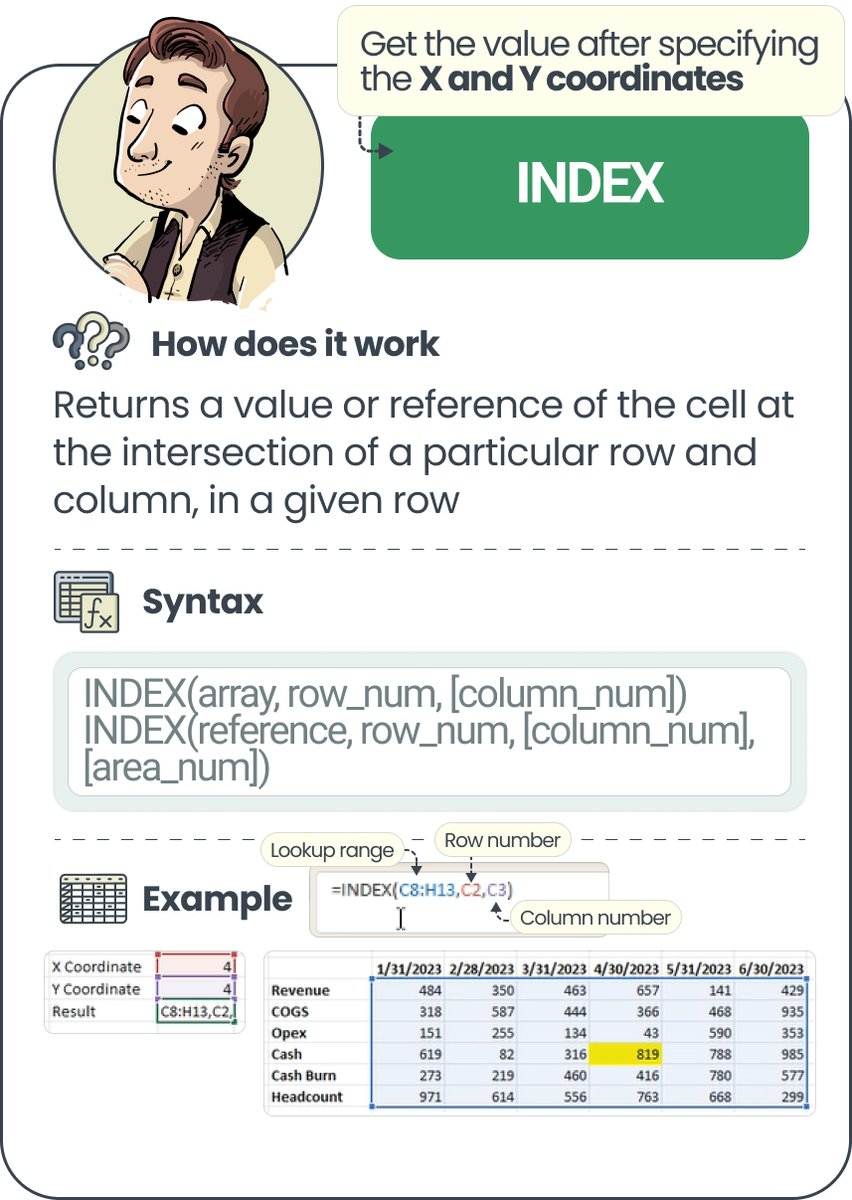
5️⃣ =INDEX
The INDEX function is one of my favorite…
and it’s really simple to understand.
Here you can point to a range with both an X and Y axis…
and simply input the coordinates for what value you want to find (ex: 3rd row, 2nd column)
The INDEX function is one of my favorite…
and it’s really simple to understand.
Here you can point to a range with both an X and Y axis…
and simply input the coordinates for what value you want to find (ex: 3rd row, 2nd column)
6️⃣ =MATCH
The MATCH function is also a really good one…
it allows you to get the POSITION of a value in a range, as compared to the position of another value in a range.
I love using this one when getting the difference in dates from one period to another.
The MATCH function is also a really good one…
it allows you to get the POSITION of a value in a range, as compared to the position of another value in a range.
I love using this one when getting the difference in dates from one period to another.

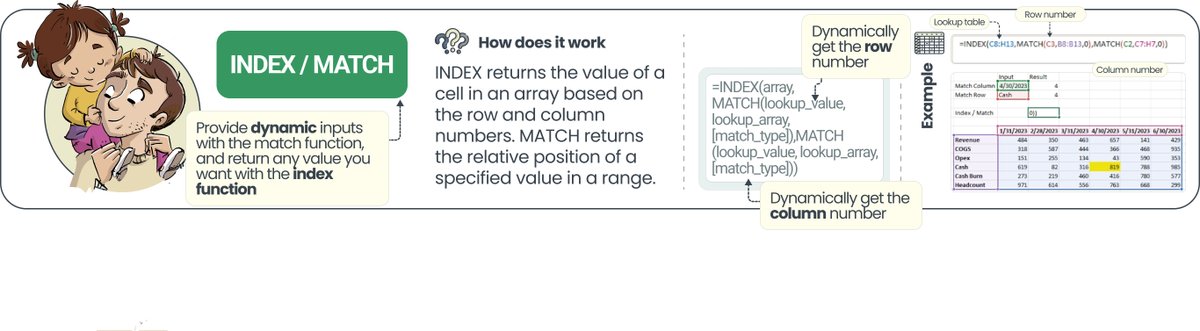
7️⃣ =INDEX/MATCH
OK…here’s my favorite method for looking up a value.
It in essence combines both the Index and the Match value, allowing you to have complete flexibility over your range with dynamic inputs.
OK…here’s my favorite method for looking up a value.
It in essence combines both the Index and the Match value, allowing you to have complete flexibility over your range with dynamic inputs.
Those are my tips for lookup functions, and 7 ones to use.
Which one is your favorite?
𝗜𝗳 𝘆𝗼𝘂 𝗲𝗻𝗷𝗼𝘆𝗲𝗱 𝘁𝗵𝗶𝘀, 𝗰𝗼𝗻𝘀𝗶𝗱𝗲𝗿 j𝗼𝗶𝗻𝗶𝗻𝗴 𝗺𝘆 𝗻𝗲𝘄𝘀𝗹𝗲𝘁𝘁𝗲𝗿 yourcfoguy.com
Which one is your favorite?
𝗜𝗳 𝘆𝗼𝘂 𝗲𝗻𝗷𝗼𝘆𝗲𝗱 𝘁𝗵𝗶𝘀, 𝗰𝗼𝗻𝘀𝗶𝗱𝗲𝗿 j𝗼𝗶𝗻𝗶𝗻𝗴 𝗺𝘆 𝗻𝗲𝘄𝘀𝗹𝗲𝘁𝘁𝗲𝗿 yourcfoguy.com

Loading suggestions...