

Gmail has 4.2 billion users worldwide.
But many people don't know Gmail hacks to 10x Productivity.
Here're 10 Gmail Secrets that you might not know:
[🔖 Bookmark for later]
But many people don't know Gmail hacks to 10x Productivity.
Here're 10 Gmail Secrets that you might not know:
[🔖 Bookmark for later]

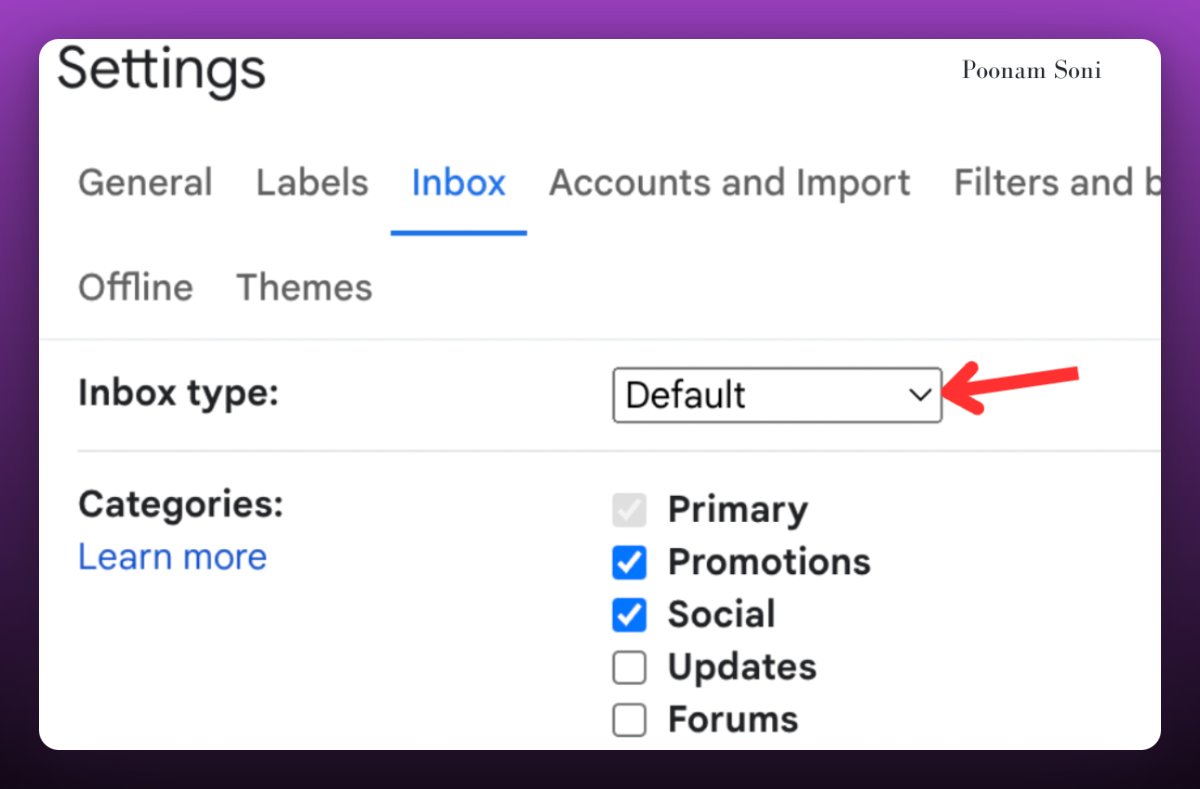
1. Bring Priority Emails to the Top:
You can activate it by the following steps:
- Go to Gmail settings
- Open the Inbox tab
- Choose "Priority" from the "Inbox-type" drop-down menu
You can activate it by the following steps:
- Go to Gmail settings
- Open the Inbox tab
- Choose "Priority" from the "Inbox-type" drop-down menu
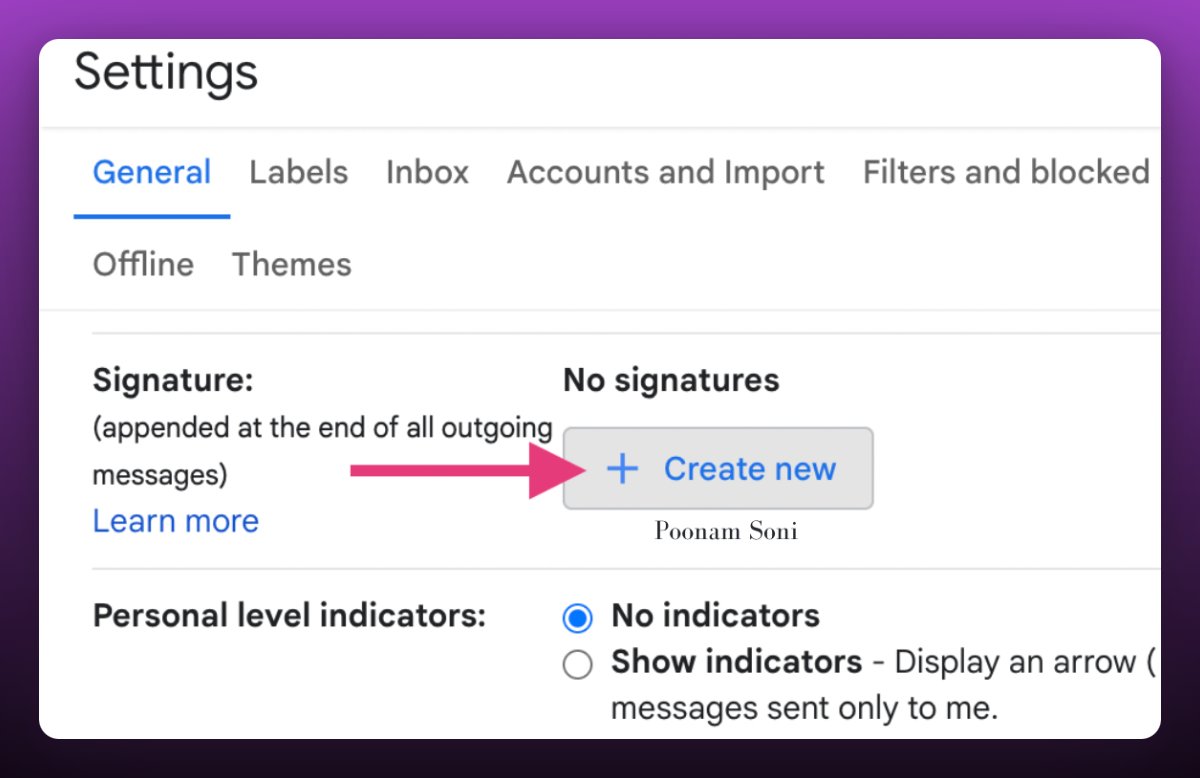
2. Add your Custom Signature:
- Go to Settings > General in Gmail.
- Scroll down to the signature section and create your own unique Signature.
- Go to Settings > General in Gmail.
- Scroll down to the signature section and create your own unique Signature.
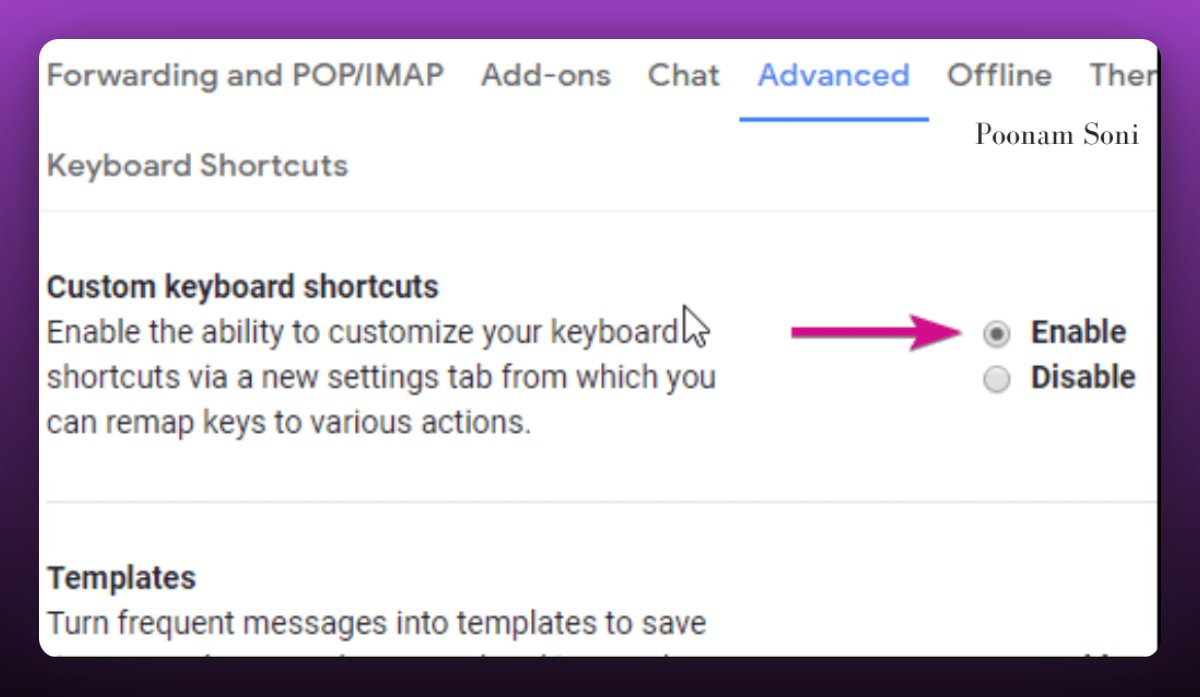
3. Enable keyboard shortcuts
- Go to Settings
- Under the Advanced tab, enable "Enable keyboard shortcuts".
Some Gmail keyboard shortcuts that can help you work faster:
1. Compose New Email: `c`
2. Reply: `r`
3. Reply All: `a`
4. Forward: `f`
5. Archive : `e`
- Go to Settings
- Under the Advanced tab, enable "Enable keyboard shortcuts".
Some Gmail keyboard shortcuts that can help you work faster:
1. Compose New Email: `c`
2. Reply: `r`
3. Reply All: `a`
4. Forward: `f`
5. Archive : `e`
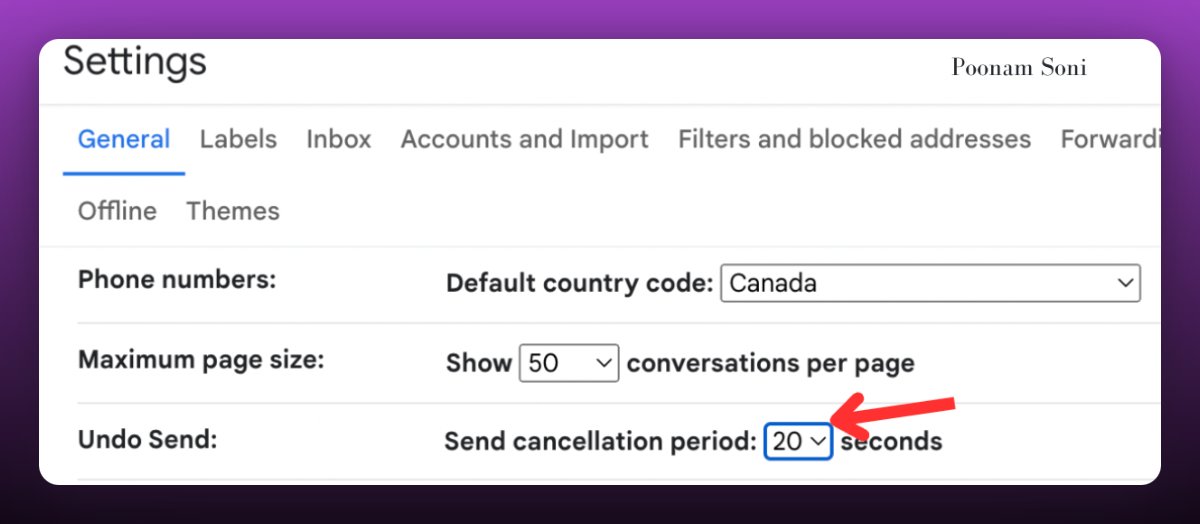
4. Create delay so you can undo sent emails
- Go to Settings > General in Gmail.
- Scroll down to the "Undo Send", Change the cancellation Period from dropdown.
- Go to Settings > General in Gmail.
- Scroll down to the "Undo Send", Change the cancellation Period from dropdown.
5. Access Gmail without internet
- Go to Settings > Offline in Gmail
- Click Enable Offline Email.
- Choose sync duration and cache settings.
-. Save Changes.
Allow Gmail some time to download your messages. Make sure to have Gmail open in Chrome before going offline.
- Go to Settings > Offline in Gmail
- Click Enable Offline Email.
- Choose sync duration and cache settings.
-. Save Changes.
Allow Gmail some time to download your messages. Make sure to have Gmail open in Chrome before going offline.

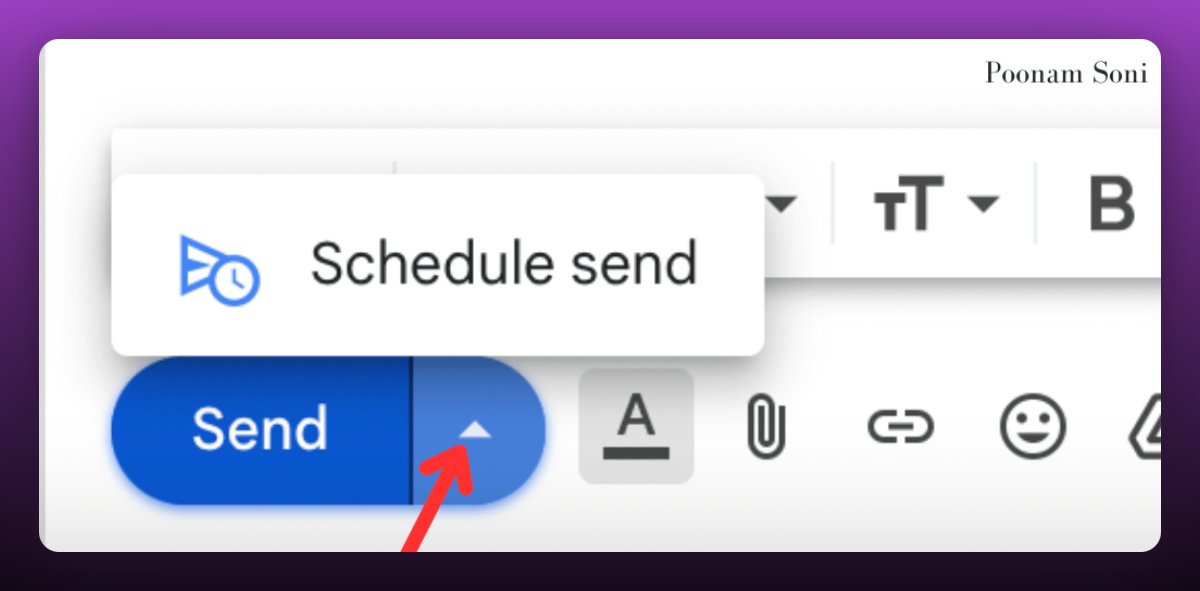
6. Schedule emails
- Compose a new email
- Click arrow next to send
- Select schedule delivery, enter desired time/date.
- Compose a new email
- Click arrow next to send
- Select schedule delivery, enter desired time/date.
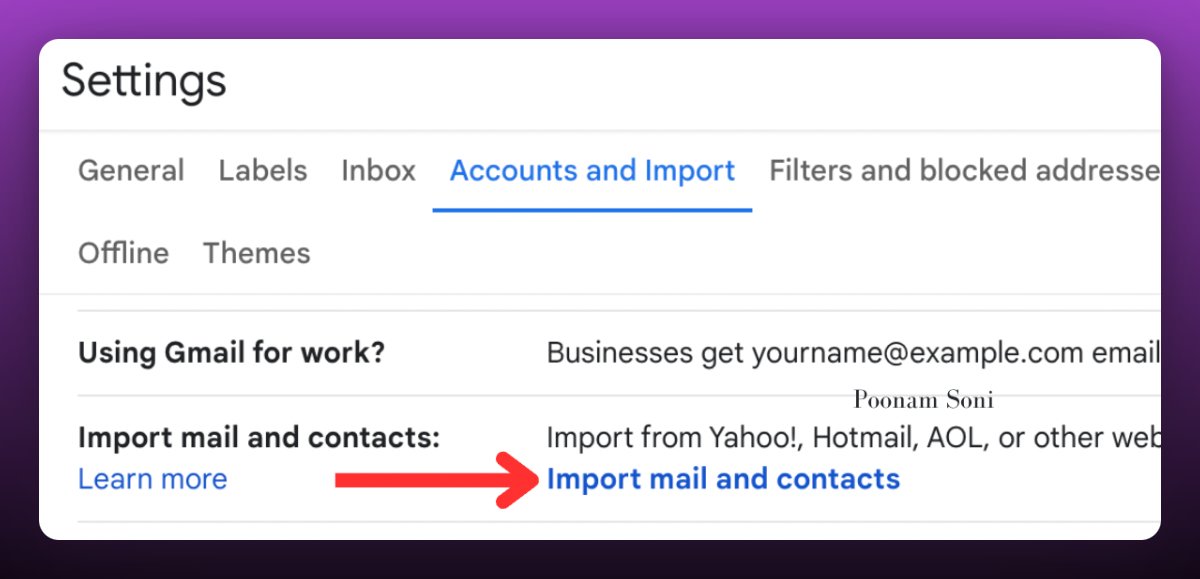
7. Import contacts and emails from other accounts:
- Go to "Settings", then go to "Accounts and Import" tab.
- Click "Import mail and contacts" and follow instructions.
In no time, have all your info in one place.
- Go to "Settings", then go to "Accounts and Import" tab.
- Click "Import mail and contacts" and follow instructions.
In no time, have all your info in one place.
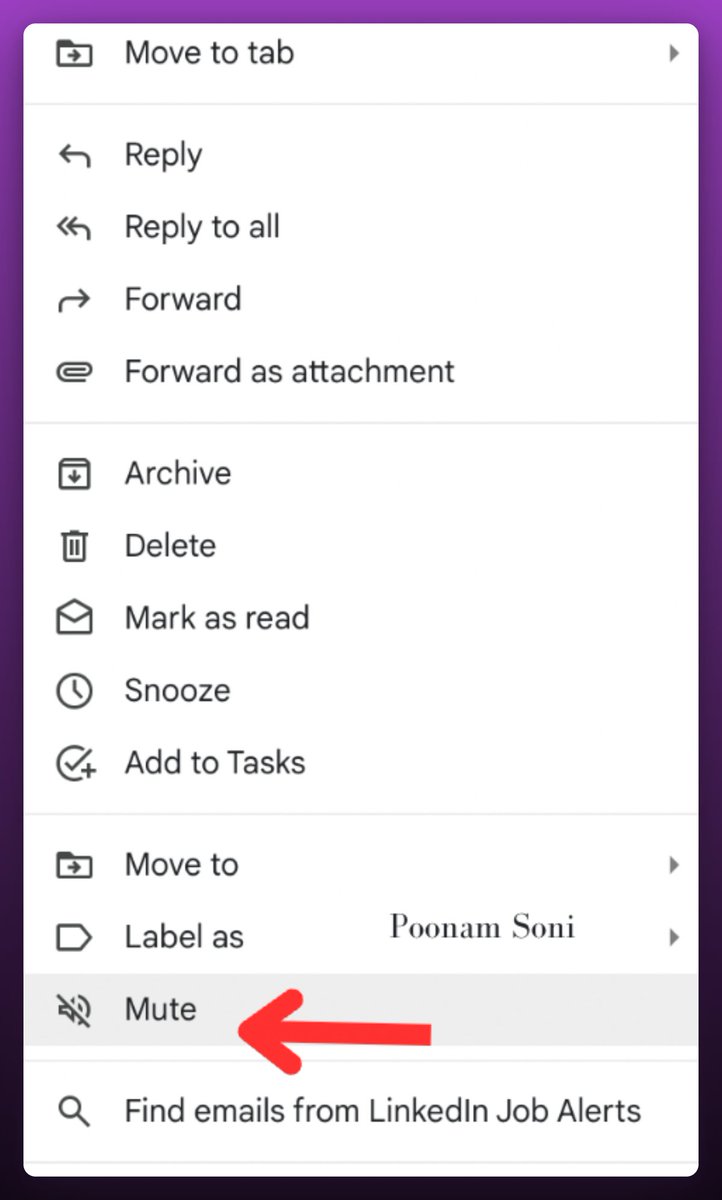
8. Mute conversations
If you want to tune out of any group conversations, simply click the "Mute" button.
Here's how you can find it:
1. Select the email.
2. Right-click on the email and choose "Mute."
If you want to tune out of any group conversations, simply click the "Mute" button.
Here's how you can find it:
1. Select the email.
2. Right-click on the email and choose "Mute."
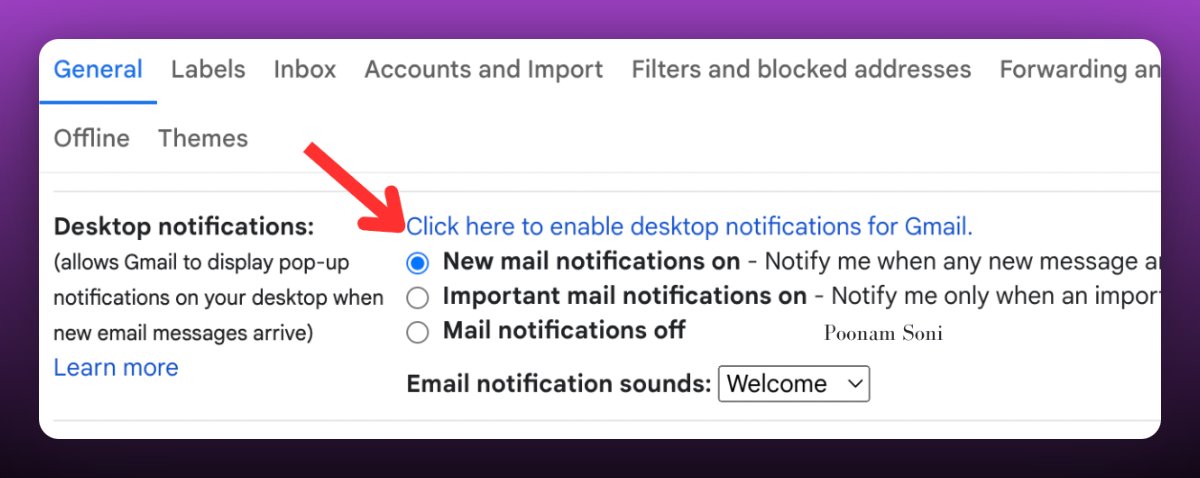
9. Enable desktop notifications
If you rely on your emails, then this is a great option. You can simply follow these steps:
- Go to Gmail Settings.
- In General, turn on Desktop Notification
If you rely on your emails, then this is a great option. You can simply follow these steps:
- Go to Gmail Settings.
- In General, turn on Desktop Notification
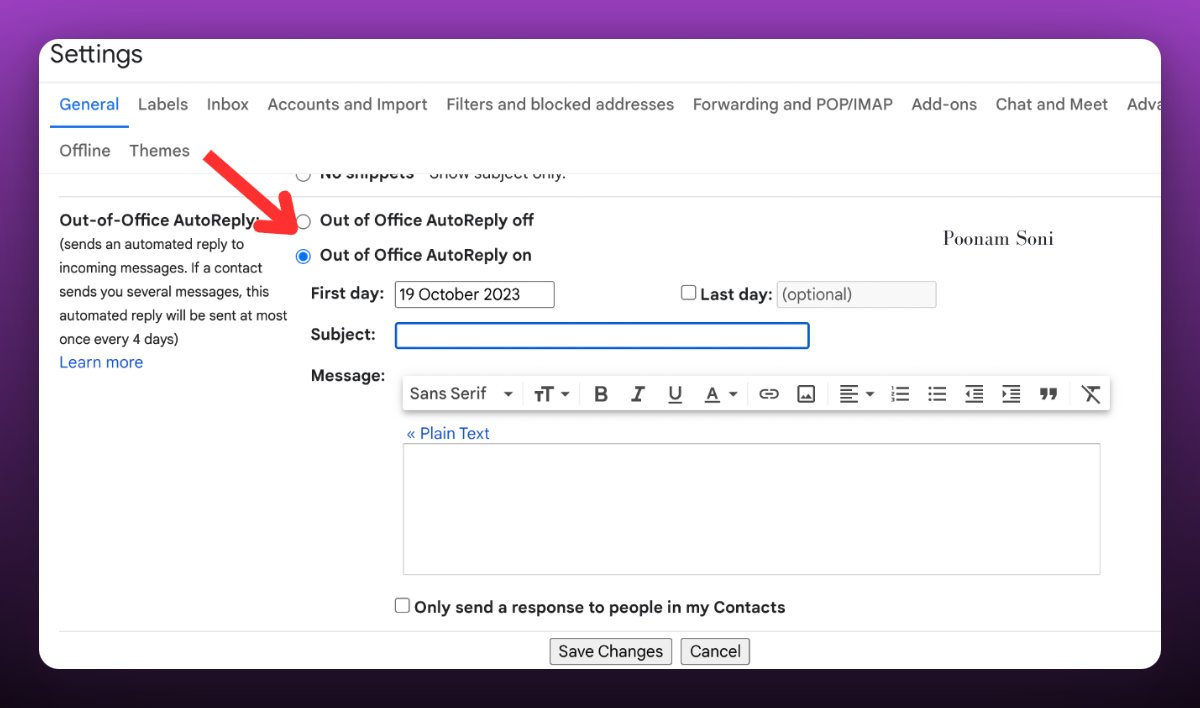
10. Out of Office Reply:
In Gmail, use the auto-responder option to customize a message when you're on leave.
1. Go to settings
2. Click on general tab
3. Scroll down to Out of Office Reply:
4. Enter custom message and Save
In Gmail, use the auto-responder option to customize a message when you're on leave.
1. Go to settings
2. Click on general tab
3. Scroll down to Out of Office Reply:
4. Enter custom message and Save
Thanks for reading.
If you enjoyed reading this post, you will love my Newsletter on AI updates and Monetisation Tips.
Join AI Toast Community. Subscribe for FREE:
aitoast.beehiiv.com
If you enjoyed reading this post, you will love my Newsletter on AI updates and Monetisation Tips.
Join AI Toast Community. Subscribe for FREE:
aitoast.beehiiv.com


That's a wrap!
Hope you enjoyed it.
If you find this post helpful, please :
1. Follow me @CodeByPoonam for more.
2. Like/Repost the first tweet below for support.
Hope you enjoyed it.
If you find this post helpful, please :
1. Follow me @CodeByPoonam for more.
2. Like/Repost the first tweet below for support.
Loading suggestions...