

Shell Scripting Interview Guide!
A Thread with 20+ mid-level to advanced Linux shell scripting interview questions with examples and answers 👇🐧
A Thread with 20+ mid-level to advanced Linux shell scripting interview questions with examples and answers 👇🐧

1/ 🐚 Question: What is the purpose of the shebang (#!) at the beginning of a shell script? Give an example.
Answer: The shebang specifies the interpreter for the script.
Example: #!/bin/bash indicates the script is using the Bash shell.
Answer: The shebang specifies the interpreter for the script.
Example: #!/bin/bash indicates the script is using the Bash shell.
2/ 🐚 Question: How can you pass arguments to a shell script? Provide an example.
Answer: Use $1, $2, etc., for positional arguments.
Example: ./myscript.sh arg1 arg2.
Answer: Use $1, $2, etc., for positional arguments.
Example: ./myscript.sh arg1 arg2.
3/ 🐚 Question: Explain the difference between single and double quotes in shell scripting.
Answer: Single quotes preserve the literal value, while double quotes allow variable expansion.
Example: echo 'Hello $USER' vs. echo "Hello $USER".
Answer: Single quotes preserve the literal value, while double quotes allow variable expansion.
Example: echo 'Hello $USER' vs. echo "Hello $USER".
4/ 🐚 Question: What is command substitution, and how can you use it in a script? Provide an example.
Answer: Command substitution allows embedding command output.
Example: current_date=$(date).
Answer: Command substitution allows embedding command output.
Example: current_date=$(date).
5/ 🐚 Question: How do you check if a file exists in a shell script? Write a conditional example.
Answer: Use if [ -e "$filename" ]; then ... fi.
Answer: Use if [ -e "$filename" ]; then ... fi.
6/ 🐚 Question: Explain what the $? variable represents in shell scripting.
Answer: $? holds the exit status of the last command. 0 means success, non-zero indicates an error.
Answer: $? holds the exit status of the last command. 0 means success, non-zero indicates an error.
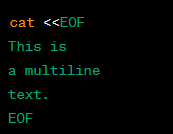
7/ 🐚 Question: What is a here document in shell scripting, and when would you use it? Show an example.
Answer: A here document is used for multiline input. Example:
Answer: A here document is used for multiline input. Example:
8/ 🐚 Question: How can you iterate over files in a directory using a for loop in Bash? Provide an example.
Answer: Example:
Answer: Example:

9/ 🐚 Question: What is process substitution in Bash? Give an example.
Answer: Process substitution allows treating the output of a command as a file.
Example: diff <(command1) <(command2).
Answer: Process substitution allows treating the output of a command as a file.
Example: diff <(command1) <(command2).
10/ 🐚 Question: How can you redirect both stdout and stderr to a file in a single command?
Answer: Use command &> output.log.
Answer: Use command &> output.log.
11/ 🐚 Question: Explain the purpose of the set -e option in a shell script.
Answer: set -e makes the script exit if any command returns a non-zero status.
Answer: set -e makes the script exit if any command returns a non-zero status.
12/ 🐚 Question: What is a pipeline in shell scripting, and why is it useful? Provide an example.
Answer: A pipeline connects the stdout of one command to the stdin of another.
Example: cat file.txt | grep "pattern".
Answer: A pipeline connects the stdout of one command to the stdin of another.
Example: cat file.txt | grep "pattern".
13/ 🐚 Question: How can you create and use functions in a shell script? Show a function definition and usage.
Answer: Example:
Answer: Example:

14/ 🐚 Question: What is process forking in shell scripting? Give an example.
Answer: Process forking is creating new processes.
Example: forked_process &.
Answer: Process forking is creating new processes.
Example: forked_process &.
15/ 🐚 Question: Explain the difference between == and = in a shell script's conditional statements.
Answer: == is used for string comparisons, while = is used for variable assignments.
Answer: == is used for string comparisons, while = is used for variable assignments.
16/ 🐚 Question: How can you trap signals in a shell script? Provide an example.
Answer: Example to trap SIGINT (Ctrl+C):
Answer: Example to trap SIGINT (Ctrl+C):

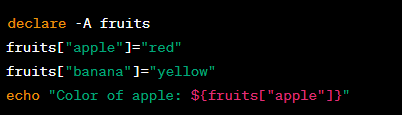
17/ 🐚 Question: What are associative arrays in Bash, and how do you use them? Show an example.
Answer: Associative arrays allow key-value pairs. Example:
Answer: Associative arrays allow key-value pairs. Example:

18/ 🐚 Question: How can you check if a variable is empty in a shell script?
Answer: Use if [ -z "$var" ]; then ... fi.
Answer: Use if [ -z "$var" ]; then ... fi.
19/ 🐚 Question: What is the purpose of the read command in shell scripting? Provide an example.
Answer: read is used to read user input.
Example:
Answer: read is used to read user input.
Example:

20/ 🐚 Question: Explain the difference between && and || in conditional statements.
Answer: && executes the right command if the left succeeds. || executes the right command if the left fails.
Answer: && executes the right command if the left succeeds. || executes the right command if the left fails.
Time for Bonus 💰😍👇

1/ 🐚 Advanced Q8: How can you create a shell script that runs as a daemon or background process? 🚀
A1: Use '&' to run in the background and 'nohup' to detach from the terminal.
Example:
nohup ./myscript.sh &
A1: Use '&' to run in the background and 'nohup' to detach from the terminal.
Example:
nohup ./myscript.sh &
2/ 🐚 Advanced Q5: Explain the use of 'select' in shell scripting. 📝
A2: 'select' provides a menu-driven interface for users. Example:
A2: 'select' provides a menu-driven interface for users. Example:

3/ 🐚 Advanced Q4: What is process control in shell scripting, and how can you use it? 🔄
A3: Process control involves managing background jobs.
Example:
A3: Process control involves managing background jobs.
Example:

4/ 🐚 Advanced Q4: How do you create and manipulate associative arrays in Bash? 🧩
A4: Declare an associative array and use it like this:
A4: Declare an associative array and use it like this:
5/ 🐚: Explain 'awk' one-liners in shell scripting and provide an example. 🎩
A5: 'awk' one-liners are concise commands for text processing. Example:
A5: 'awk' one-liners are concise commands for text processing. Example:

Repost the thread if you find it useful. Thanks!
Loading suggestions...