

Mastering DockerFile!🐳
A guide of 20+ examples for all the #developers , #DevOps Engineers and #Linux Admins👇
A guide of 20+ examples for all the #developers , #DevOps Engineers and #Linux Admins👇

Example 1: A Basic Dockerfile
Explanation:
FROM: Specifies the base image (in this case, Python 3.8).
WORKDIR: Sets the working directory inside the container.
COPY: Copies files from the host into the container.
RUN: Executes commands during the image build process.
Explanation:
FROM: Specifies the base image (in this case, Python 3.8).
WORKDIR: Sets the working directory inside the container.
COPY: Copies files from the host into the container.
RUN: Executes commands during the image build process.
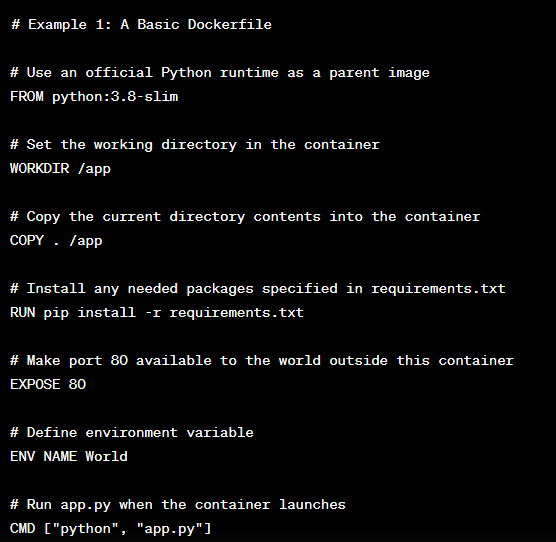
Explanation Cont ..
EXPOSE: Exposes a port for communication.
ENV: Sets environment variables.
CMD: Specifies the default command to run when the container starts.
EXPOSE: Exposes a port for communication.
ENV: Sets environment variables.
CMD: Specifies the default command to run when the container starts.
Example 2: Multi-Stage Build
Explanation:
- Uses multi-stage builds with two FROM statements.
- The first stage builds the application using Node.js.
- The second stage uses a smaller Nginx image for production and copies the build artifacts.
Explanation:
- Uses multi-stage builds with two FROM statements.
- The first stage builds the application using Node.js.
- The second stage uses a smaller Nginx image for production and copies the build artifacts.

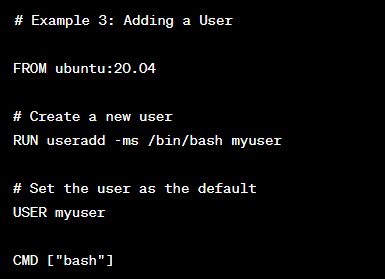
Example 3: Adding a User
Explanation:
- RUN useradd: Creates a new user.
- USER: Sets the user as the default for subsequent commands.
Explanation:
- RUN useradd: Creates a new user.
- USER: Sets the user as the default for subsequent commands.
Example 4: Using ARG for Dynamic Values
Explanation:
- ARG: Defines an argument that can be passed during build with --build-arg.
- Allows flexibility when specifying the version during build.
Explanation:
- ARG: Defines an argument that can be passed during build with --build-arg.
- Allows flexibility when specifying the version during build.

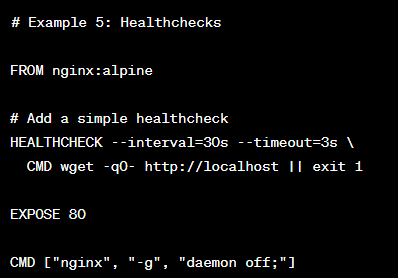
Example 5: Healthchecks
Explanation:
- HEALTHCHECK: Defines a healthcheck command to monitor container health.
In this example, it checks if Nginx is responsive every 30 seconds.
Explanation:
- HEALTHCHECK: Defines a healthcheck command to monitor container health.
In this example, it checks if Nginx is responsive every 30 seconds.
Example 6: Using Labels for Metadata
Explanation:
LABEL: Adds metadata labels to the image, providing information about the image and its maintainers.
Explanation:
LABEL: Adds metadata labels to the image, providing information about the image and its maintainers.

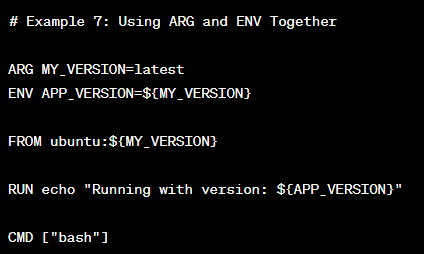
Example 7: Using ARG and ENV Together
Explanation:
Demonstrates how to use ARG and ENV together to set environment variables during the build.
Explanation:
Demonstrates how to use ARG and ENV together to set environment variables during the build.
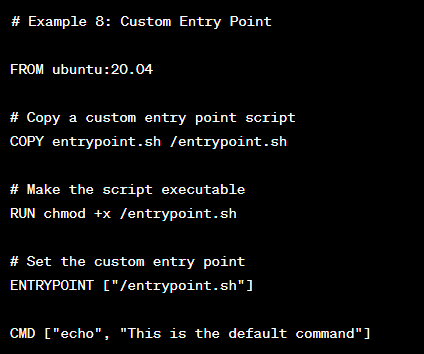
Example 8: Custom Entry Point
Explanation:
ENTRYPOINT: Specifies a custom entry point script to be executed when the container starts.
Explanation:
ENTRYPOINT: Specifies a custom entry point script to be executed when the container starts.
Example 9: Using Volumes
Explanation:
VOLUME: Defines a volume that can be mounted from the host or other containers.
Explanation:
VOLUME: Defines a volume that can be mounted from the host or other containers.

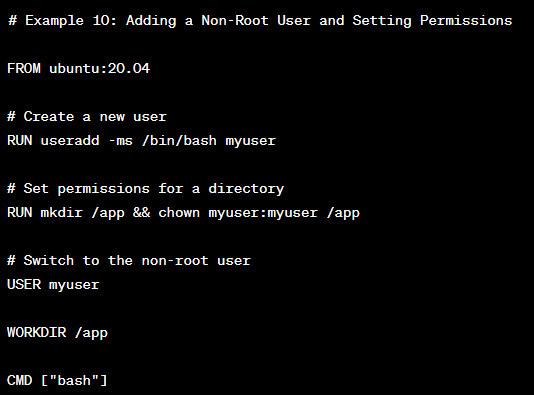
Example 10: Adding a Non-Root User and Setting Permissions
Explanation:
Demonstrates creating a non-root user, creating a directory, and setting permissions for security best practices.
Explanation:
Demonstrates creating a non-root user, creating a directory, and setting permissions for security best practices.
Example 11: Installing Multiple Packages
Explanation:
Demonstrates how to install multiple packages using a single RUN command to reduce layer overhead.
Explanation:
Demonstrates how to install multiple packages using a single RUN command to reduce layer overhead.

Example 12: Using Build Arguments for Conditional Builds
Explanation:
Uses build arguments to conditionally choose different base images and configurations based on the build type.
Explanation:
Uses build arguments to conditionally choose different base images and configurations based on the build type.

Example 13: Custom Network Configuration
Explanation:
Demonstrates how to create a custom network and assign a container to it for isolated communication.
Explanation:
Demonstrates how to create a custom network and assign a container to it for isolated communication.

Example 14: Copying Files from a Remote URL
Explanation:
Uses wget to download a file from a remote URL and copy it into the container.
Explanation:
Uses wget to download a file from a remote URL and copy it into the container.

Example 15: Using Build Cache for Efficiency
Explanation:
Copies only the package-related files initially to leverage Docker's build cache for faster builds.
Explanation:
Copies only the package-related files initially to leverage Docker's build cache for faster builds.

Example 16: Using Labels to Document Ports
Explanation:
Labels can be used to document important information about the image, such as the exposed port.
Explanation:
Labels can be used to document important information about the image, such as the exposed port.

Example 17: Configuring Timezone
Explanation:
Demonstrates how to set the timezone within the container.
Explanation:
Demonstrates how to set the timezone within the container.

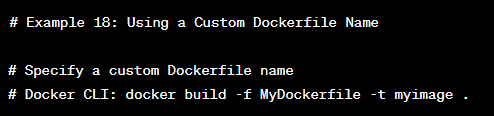
Example 18: Using a Custom Dockerfile Name
Explanation:
You can specify a custom Dockerfile name using the -f option when building an image with the docker build command.
Explanation:
You can specify a custom Dockerfile name using the -f option when building an image with the docker build command.
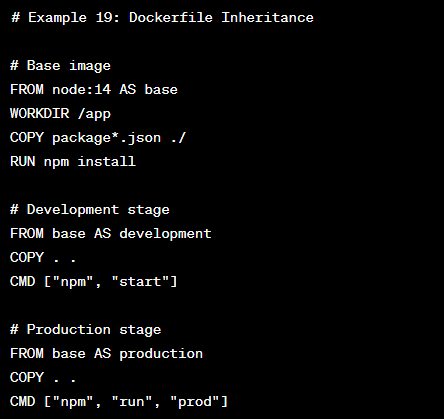
Example 19: Dockerfile Inheritance
Explanation:
Demonstrates Dockerfile inheritance, where multiple stages build on top of a base image for development and production purposes.
Explanation:
Demonstrates Dockerfile inheritance, where multiple stages build on top of a base image for development and production purposes.
Example 20: Using Shell Form and Exec Form for CMD
Explanation:
Shows the difference between the shell form and exec form for the CMD instruction.
Explanation:
Shows the difference between the shell form and exec form for the CMD instruction.

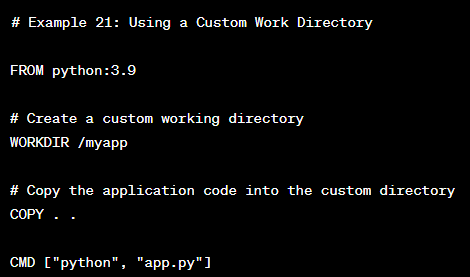
Example 21: Using a Custom Work Directory
Explanation:
Demonstrates how to set a custom working directory inside the container.
Explanation:
Demonstrates how to set a custom working directory inside the container.
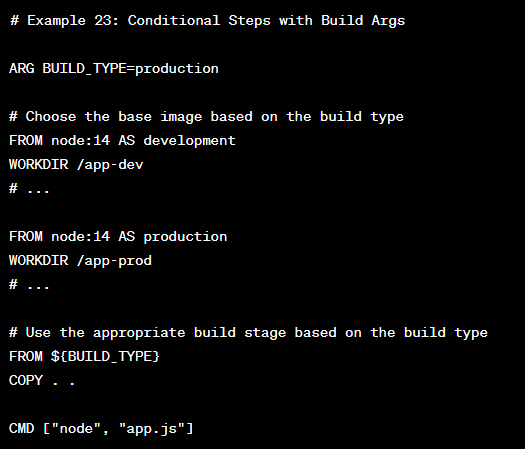
Example 22: Conditional Steps with Build Args
Explanation:
Illustrates how to use build arguments to conditionally select different stages in the Dockerfile.
Explanation:
Illustrates how to use build arguments to conditionally select different stages in the Dockerfile.
These examples should provide you with a broader understanding of Dockerfile usage.
If you have any more specific requests or questions, please feel free to ask!
#Docker #DockerFile #DevOps #Linux #Automation #cicd
If you have any more specific requests or questions, please feel free to ask!
#Docker #DockerFile #DevOps #Linux #Automation #cicd
Repost the thread if you find it useful. Thanks!
Loading suggestions...