

Previously we've seen @LangChainAI ParentDocumentRetriever that creates smaller chunks from a document and links them back to the initial documents during retrieval.
MultiVectorRetriever is a more customizable version of that. Let's see how to use it 🧵👇
MultiVectorRetriever is a more customizable version of that. Let's see how to use it 🧵👇

@LangChainAI ParentDocumentRetriever automatically creates the small chunks and links their parent document id.
If we want to create some additional vectors for each documents, other than smaller chunks, we can do that and then retrieve those using MultiVectorRetriever.
If we want to create some additional vectors for each documents, other than smaller chunks, we can do that and then retrieve those using MultiVectorRetriever.
We can customize how these additional vectors are created for each parent document. Here're some ways @LangChainAI mentioned in their documentation.
- smaller chunks
- store the summary vector of each document
- store the vectors of hypothetical questions for each documents
- smaller chunks
- store the summary vector of each document
- store the vectors of hypothetical questions for each documents
Now let's try to understand the example code from langchain documentation 👇
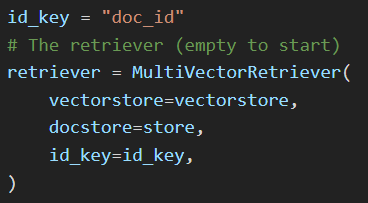
First we create the retriever itself.
Here we pass the
- vectorstore to store all the vectors for the documents
- docstore to store the documents themselves
- id_key is the key of the metadata field which will be used to store the document id for each vector
Here we pass the
- vectorstore to store all the vectors for the documents
- docstore to store the documents themselves
- id_key is the key of the metadata field which will be used to store the document id for each vector
Also we create unique uuid for each of the documents.
We'll use these ids to store the documents in the docstore.
MultiVectorRetriever will use these ids to retrieve the documents from the vector similarity search.
We'll use these ids to store the documents in the docstore.
MultiVectorRetriever will use these ids to retrieve the documents from the vector similarity search.

Now let's implement the ParentDocumentRetriever using MultiVectorRetriever
- iterate over each document
- split the document to get the children chunks
- store each small chunk in the vectorstore, with the parent doc_id as metadata
- iterate over each document
- split the document to get the children chunks
- store each small chunk in the vectorstore, with the parent doc_id as metadata
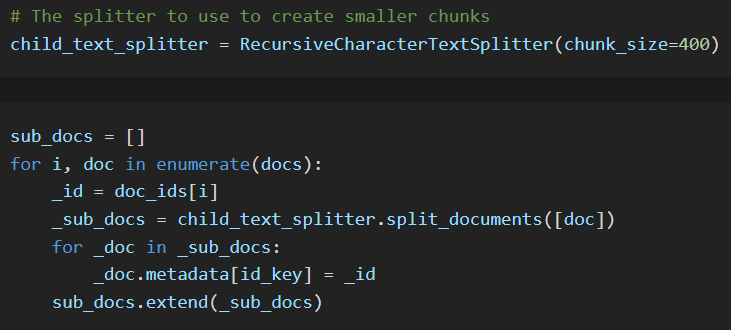
As MultiVectorRetriever is more flexible and customizable, we need to manually add the additional vectors to the vectorstore and set the doc_id of the associated document as a metadata field.
Also we need to add the docs with their id to the docstore.
Also we need to add the docs with their id to the docstore.

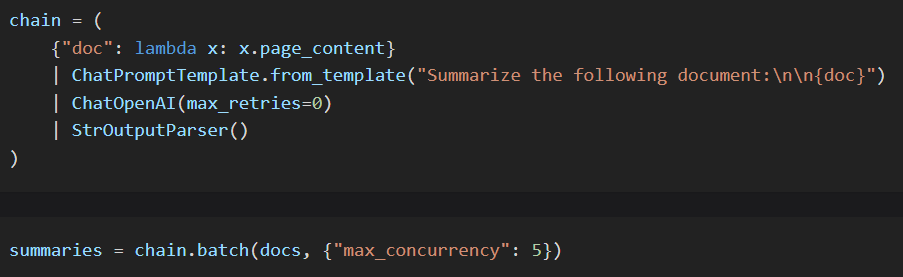
We can also create a summary for each document.
Oftentimes a summary may be able to capture more accurately what a chunk is about, leading to better retrieval.
Oftentimes a summary may be able to capture more accurately what a chunk is about, leading to better retrieval.

Also as we'll be matching the vectors with user's query embedding vector, we might get better results if we create some hypothetical user queries of a particular document and store them in the vectorstore.
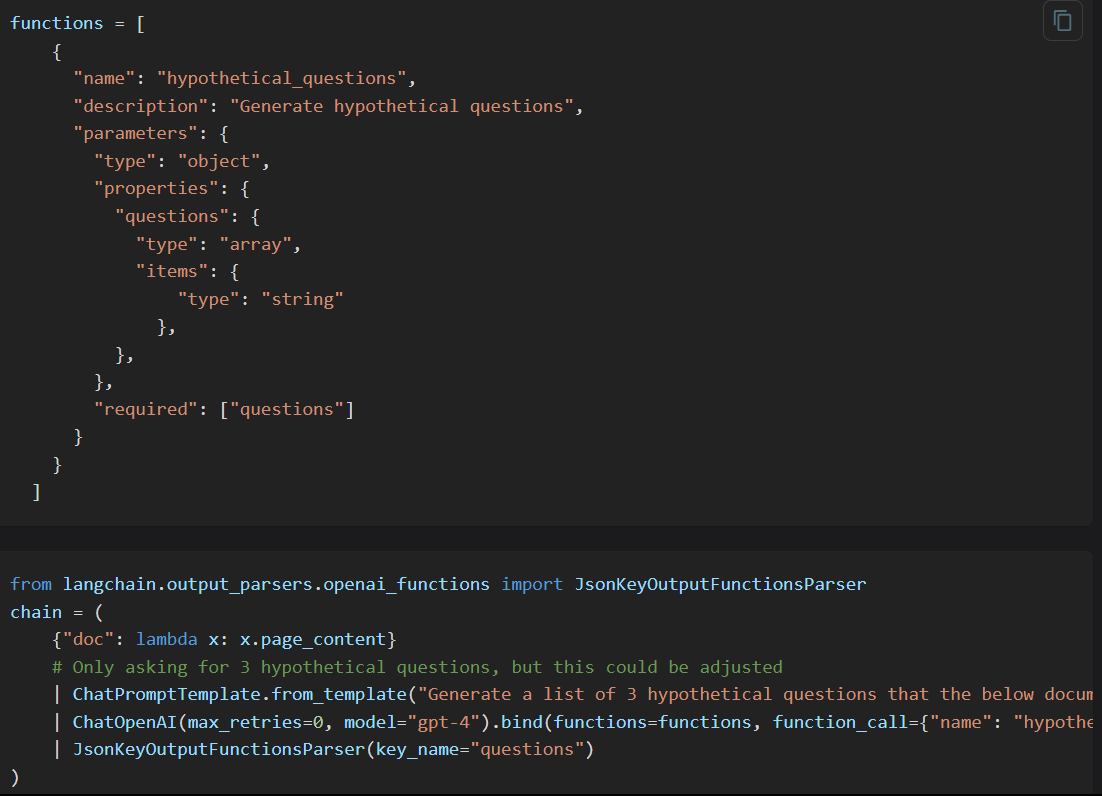

Based on the specific use case, we can create other vectors as well for each document.
For these vectors, we need to make sure to add the doc_id as the metadata. And MultiVectorRetriever will handle the rest to retrieve the initial documents from these vectors.
For these vectors, we need to make sure to add the doc_id as the metadata. And MultiVectorRetriever will handle the rest to retrieve the initial documents from these vectors.

Thanks for reading.
I write about AI, ChatGPT, LangChain etc. and try to make complex topics as easy as possible.
Stay tuned for more ! 🔥 #ChatGPT #LangChain
I write about AI, ChatGPT, LangChain etc. and try to make complex topics as easy as possible.
Stay tuned for more ! 🔥 #ChatGPT #LangChain
Loading suggestions...