

Gmail has 4.66 billion active Users globally.
But only a few know how to use the platform effectively.
Here are 6 Gmail hacks that you shouldn’t miss:
But only a few know how to use the platform effectively.
Here are 6 Gmail hacks that you shouldn’t miss:

1 Use offline
Gmail has a handy feature that lets you read and reply to your emails even when offline.
However, you’ll need to turn it on with afew steps:
☑️ Settings then
☑️ click All settings, followed by Offline.
☑️ Once in the Offline tab, select Enable offline mail.…
Gmail has a handy feature that lets you read and reply to your emails even when offline.
However, you’ll need to turn it on with afew steps:
☑️ Settings then
☑️ click All settings, followed by Offline.
☑️ Once in the Offline tab, select Enable offline mail.…
2 Snooze an email.
Have an email that you don't need to deal with now?
Set a reminder for later:
☑️Click on the clock icon on the right.
☑️Choose how long you want to snooze the email.
It’ll appear back in your inbox on that date.
Have an email that you don't need to deal with now?
Set a reminder for later:
☑️Click on the clock icon on the right.
☑️Choose how long you want to snooze the email.
It’ll appear back in your inbox on that date.
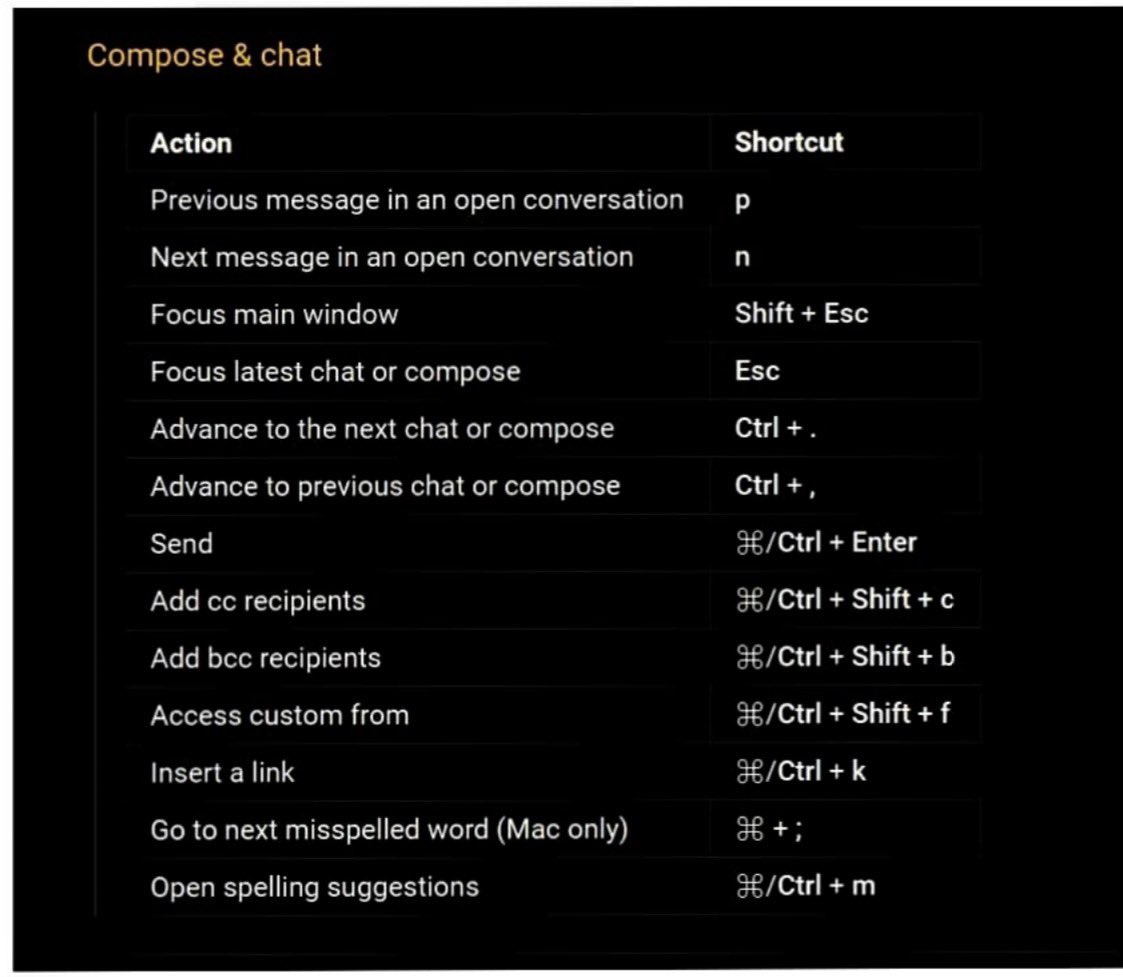
3 Use Shortcuts :
4 Get rid of promotional emails
First, log in with your Gmail account on a-desktop or laptop and then,in
the “unsubscribe" and hit enter.
Now,tick the box above to select all emails with this unsubscribe tag
then all you need to do promotional emails will be deleted.
First, log in with your Gmail account on a-desktop or laptop and then,in
the “unsubscribe" and hit enter.
Now,tick the box above to select all emails with this unsubscribe tag
then all you need to do promotional emails will be deleted.
5 Undo that email you just sent.
Ever had that sinking feeling right after you press send?
Undo it before disaster strikes:
☑️ Setting icon ( top right)
☑️ Setting > General
☑️ Toggle on ‘Undo send’
☑️ Choose 30 secs
Next time you send an email the ‘undo’ button will…
Ever had that sinking feeling right after you press send?
Undo it before disaster strikes:
☑️ Setting icon ( top right)
☑️ Setting > General
☑️ Toggle on ‘Undo send’
☑️ Choose 30 secs
Next time you send an email the ‘undo’ button will…
6 Send a Confidential email :
What does it do :
It makes your email confidential while disabling the features such as copying, Printing, Forwarding, and downloading by the recipient .
To enable it , you will need to tap on the ‘lock’ symbol while sending a new email.
What does it do :
It makes your email confidential while disabling the features such as copying, Printing, Forwarding, and downloading by the recipient .
To enable it , you will need to tap on the ‘lock’ symbol while sending a new email.
That's a wrap-up for this one 🎁
If you liked this thread :
🔁 Retweet the first tweet
Do Follow @AdarshChetan for more such amazing stuff ❤️
#coder #SoftwareEngineer #adarschetan
If you liked this thread :
🔁 Retweet the first tweet
Do Follow @AdarshChetan for more such amazing stuff ❤️
#coder #SoftwareEngineer #adarschetan
Thank you 😊
Loading suggestions...