

18 Ahrefs’ hacks we bet you didn’t know of ⚡🧵

1️⃣ Browse the most popular search queries in each country
Perform an empty search in Keywords Explorer and gain access to our FULL 4.5 billion US keyword database (largest in the industry).
Then use "search volume", "KD", & "Word count" filters to discover lucrative keywords.
Perform an empty search in Keywords Explorer and gain access to our FULL 4.5 billion US keyword database (largest in the industry).
Then use "search volume", "KD", & "Word count" filters to discover lucrative keywords.


2️⃣ Find out if you can target multiple keywords with one page
If you're not sure which keyword to target, you can see how much their SERP overlaps in two ways:
A) Put them in Keywords Explorer and go to the "Traffic Share > By Pages" report:
👇
If you're not sure which keyword to target, you can see how much their SERP overlaps in two ways:
A) Put them in Keywords Explorer and go to the "Traffic Share > By Pages" report:
👇
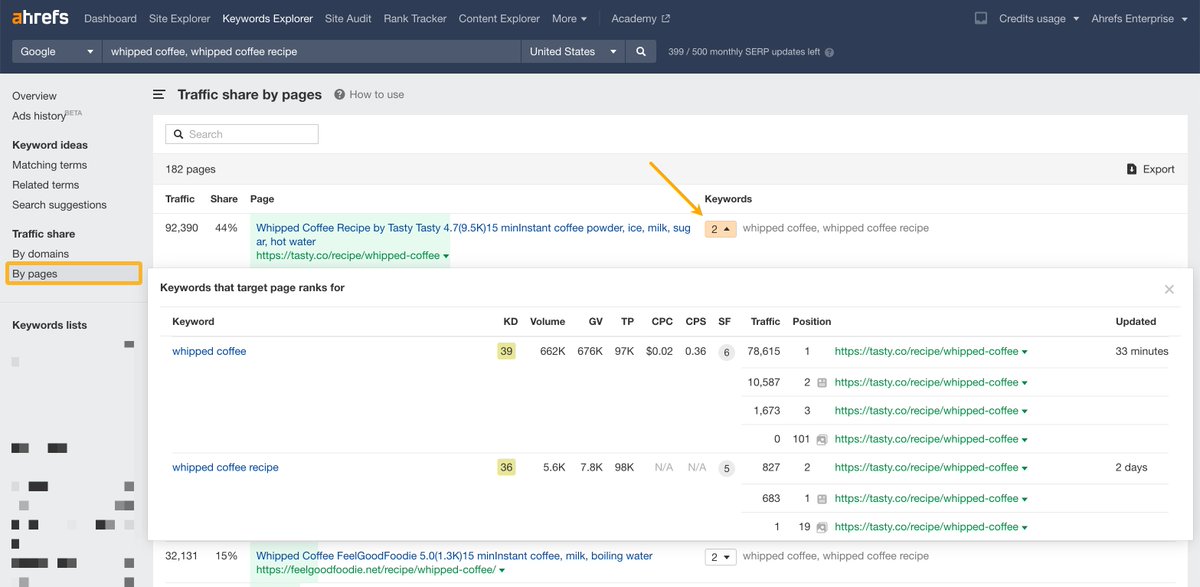
2️⃣ Find out if you can target multiple keywords with one page (cont'd)
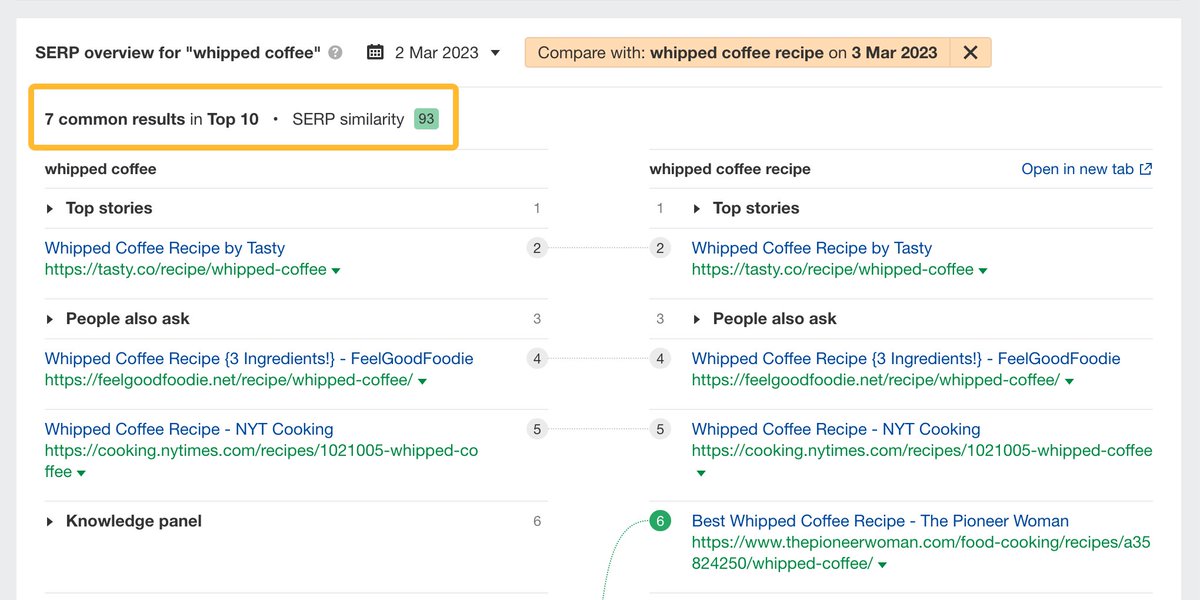
B) Use the SERP comparison tool under the "Keyword overview" report:
B) Use the SERP comparison tool under the "Keyword overview" report:
3️⃣ Monitor your competitor's content output
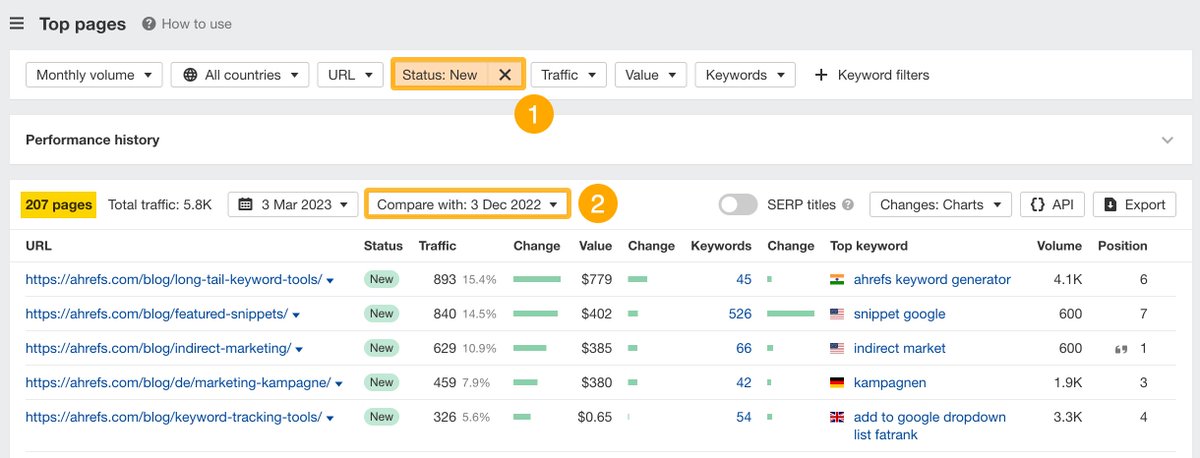
Want to know how much content your competitor has churned out lately?
Open the "Top pages" report under Site Explorer and filter for new pages. Then compare them with previous dates.
This is a great use case to ask for more budget 😉
Want to know how much content your competitor has churned out lately?
Open the "Top pages" report under Site Explorer and filter for new pages. Then compare them with previous dates.
This is a great use case to ask for more budget 😉
4️⃣ Filter out low-quality backlinks by website traffic
This works in the reverse too.
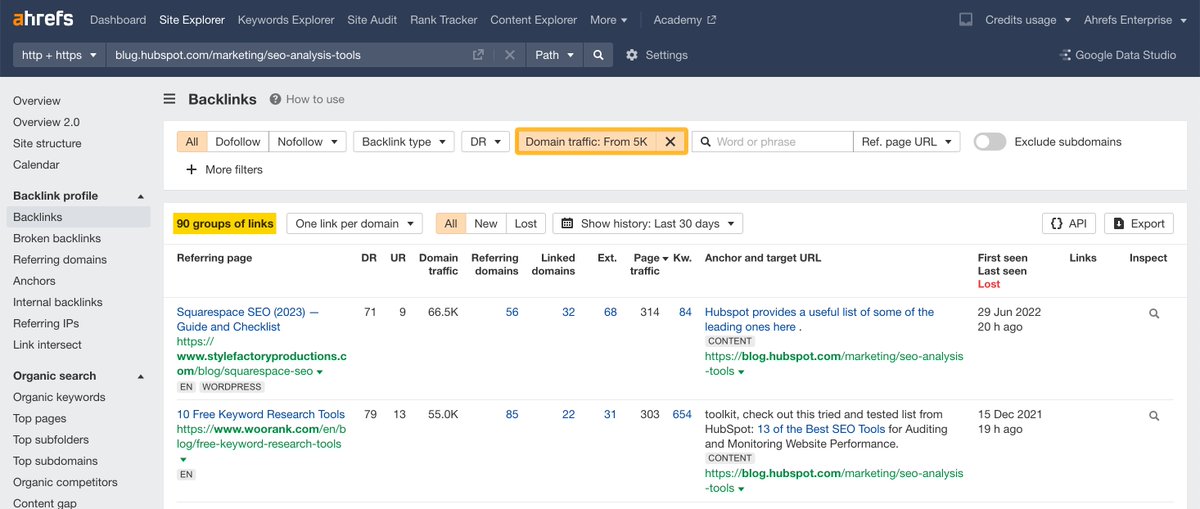
You can filter out links from low-quality websites based on the "Domain traffic" of the linking website.
This works in the reverse too.
You can filter out links from low-quality websites based on the "Domain traffic" of the linking website.
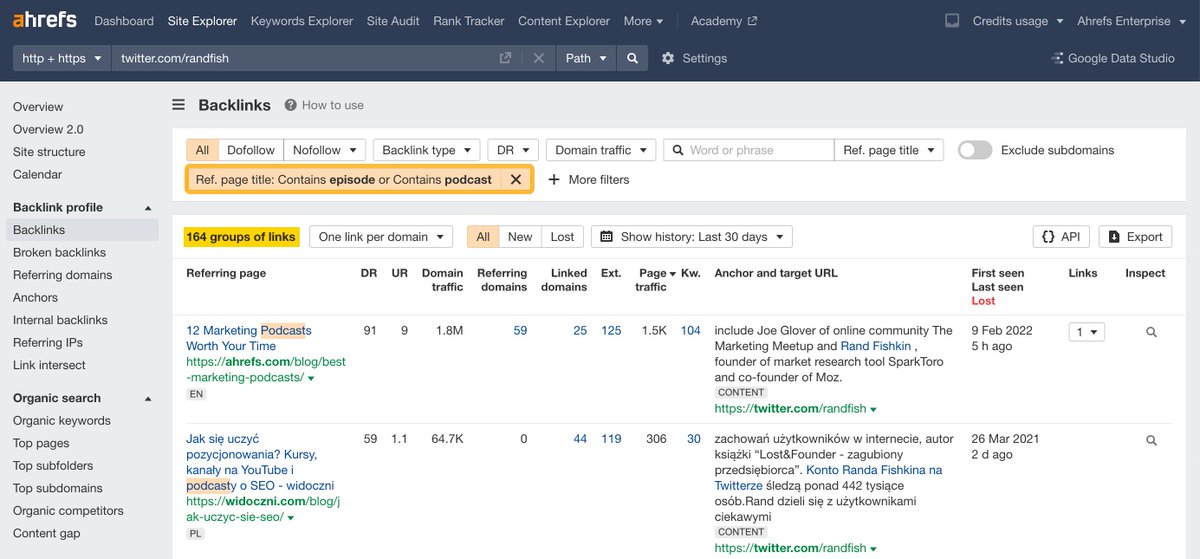
5️⃣ Research podcasts to be a guest on
Look at the backlink profile of an interviewee's Twitter profile in the "Backlinks" report in Site Explorer.
Then filter after "episode" or "podcast" in the referring page title to discover relevant podcasts.
Look at the backlink profile of an interviewee's Twitter profile in the "Backlinks" report in Site Explorer.
Then filter after "episode" or "podcast" in the referring page title to discover relevant podcasts.
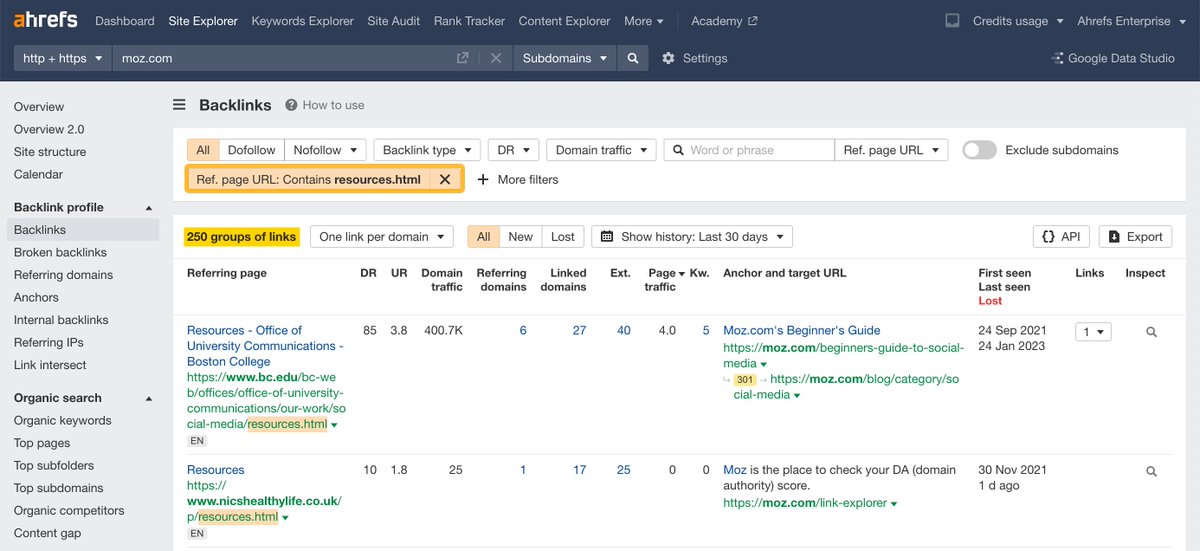
6️⃣ Find resource pages to get featured on
Specifically, pages your competitor has links from—but that you don't.
Similarly to the previous example, filter after the referring page title. Only this time, include the "resources" keyword instead.
Specifically, pages your competitor has links from—but that you don't.
Similarly to the previous example, filter after the referring page title. Only this time, include the "resources" keyword instead.
7️⃣ Get a top-level view of your competitor’s SEO strategy
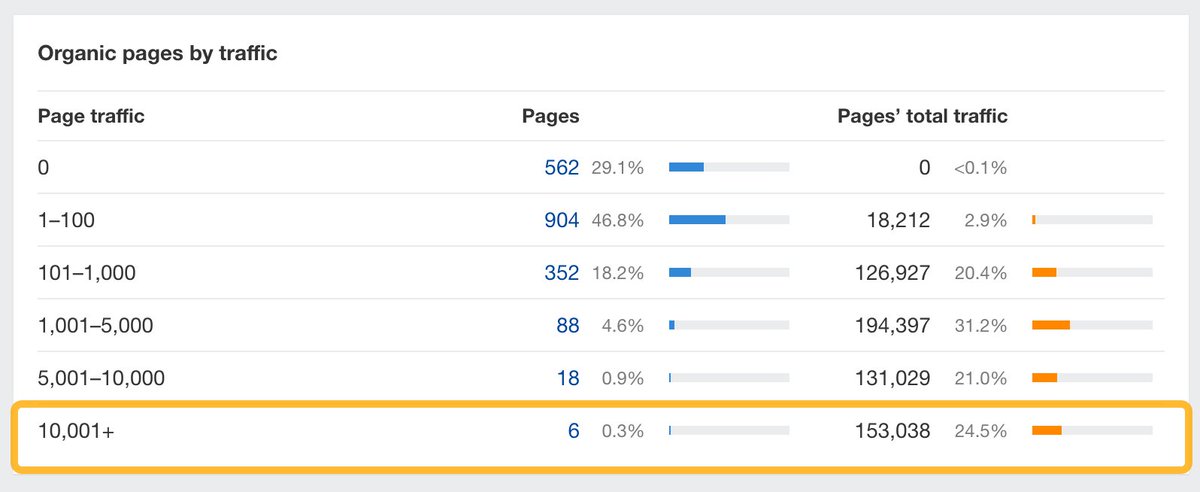
See pages distributed by their organic search traffic through the widget with the same name under Overview 2.0.
For example, 6 pages are responsible for almost 25% of the traffic to the Ahrefs blog 🤯
See pages distributed by their organic search traffic through the widget with the same name under Overview 2.0.
For example, 6 pages are responsible for almost 25% of the traffic to the Ahrefs blog 🤯
8️⃣ Find low-competition topics with high traffic potential
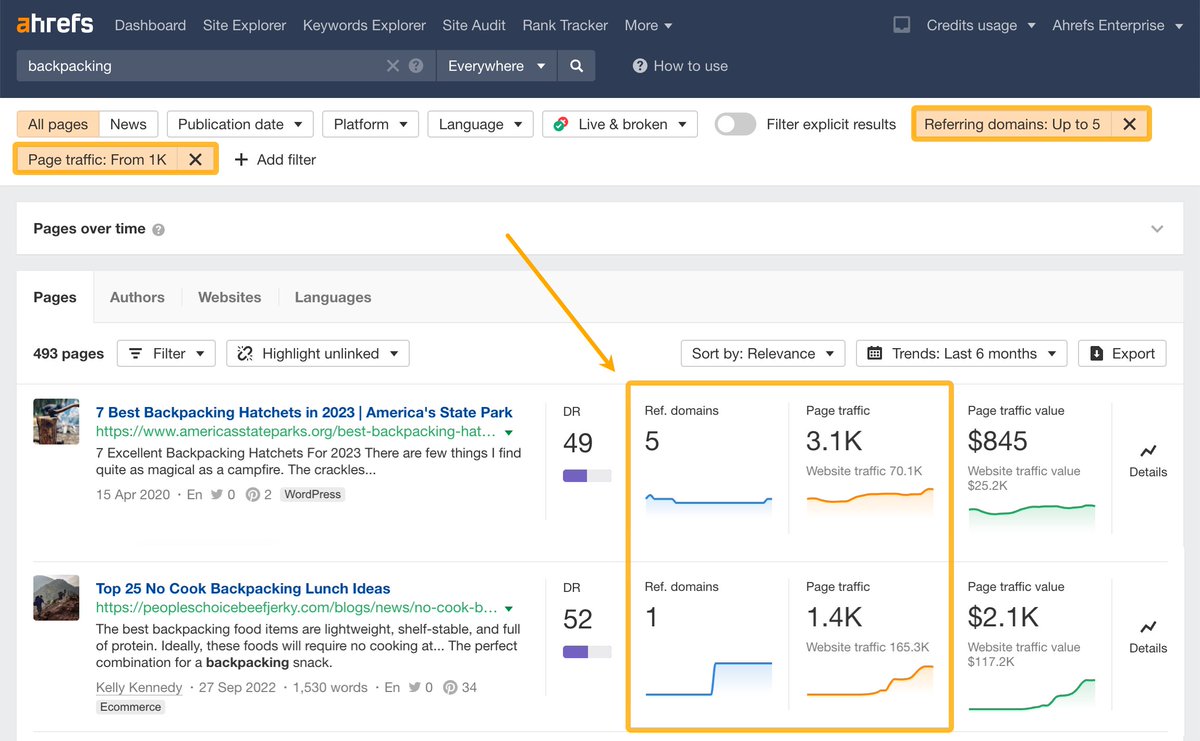
Search for a broad topic in Content Explorer and apply:
👉 Referring domains < 5
👉 Organic traffic > 1,000
You'll get a list of relevant pages with lots of organic traffic while having few or no backlinks.
Search for a broad topic in Content Explorer and apply:
👉 Referring domains < 5
👉 Organic traffic > 1,000
You'll get a list of relevant pages with lots of organic traffic while having few or no backlinks.
9️⃣ Find video topics to rank on Google
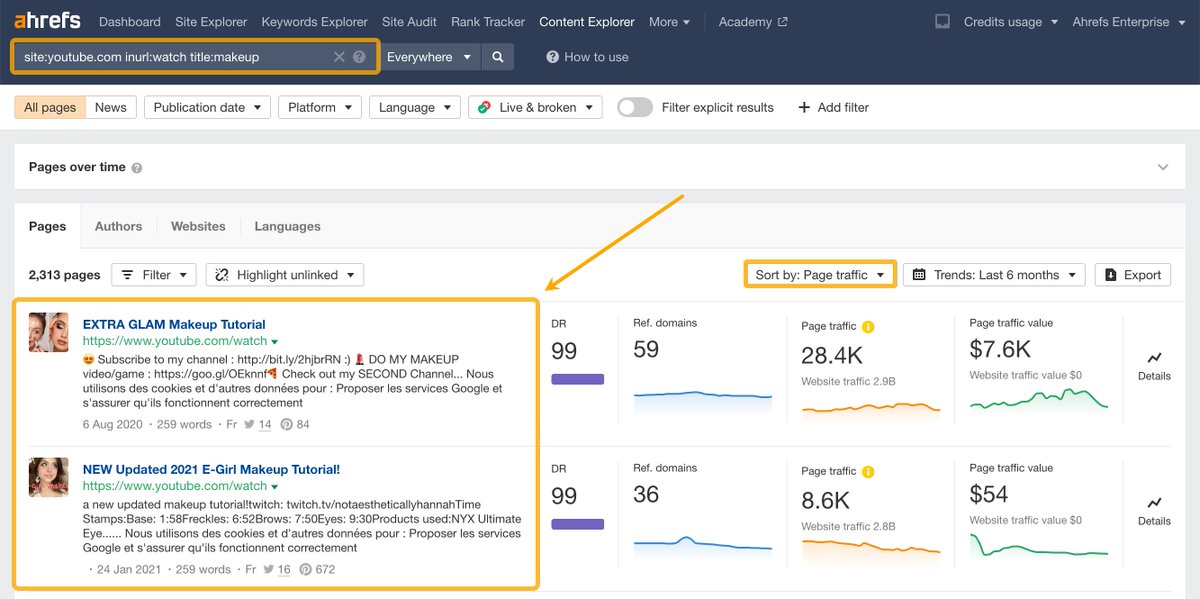
Just type in the following command in Content Explorer:
👉 site:youtube.com inurl:watch title:[your topic]
Then sort the pages by "page traffic" & skim through videos with high traffic potential you'd want to create.
Just type in the following command in Content Explorer:
👉 site:youtube.com inurl:watch title:[your topic]
Then sort the pages by "page traffic" & skim through videos with high traffic potential you'd want to create.
1️⃣0️⃣ Get internal linking suggestions
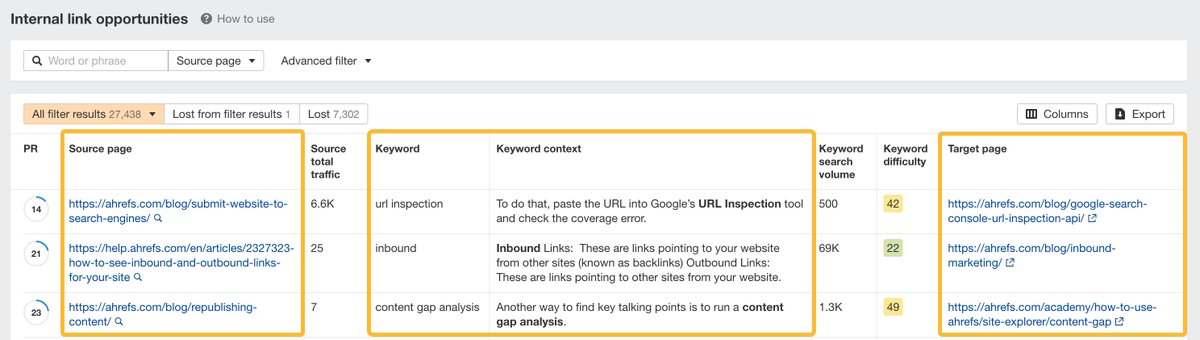
Our Site Audit tool identifies internal link opportunities by taking the top 10 keywords for your ranking pages—then finding mentions of them on your other pages.
Our Site Audit tool identifies internal link opportunities by taking the top 10 keywords for your ranking pages—then finding mentions of them on your other pages.
1️⃣1️⃣ Discover local citation opportunities
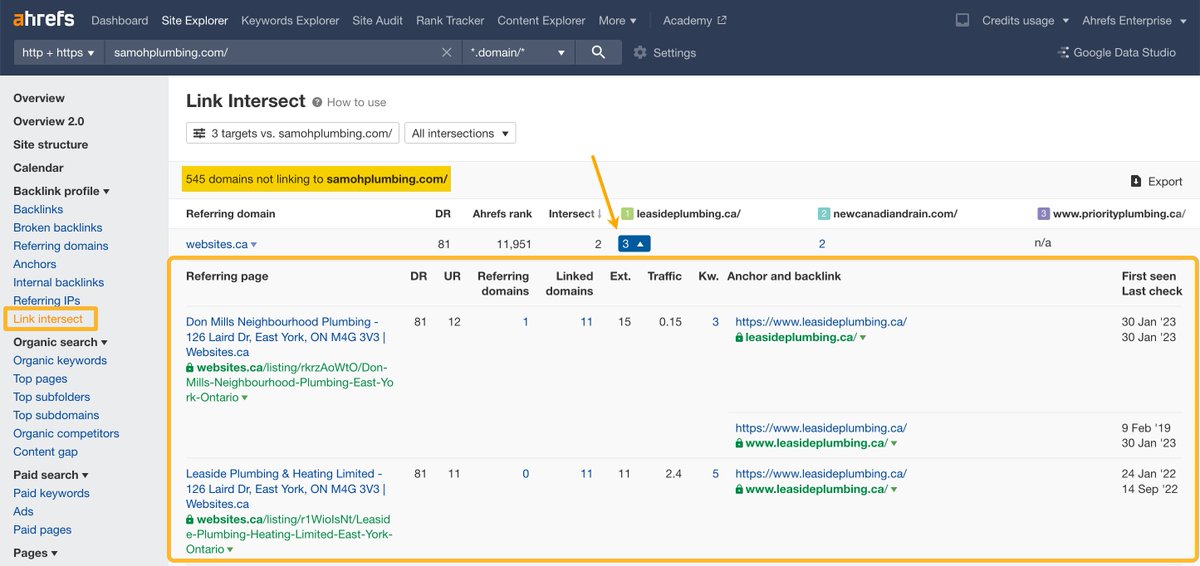
Use the "Link Intersect" tool to find directories where your competitors' business profiles are mentioned, but yours isn't.
Next, get featured on them to improve your local SEO.
Use the "Link Intersect" tool to find directories where your competitors' business profiles are mentioned, but yours isn't.
Next, get featured on them to improve your local SEO.
1️⃣2️⃣ Find missed keyword opportunities
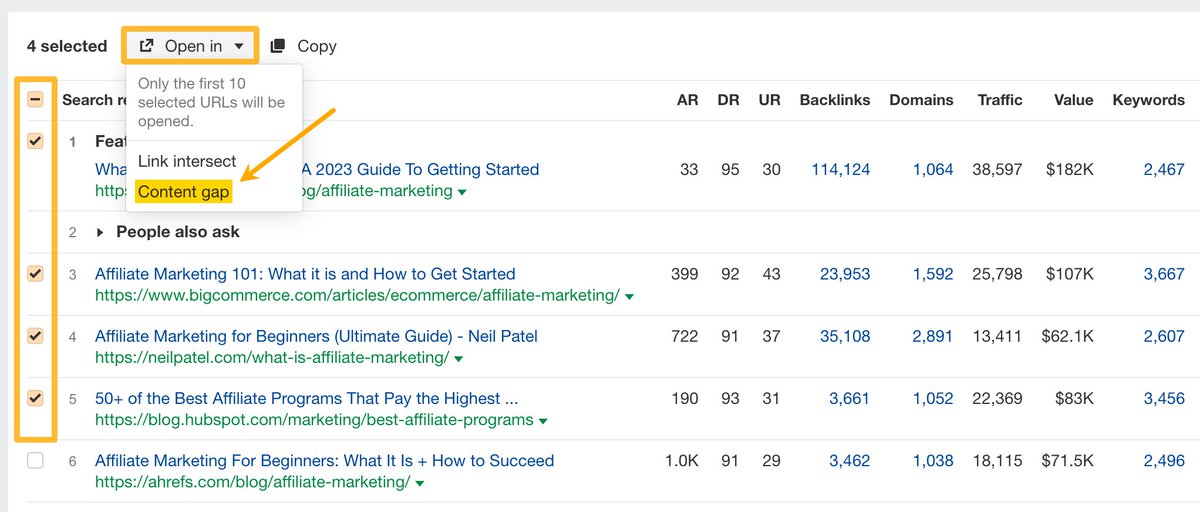
Check the Top 10 search results under the "SERP overview" in Keyword Explorer.
Select the top URLs and open them in the "Content Gap" tool.
This will find missed keyword opportunities that you can potentially cover as subtopics.
Check the Top 10 search results under the "SERP overview" in Keyword Explorer.
Select the top URLs and open them in the "Content Gap" tool.
This will find missed keyword opportunities that you can potentially cover as subtopics.
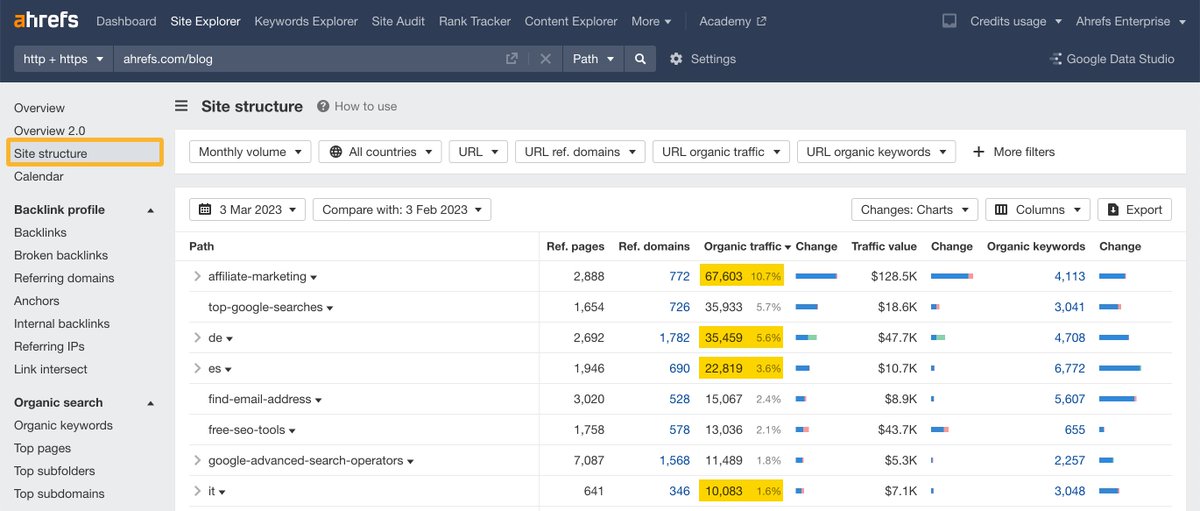
1️⃣3️⃣ Analyze which subfolders drive the most organic traffic
Use the "Site structure" report in Site Explorer to understand any website structure in a tree-like format.
For example, 3 of our translated blogs (IT, DE, ES) generate almost as much traffic as the top page.
Use the "Site structure" report in Site Explorer to understand any website structure in a tree-like format.
For example, 3 of our translated blogs (IT, DE, ES) generate almost as much traffic as the top page.
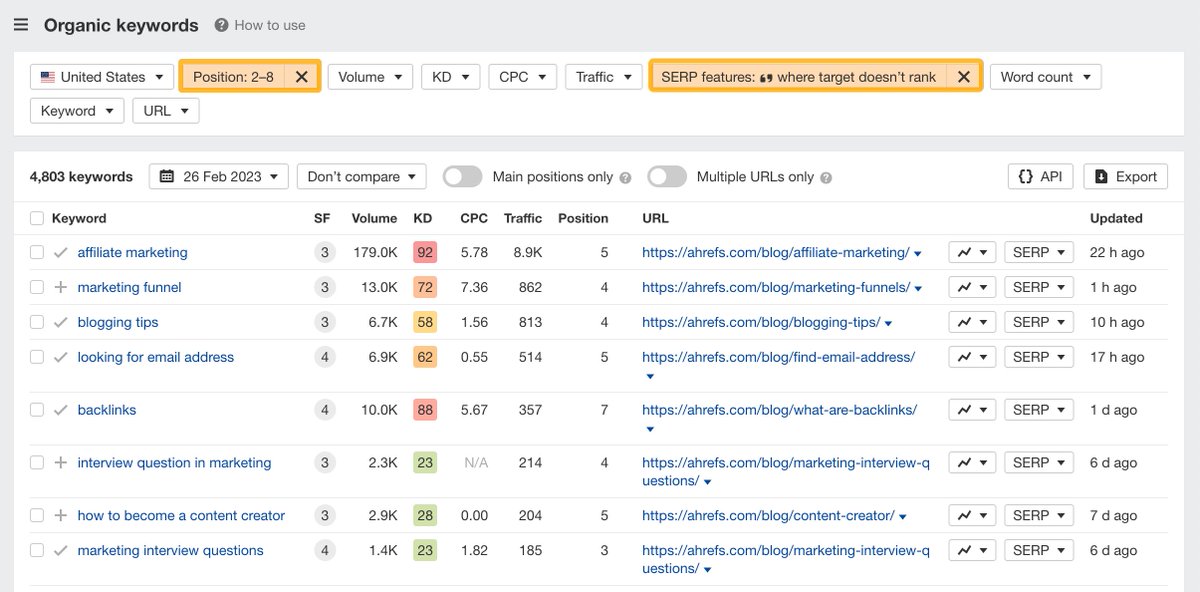
1️⃣4️⃣ Target featured snippet opportunities
✅ Go to Site Explorer
✅ Open the "Organic keywords" report
✅ Filter for keywords in positions 2-8 where target doesn't rank for featured snippets
This will help you shortcut your way to the top position 🪜
✅ Go to Site Explorer
✅ Open the "Organic keywords" report
✅ Filter for keywords in positions 2-8 where target doesn't rank for featured snippets
This will help you shortcut your way to the top position 🪜
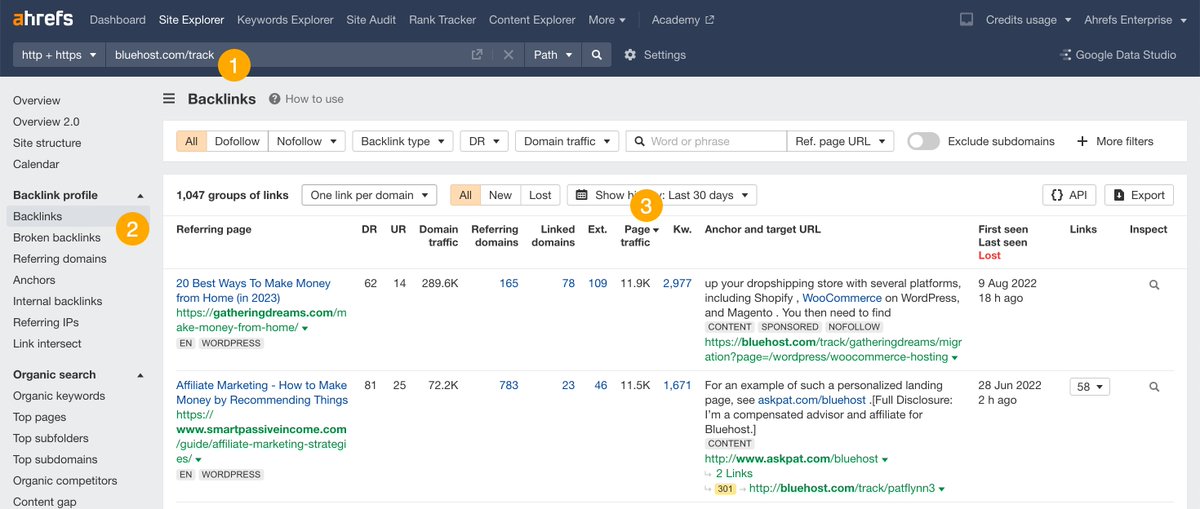
1️⃣5️⃣ Reveal the top SEO affiliates for a product
1. Paste the affiliate link in Site Explorer
2. Go to the "Backlinks" report
3. Sort by page traffic
You could build partnerships with them to increase your reach.
1. Paste the affiliate link in Site Explorer
2. Go to the "Backlinks" report
3. Sort by page traffic
You could build partnerships with them to increase your reach.
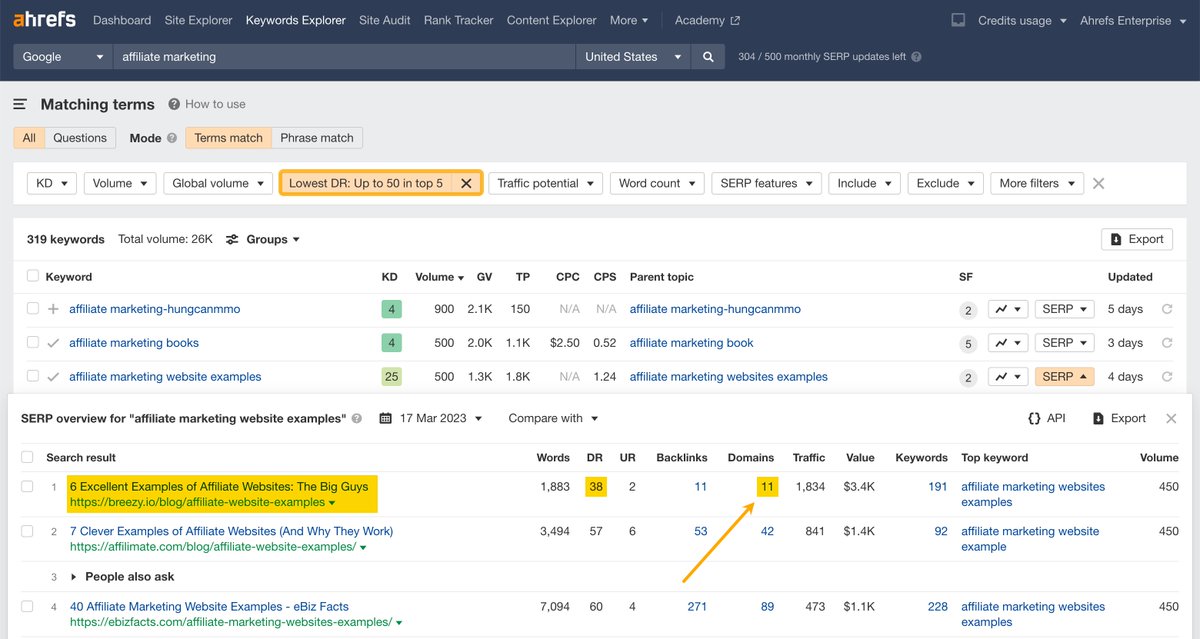
1️⃣6️⃣ Discover keywords that rank with a page that has few referring domains
Open the "Matching terms" report for a keyword with high business potential + the following filter:
👉 Lowest DR: Up to 50, top 5
Then create a similar page to the outlier search result.
Open the "Matching terms" report for a keyword with high business potential + the following filter:
👉 Lowest DR: Up to 50, top 5
Then create a similar page to the outlier search result.
1️⃣7️⃣ Build links with images
Claim improper image attributions from the "Backlinks" report under Site Explorer.
All you have to do is search for .PNG or .JPG in the “Target URL” filter.
Claim improper image attributions from the "Backlinks" report under Site Explorer.
All you have to do is search for .PNG or .JPG in the “Target URL” filter.

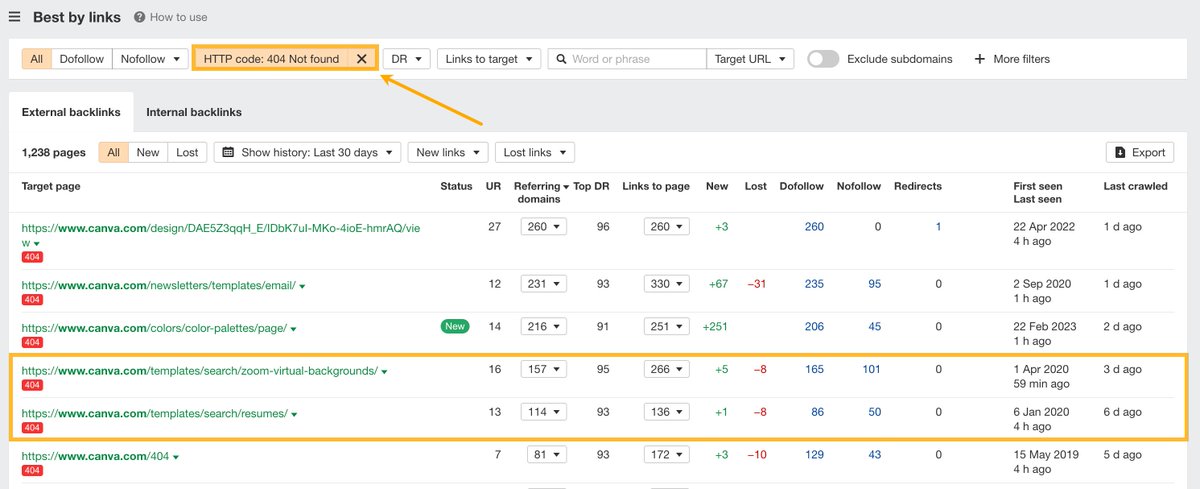
1️⃣8️⃣ Find broken link building opportunities for large websites
👉 Access the "Best by links" report
👉 Filter by 404 pages
👉 Sort by "Referring Domains"
This will surface URLs with a lot of authority from which you can get referrals.
👉 Access the "Best by links" report
👉 Filter by 404 pages
👉 Sort by "Referring Domains"
This will surface URLs with a lot of authority from which you can get referrals.
Found this useful? We've got loads more in our ✨ FREE ✨ weekly newsletter.
Sign up here: ahrefs.com
Sign up here: ahrefs.com
Loading suggestions...