

Event Handlers in JavaScript.
A Beginner’s Guide.
Thread:
A Beginner’s Guide.
Thread:
Hey there, fellow coders!
1. Have you ever wanted to bring your website to life?
2. To make it dynamic and interactive?
Well, that’s where event handlers in JavaScript come into play.
1. Have you ever wanted to bring your website to life?
2. To make it dynamic and interactive?
Well, that’s where event handlers in JavaScript come into play.
In this thread, we’ll dive into the world of event handlers and understand how they can transform your website from a static page to a lively and engaging experience for your users.
What are Event Handlers?
Imagine you’re building a website and you want your users to be able to click a button and have something happen.
That’s where event handlers come in. Event handlers are functions that get triggered when a specific event occurs on a web page.
Imagine you’re building a website and you want your users to be able to click a button and have something happen.
That’s where event handlers come in. Event handlers are functions that get triggered when a specific event occurs on a web page.
For example, when a user clicks a button, an event handler can be triggered to perform an action, like showing an alert message or changing the colour of the button.
> Adding Event Listeners
- Now that we know what event handlers are, let’s see how we can add them to our website.
- The process of adding event handlers is called registering event listeners.
- This is done using the `addEventListener` method.
- Now that we know what event handlers are, let’s see how we can add them to our website.
- The process of adding event handlers is called registering event listeners.
- This is done using the `addEventListener` method.
Let’s take a look at an example:

In this example, we first select the button element using querySelector.
- Then, we use the addEventListener method to add an event listener to the button.
- The first argument of addEventListener is the type of event we want to listen for, in this case, it’s a click event.
- Then, we use the addEventListener method to add an event listener to the button.
- The first argument of addEventListener is the type of event we want to listen for, in this case, it’s a click event.
- The second argument is the function that we want to execute when the event occurs.
- In this case, when the button is clicked, the function will log the message “The button was clicked!” to the console.
- In this case, when the button is clicked, the function will log the message “The button was clicked!” to the console.
> Removing Event Listeners
- There may be times when we want to remove an event listener that we have added to an element.
- This can be done using the removeEventListener method. Let’s take a look at an example:
- There may be times when we want to remove an event listener that we have added to an element.
- This can be done using the removeEventListener method. Let’s take a look at an example:

- In this example, we create a function clickHandler that will be executed when the button is clicked.
- Then, we add the event listener to the button using addEventListener.
- Then, we add the event listener to the button using addEventListener.
- Later on in our code, we remove the event listener using removeEventListener.
- This is useful when we no longer need the event listener and want to clean up our code.
- This is useful when we no longer need the event listener and want to clean up our code.
> Event Bubbling and Event Delegation
When an event occurs on an element, it triggers the event handler for that element and then bubbles up to its parent elements. This process is called event bubbling.
When an event occurs on an element, it triggers the event handler for that element and then bubbles up to its parent elements. This process is called event bubbling.
Event delegation is a technique that allows us to handle events on multiple elements using a single event listener on a parent element.
Let’s take a look at an example:

- In this example, we add an event listener to the ul element that listens for the click event.
- When the event takes place, the function inside the event listener checks the target of the event to see if it is a `li` element.
- When the event takes place, the function inside the event listener checks the target of the event to see if it is a `li` element.
If it is, the message “A list item was clicked!” will be displayed in the console. With event delegation, we can handle events for multiple elements in a clean and efficient way.
> Handling Events in Forms
Forms are a vital part of many web applications, and handling events in forms is a common task for JavaScript developers.
A common scenario is preventing the default browser behaviour when a form is submitted.
Forms are a vital part of many web applications, and handling events in forms is a common task for JavaScript developers.
A common scenario is preventing the default browser behaviour when a form is submitted.
- For example, when a user submits a form, the browser typically reloads the page and clears the form data.
- To stop this behaviour, we can use the preventDefault method of the event object, which stops the default behaviour from being triggered.
- To stop this behaviour, we can use the preventDefault method of the event object, which stops the default behaviour from being triggered.
Let’s take a look at an example:
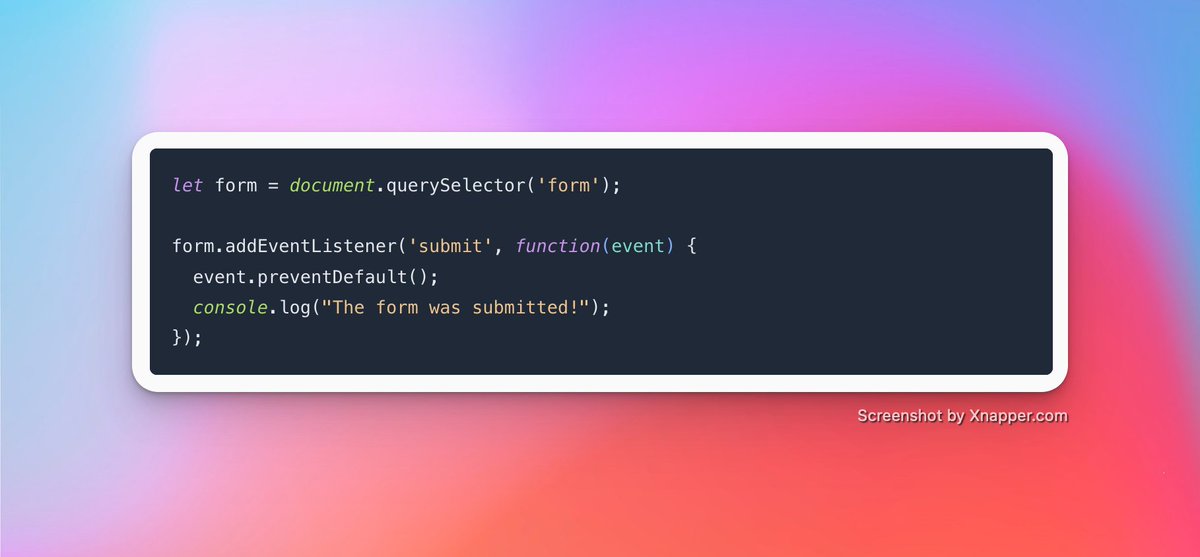
- In this example, we add an event listener to the form that listens for the submitted event.
- When the form is submitted, the function inside the event listener will be executed, and the default behavior of the form will be prevented.
- When the form is submitted, the function inside the event listener will be executed, and the default behavior of the form will be prevented.
- The message “The form was submitted!” will be displayed in the console.
> Wrapping up
Event handling is a critical aspect of JavaScript that enables developers to bring interactivity to their web pages.
Event handling is a critical aspect of JavaScript that enables developers to bring interactivity to their web pages.
In this thread, we covered the basics of event handlers, including how to add and remove event listeners, how to handle events using event bubbling and event delegation, and how to handle events in forms.
That's a wrap.
Follow @codedamncom for more.
Follow @codedamncom for more.
Loading suggestions...