

How to Write JavaScript in HTML?
All possible ways:
All possible ways:
- JavaScript is a versatile and widely-used programming language that can be used for a variety of purposes, including web development.
- When it comes to developing web pages, HTML and JavaScript are two essential components.
- When it comes to developing web pages, HTML and JavaScript are two essential components.
In this thread, we will explore all the possible ways of using JavaScript with HTML.
JavaScript in an HTML file:
- The most straightforward way to use JavaScript with HTML is to include JavaScript code directly in an HTML file.
- There are two main ways to do this: by embedding the code within a script tag or by linking to an external JavaScript file.
- The most straightforward way to use JavaScript with HTML is to include JavaScript code directly in an HTML file.
- There are two main ways to do this: by embedding the code within a script tag or by linking to an external JavaScript file.
- You can embed JavaScript code within a script tag in the head or body of an HTML document.
- To do this, simply enclose your JavaScript code within the opening and closing script tags. For example:
- To do this, simply enclose your JavaScript code within the opening and closing script tags. For example:
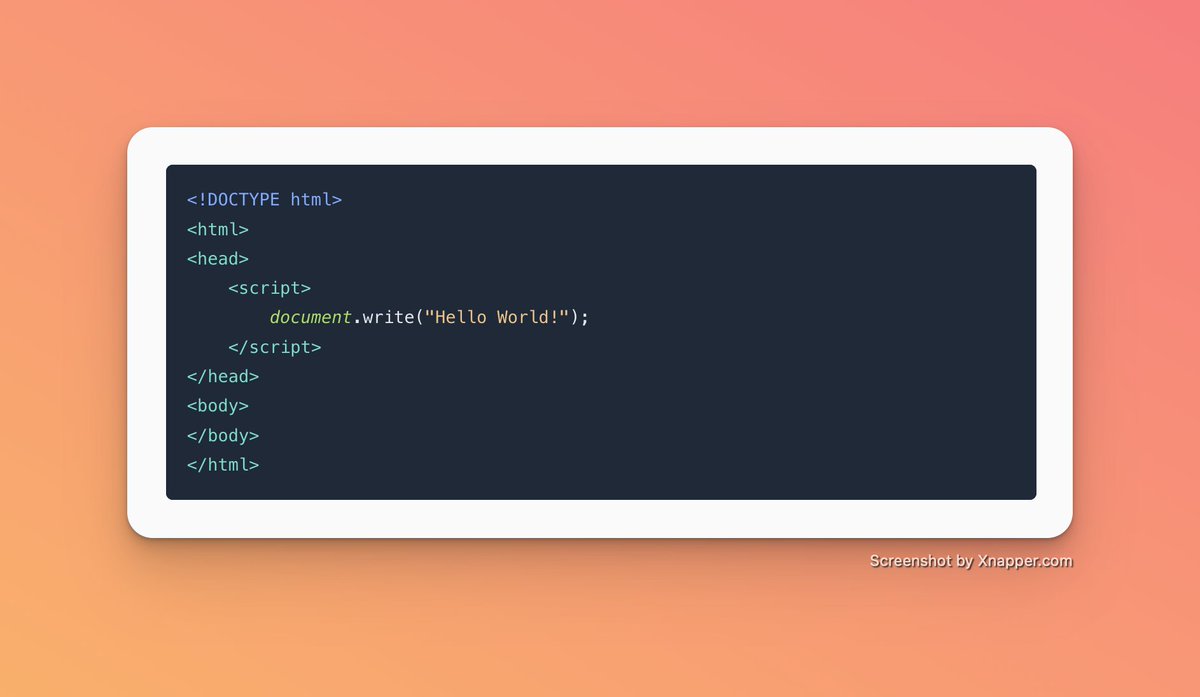
- In the above example, the JavaScript code is embedded within the script tag in the head of the HTML document.
- The code uses the `document. write`method to write the string “Hello World!” to the web page.
- The code uses the `document. write`method to write the string “Hello World!” to the web page.
Linking to an external JavaScript file:
- Another way to include JavaScript in an HTML file is by linking to an external JavaScript file.
- Another way to include JavaScript in an HTML file is by linking to an external JavaScript file.
- This is useful if you have a large amount of JavaScript code that you want to reuse across multiple web pages, or if you want to keep your HTML code clean and free of clutter.
To link to an external JavaScript file, you need to create a separate .js file and then link to it from within your HTML file using the script tag. For example:

- In this example, the script tag in the head of the HTML file links to an external JavaScript file named “script.js”.
- The JavaScript code in this file will be executed when the HTML page is loaded.
- The JavaScript code in this file will be executed when the HTML page is loaded.

JavaScript in an HTML tag
- Another way to use JavaScript with HTML is to include JavaScript code directly in an HTML tag.
- This can be done by using the “on” attributes (event listener attributes) , such as onclick, onload, and onmouseover. For example:
- Another way to use JavaScript with HTML is to include JavaScript code directly in an HTML tag.
- This can be done by using the “on” attributes (event listener attributes) , such as onclick, onload, and onmouseover. For example:

- In this example, the `onclick` attribute is used to attach a JavaScript function to a button element.
- When the button is clicked, the JavaScript function will be executed, displaying an alert box with the message “Hello World!”.
- When the button is clicked, the JavaScript function will be executed, displaying an alert box with the message “Hello World!”.
- In conclusion, there are several ways to use JavaScript with HTML, including embedding the code within a script tag, linking to an external JavaScript file, and including JavaScript code directly in an HTML tag.
- The best method to use will depend on your specific needs and the size and complexity of your project.
- However, for most professional web development projects, including JavaScript in a separate file and referencing it in the HTML file using the script tag is the preferred method.
If you want to learn JavaScript you can start learning from our free JavaScript Basics course, to learn how to build interactive web pages.
Here's the link:
codedamn.com
Here's the link:
codedamn.com
That's a wrap!
If you enjoyed this thread:
1. Follow us @codedamncom for more of these.
2. Retweet the first tweet above to share with your friends.
If you enjoyed this thread:
1. Follow us @codedamncom for more of these.
2. Retweet the first tweet above to share with your friends.
Practice 100+ Projects for free:
🔗 codedamn.com
🔗 codedamn.com
جاري تحميل الاقتراحات...