

16 Basic Linux commands for text manipulation (save this)🧵↓
Hello linux folks, Today I'll be doing a quick, easy-to-follow thread on basic Linux text manipulation commands.
1. echo 🐧
The echo command is used to display line of text to the standard output(stdout).
The echo command is used to display line of text to the standard output(stdout).

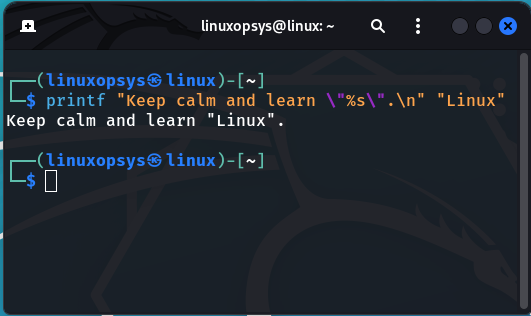
2. printf 🐧
Just like the echo command but with more advanced functionality. printf is used to convert, format and print data to the standard output (stdout).
Just like the echo command but with more advanced functionality. printf is used to convert, format and print data to the standard output (stdout).
3. cat 🐧
The cat command is used concatenate files and print their contents on the standard output. In other words it's just used to display the contents of a file.
The cat command is used concatenate files and print their contents on the standard output. In other words it's just used to display the contents of a file.

4. Tac 🐧
Similar to the cat command, the tac command concatenate and print files contents in reverse order. You can tell from the name that this command is the reverse version of the popular cat command.
Similar to the cat command, the tac command concatenate and print files contents in reverse order. You can tell from the name that this command is the reverse version of the popular cat command.

5. paste 🐧
The paste command is similar to the cat command, it merges lines together in a file and make it a one huge single line.
The paste command is similar to the cat command, it merges lines together in a file and make it a one huge single line.

6. Head🐧
This command displays the first part of a file. Let's say we have a very long file and you only want to see the first couple of lines.
This command displays the first part of a file. Let's say we have a very long file and you only want to see the first couple of lines.
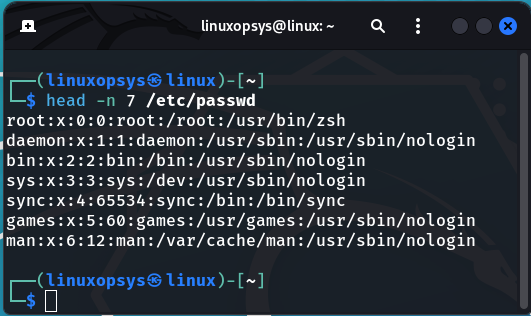
This is where the head command comes in; by default, the head command displays the first 10 lines of a file. But you can also specify the number of lines you want the command to display.

As mention above,you can specify the number of lines to whatever you want, for example let's say I wanted to see the first 7 lines instead. From the example below the -n stands for the number of lines we want to display.
7. Tail🐧
Similar to the head command, the tail command lets you see the last 10 lines of a file by default. But you can always change it as well and specify the number of lines you want to display. Here I have chose to display the last 8 lines.
Similar to the head command, the tail command lets you see the last 10 lines of a file by default. But you can always change it as well and specify the number of lines you want to display. Here I have chose to display the last 8 lines.

8. Rev 🐧
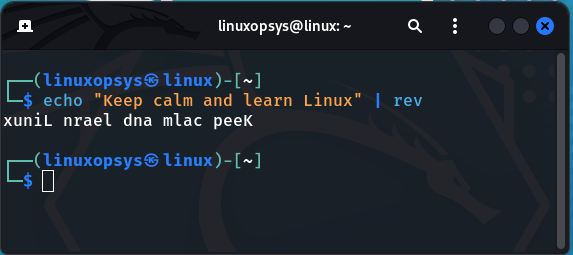
This command reverses lines characterwise.
This command reverses lines characterwise.
9. Sort 🐧
The sort command is very useful for sorting files, text lines.
The sort command is very useful for sorting files, text lines.

With sort command you also can sort according to string numerical value by simply using the -n option the command.

The sort command also has the capability of sorting in reverse order by using it's -r option.
Finally on the sort command, you can also remove repeated lines to get only unique lines. This is achieved by using the -u option of the sort command.
10. tr (Translate)🐧
The tr (translate) command allows you to translate a set of characters into another set of characters. It's also used to squeeze or delete characters from standard input and display the result to standard output.
The tr (translate) command allows you to translate a set of characters into another set of characters. It's also used to squeeze or delete characters from standard input and display the result to standard output.

From the preceding exampl, notice we converted all the t -> T, b -> B and q -> Q, .... . Keep in mind that the number of characters on the first set should be equal to the number of characters on the second set. Let's try another example of translating characters.

Here we traslated - to spaces. Here is another quick example for deleting characters with tr command.
The tr command also supports the intimidating 😄regular expressions. Let's try an example of translating all lower case characters to uppercase characters using regex.

11. Uniq (Unique) 🐧
The uniq (unique) command is another useful tool for parsing text. It's used to omit/remove duplicates from a file, hence the name uniq. Uniq only remove adjacent duplicates, so we have to sort our file before we use it against uniq otherwise it won't work.
The uniq (unique) command is another useful tool for parsing text. It's used to omit/remove duplicates from a file, hence the name uniq. Uniq only remove adjacent duplicates, so we have to sort our file before we use it against uniq otherwise it won't work.

The preceding example is simply equivalent to the'sort -u' command; it is up to you to choose which one you prefer. As for me, I tend to use both, depending on which comes to mind first.
12. wc 🐧
Word Count(wc) is used to print newline, word, and byte counts for each file or supplied text. It display the number of lines, number of words and number of bytes, respectively.
Word Count(wc) is used to print newline, word, and byte counts for each file or supplied text. It display the number of lines, number of words and number of bytes, respectively.

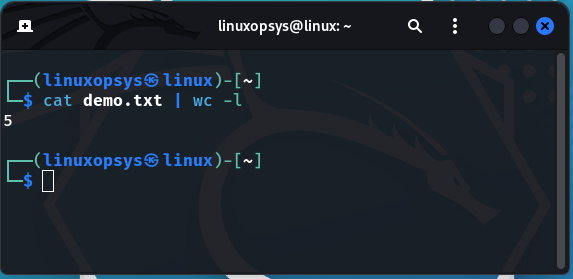
You can also explicitly specify what you want to display but using the l-, -w, or -c options which will displays number of lines, words, characters(bytes) respectively.
Let's try out to display the number of lines. Few free to also experiment with other options.
Let's try out to display the number of lines. Few free to also experiment with other options.
13. nl 🐧
Another command you can use to check the count of lines on a file is the nl (number lines) command. It displays contents of a file along with line numbers. This command is equivalent to the 'cat -s' command.
Another command you can use to check the count of lines on a file is the nl (number lines) command. It displays contents of a file along with line numbers. This command is equivalent to the 'cat -s' command.

14. grep 🐧
The grep command is one of the most common text processing command you will use. It allows you to search files for characters that match a certain pattern.
The grep command is one of the most common text processing command you will use. It allows you to search files for characters that match a certain pattern.

Grep has a lot of useful switches that I won't go over here, but if you want to learn more about this handy utility, check out the grep man pages.
15. diff 🐧
The diff command simply compares two text sources/text files and outputs their differences. It compares the files line by line to find the differences.
The diff command simply compares two text sources/text files and outputs their differences. It compares the files line by line to find the differences.

16. cut 🐧
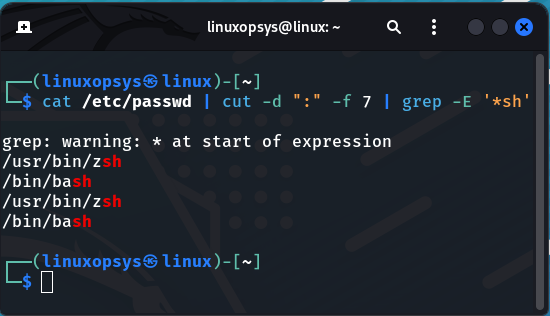
The cut command can be used to remove/extract bytes, characters, and fields from files. Various parameters are used to specify what part or parts of the file are to be removed or displayed.
The cut command can be used to remove/extract bytes, characters, and fields from files. Various parameters are used to specify what part or parts of the file are to be removed or displayed.
Here is a quick example, let's say we want to display all the user shells in the / etc/passwd file.

That concludes today's thread! Thank you for reading!
If you enjoyed this thread and found it useful, please follow us (@linuxopsys) for more Linux, sysadmin, and devops content!.
Make sure to include some text manipulation commands; I'd love to know them as well.
If you enjoyed this thread and found it useful, please follow us (@linuxopsys) for more Linux, sysadmin, and devops content!.
Make sure to include some text manipulation commands; I'd love to know them as well.
Loading suggestions...