

ChatGPT for SEO: 11 best and worst use cases 🤖
We've done the work so you don't have to!
Let's take a closer look—plus, some tactics and prompts to improve SEO for your website ⛏️
H/T: @samsgoh
We've done the work so you don't have to!
Let's take a closer look—plus, some tactics and prompts to improve SEO for your website ⛏️
H/T: @samsgoh
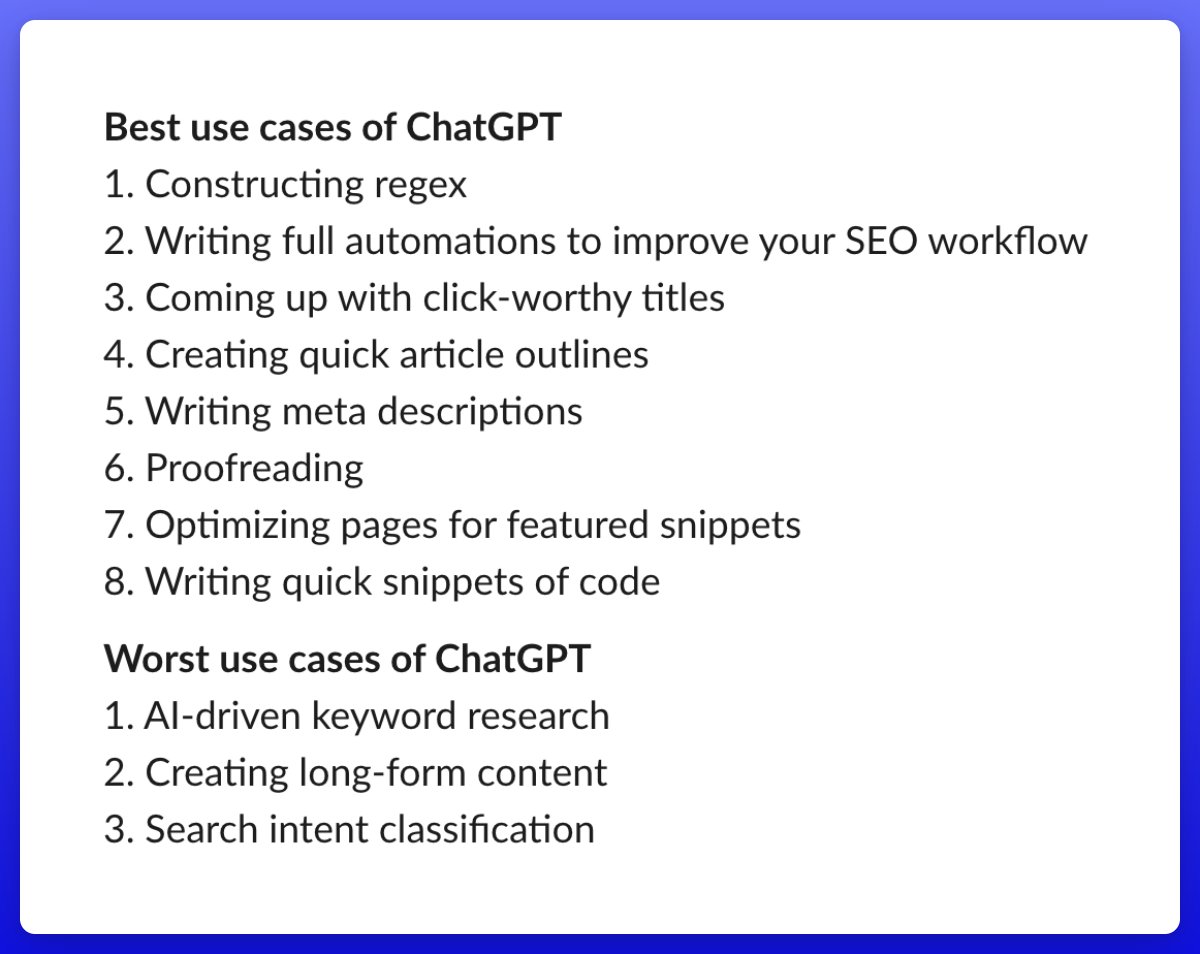
*Best* use cases of ChatGPT 🏆
1️⃣ Constructing regex
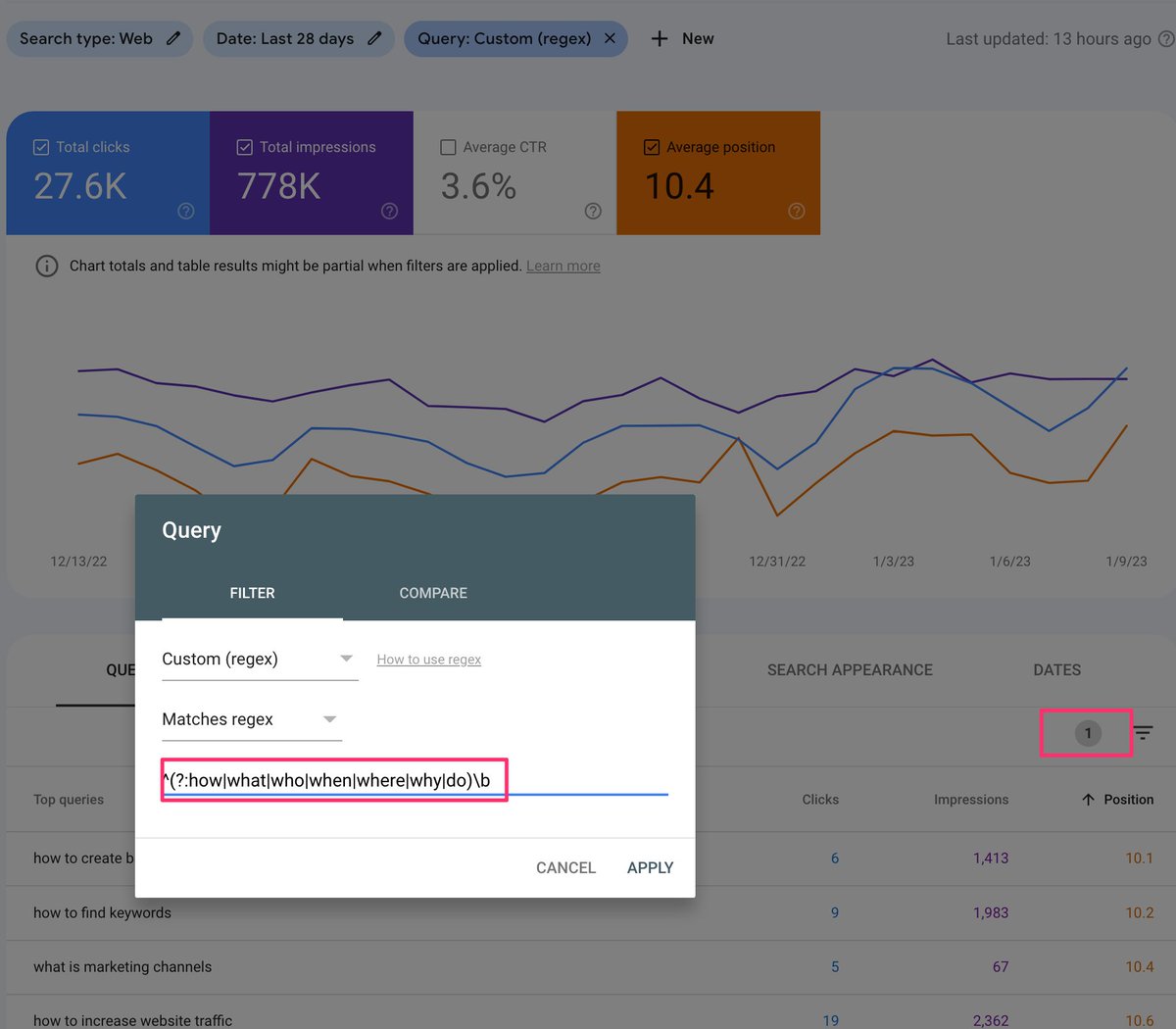
Regex (aka regular expression) is a sequence of characters that’s used to find patterns within text.
Let's say you want to find keywords phrased as a question in Google Search Console.
You can start by asking ChatGPT this:
1️⃣ Constructing regex
Regex (aka regular expression) is a sequence of characters that’s used to find patterns within text.
Let's say you want to find keywords phrased as a question in Google Search Console.
You can start by asking ChatGPT this:

1️⃣ Constructing regex (cont'd)
Next:
- Go to GSC
- Paste the regex from ChatGPT into the query filter
- Set your positions filter to >10
- Sort list in ascending order
You now have a list of informational keywords to work on bringing you from page 2 to page 1 of Google. 👀
Next:
- Go to GSC
- Paste the regex from ChatGPT into the query filter
- Set your positions filter to >10
- Sort list in ascending order
You now have a list of informational keywords to work on bringing you from page 2 to page 1 of Google. 👀
2️⃣ Writing full automations to improve your SEO workflow
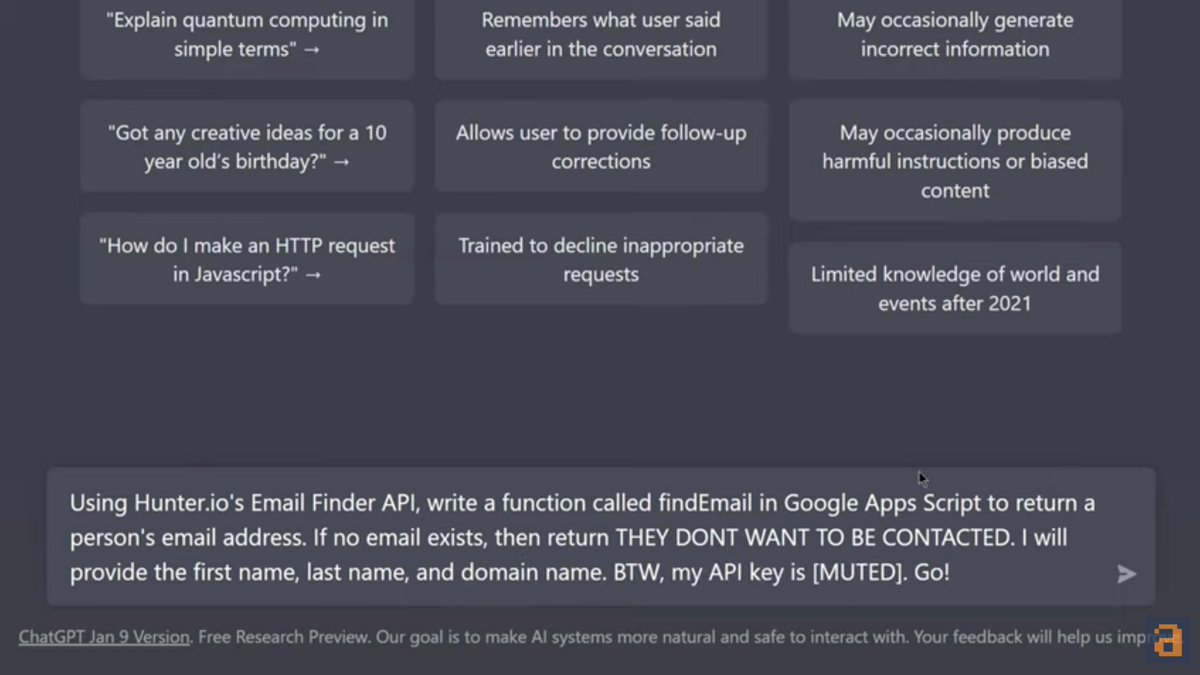
Scenario: You're working on a link building campaign. You've got the first + last names of prospects, plus the URLs and domains.
To find their emails, the inefficient way would be to go through them one at a time...
Scenario: You're working on a link building campaign. You've got the first + last names of prospects, plus the URLs and domains.
To find their emails, the inefficient way would be to go through them one at a time...
2️⃣ Writing full automations (cont'd)
...whether with a web app or Chrome extension.
The *efficient* way would be to have ChatGPT write the code for you, like so 👇
...whether with a web app or Chrome extension.
The *efficient* way would be to have ChatGPT write the code for you, like so 👇
2️⃣ Writing full automations (cont'd)
Next:
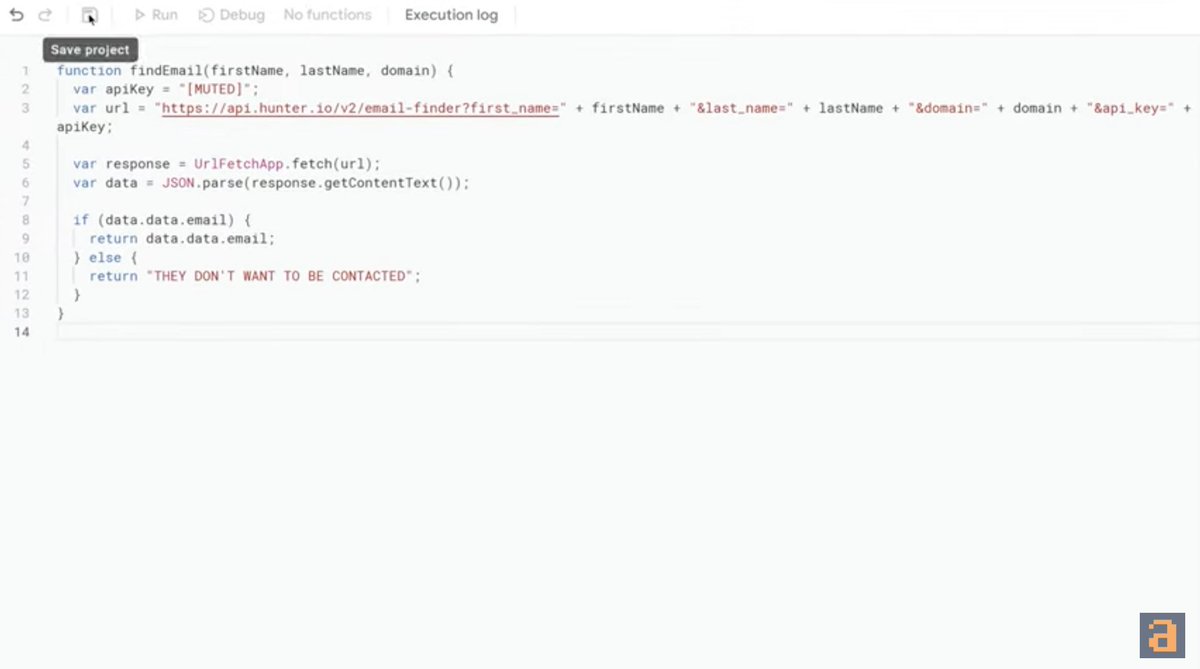
- Copy the generated code and open Appscripts 🔽
- Paste the code, update your API key, and save the file
- Return to your spreadsheet of contacts
Next:
- Copy the generated code and open Appscripts 🔽
- Paste the code, update your API key, and save the file
- Return to your spreadsheet of contacts
2️⃣ Writing full automations (cont'd)
- In the Email column, type in findEmail(first name, last name, domain name). Hit "Enter", and you're all set!
- To repeat the action, drag your formula down the Email column.
Watch this for a detailed explainer:
youtu.be
- In the Email column, type in findEmail(first name, last name, domain name). Hit "Enter", and you're all set!
- To repeat the action, drag your formula down the Email column.
Watch this for a detailed explainer:
youtu.be

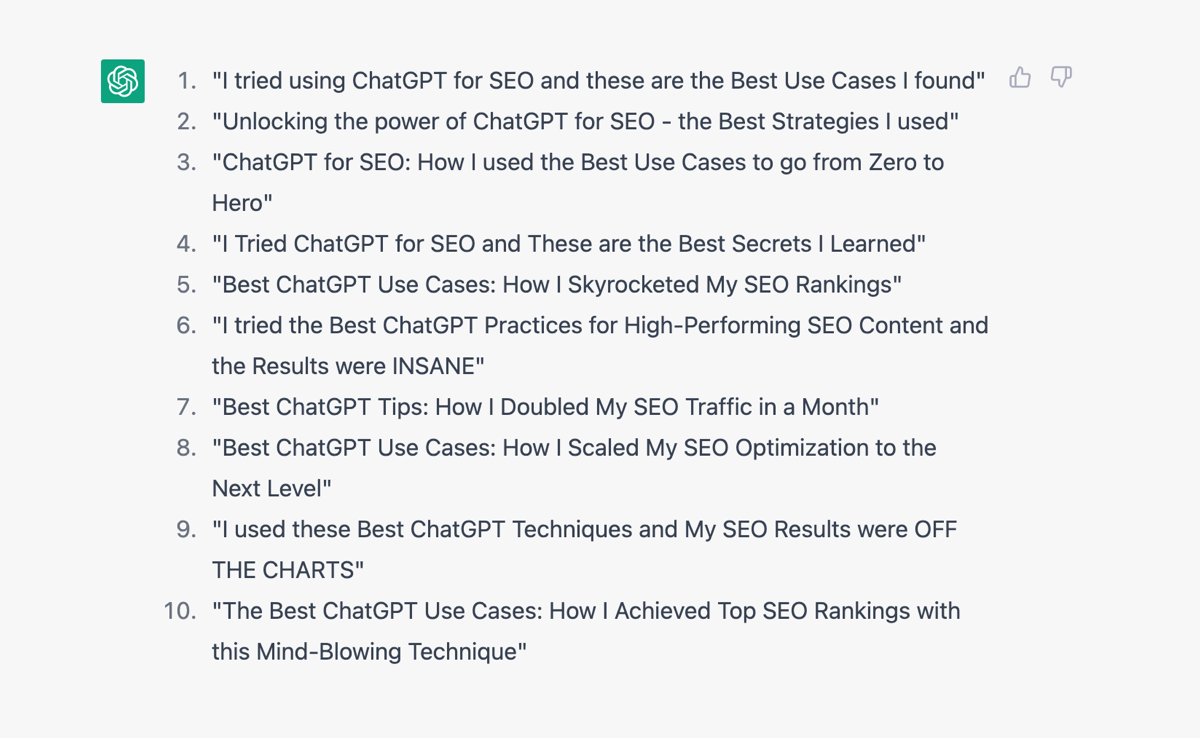
3️⃣ Coming up with click-worthy titles
This is ideal if you're stuck.
Simply ask ChatGPT to write 10 click-worthy titles for your blog post on a topic.
For the best results, give it a working title—particularly if you've a specific angle you want to match for search intent.
This is ideal if you're stuck.
Simply ask ChatGPT to write 10 click-worthy titles for your blog post on a topic.
For the best results, give it a working title—particularly if you've a specific angle you want to match for search intent.
3️⃣ Coming up with click-worthy titles (cont'd)
You can even ask it to:
- Front-load keywords, if you have a specific opening title in mind 👇
- Make your titles sound like a Mr. Beast video 🤨
You can even ask it to:
- Front-load keywords, if you have a specific opening title in mind 👇
- Make your titles sound like a Mr. Beast video 🤨

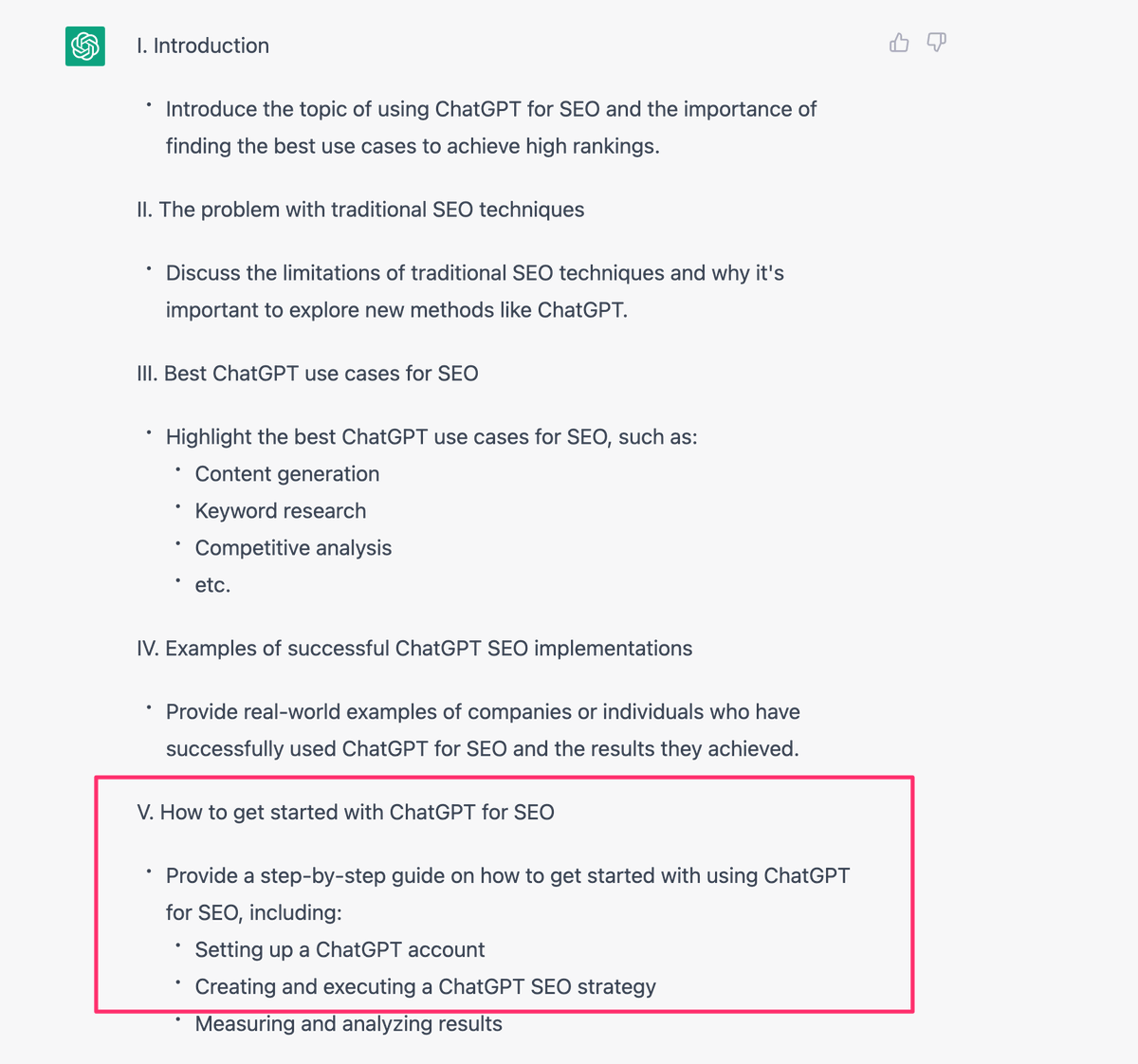
4️⃣ Creating quick article outlines
After ChatGPT generates an article outline, you can decide which sections to prioritise or remove.
Then, ask it to elaborate on certain pointers where needed.
Doing this can improve efficiency.
After ChatGPT generates an article outline, you can decide which sections to prioritise or remove.
Then, ask it to elaborate on certain pointers where needed.
Doing this can improve efficiency.
4️⃣ Creating quick article outlines (cont'd)
But remember: ChatGPT only has limited access to information after 2021.
We'll cover this (under—whoops—worst use cases) in a bit. 👀 In the meantime, always double-check your facts.
But remember: ChatGPT only has limited access to information after 2021.
We'll cover this (under—whoops—worst use cases) in a bit. 👀 In the meantime, always double-check your facts.
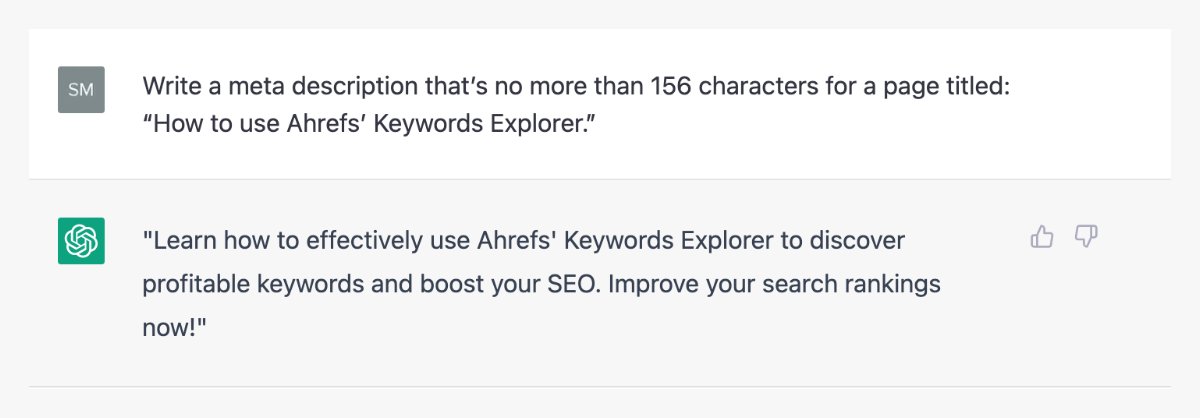
5️⃣ Writing meta descriptions
Still, AI has its place in content generation—albeit mostly for short-form content like meta descriptions.
Like in this example👇
You can also run a site audit in Ahrefs to find missing meta descriptions, then ask ChatGPT to generate those for you.
Still, AI has its place in content generation—albeit mostly for short-form content like meta descriptions.
Like in this example👇
You can also run a site audit in Ahrefs to find missing meta descriptions, then ask ChatGPT to generate those for you.
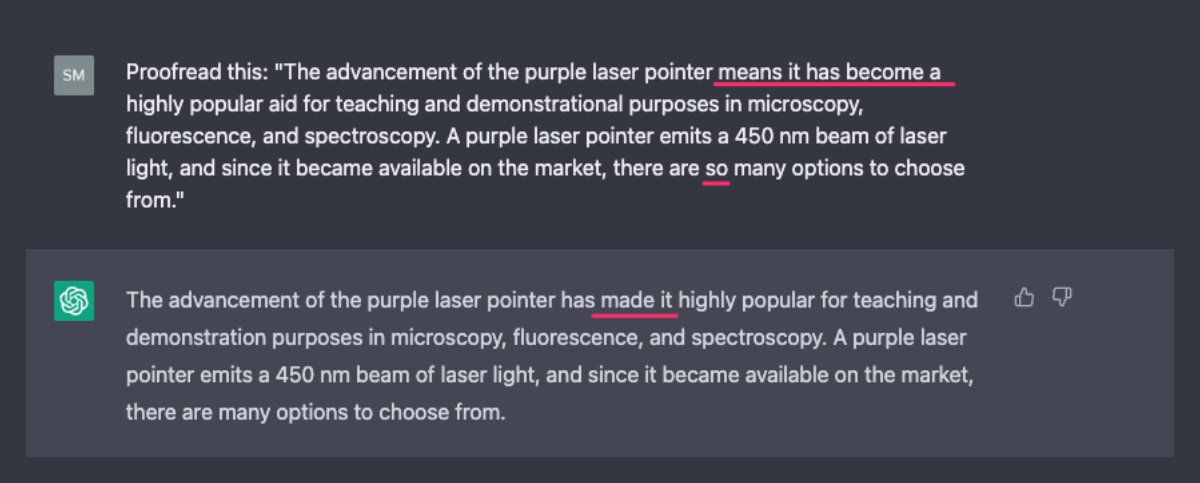
6️⃣ Proofreading
ChatGPT can proofread your copy and make small yet accurate improvements—in seconds.
That's impressive in itself.
Another underrated use case: It's also great at writing concise sentences to improve the readability of your content. 🤓
ChatGPT can proofread your copy and make small yet accurate improvements—in seconds.
That's impressive in itself.
Another underrated use case: It's also great at writing concise sentences to improve the readability of your content. 🤓
7️⃣ Optimizing pages for featured snippets
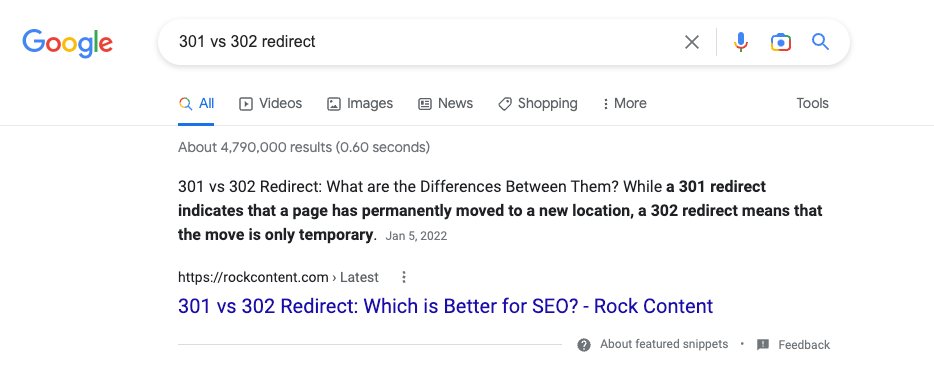
Simply search for a query in Google and study the featured snippet to see what kinds of information has helped it to rank.
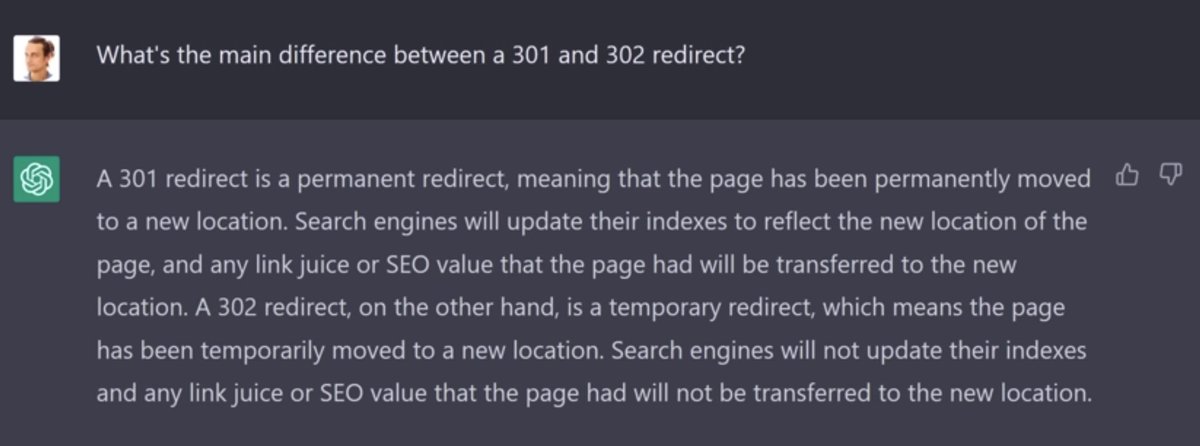
In the below example, we can see what an optimized feature snippet looks like—vs what ChatGPT has generated.
Simply search for a query in Google and study the featured snippet to see what kinds of information has helped it to rank.
In the below example, we can see what an optimized feature snippet looks like—vs what ChatGPT has generated.
7️⃣ Optimizing pages for featured snippets (cont'd)
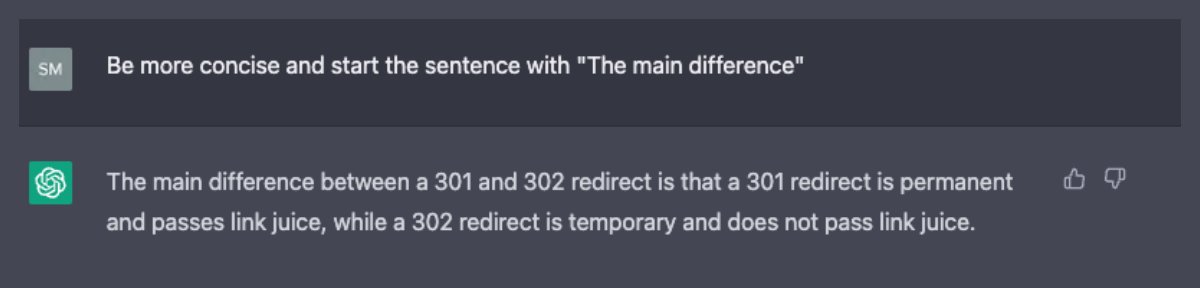
Next, refine your request in ChatGPT.
Still, its write-up isn't fully accurate: There are nuances to how 301s and 302s pass link equity.
Our takeaway? Don't rely purely on ChatGPT to write full content that requires expertise.
Next, refine your request in ChatGPT.
Still, its write-up isn't fully accurate: There are nuances to how 301s and 302s pass link equity.
Our takeaway? Don't rely purely on ChatGPT to write full content that requires expertise.
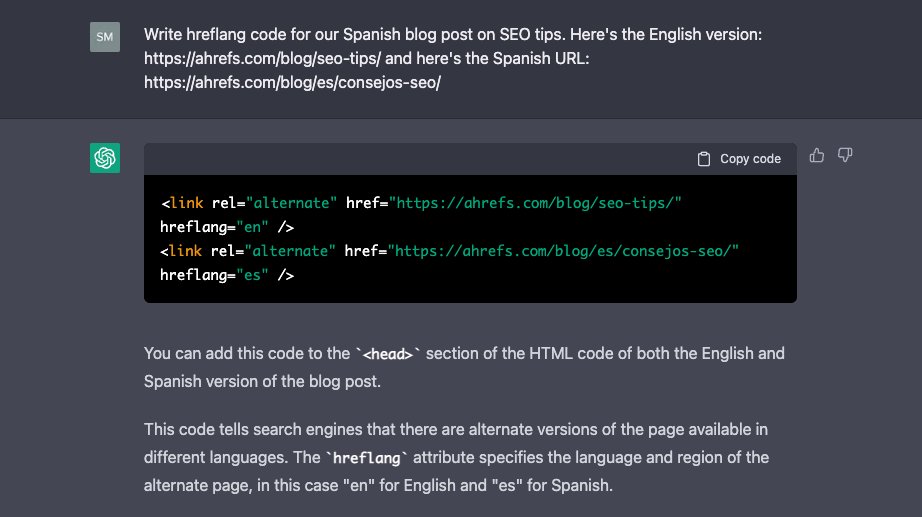
8️⃣ Writing quick snippets of code
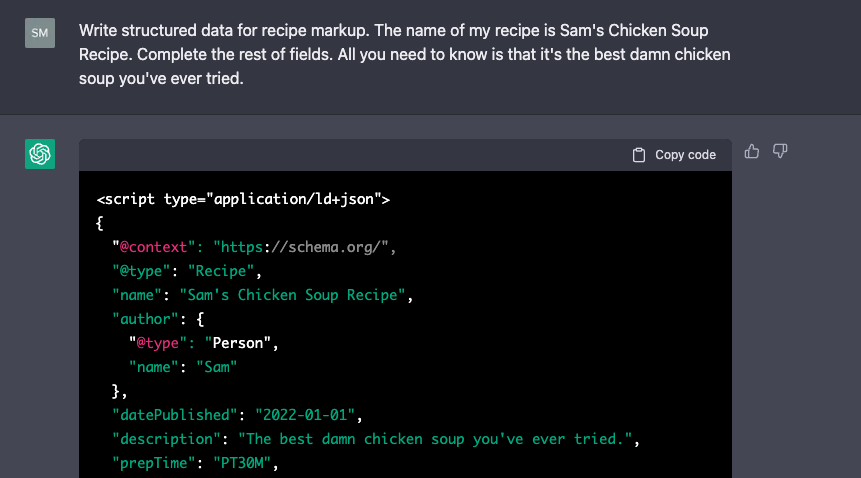
Whether it's schema markup or hreflang snippets, ChatGPT is a wiz at it:
Whether it's schema markup or hreflang snippets, ChatGPT is a wiz at it:
And now, the *worst* use cases of ChatGPT for SEO:
1️⃣ AI-driven keyword research
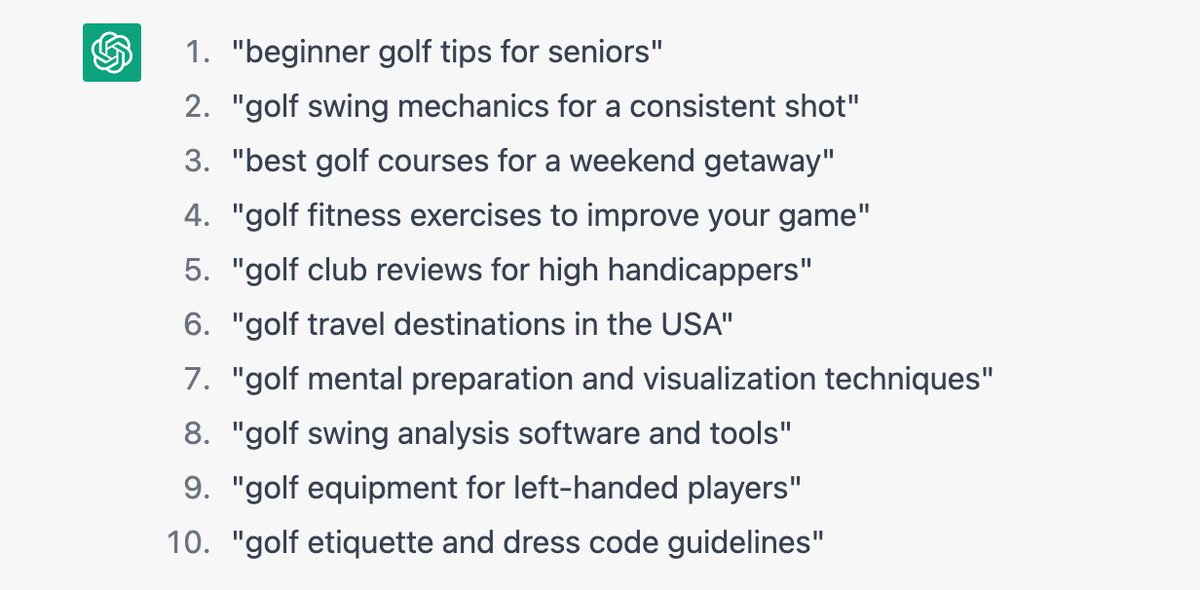
A common prompt that people share on Twitter and LinkedIn is to ask ChatGPT for long-tail or "easy to rank for" queries.
At first glance, this list in the golf niche looks fine...
1️⃣ AI-driven keyword research
A common prompt that people share on Twitter and LinkedIn is to ask ChatGPT for long-tail or "easy to rank for" queries.
At first glance, this list in the golf niche looks fine...
1️⃣ AI-driven keyword research (cont'd)
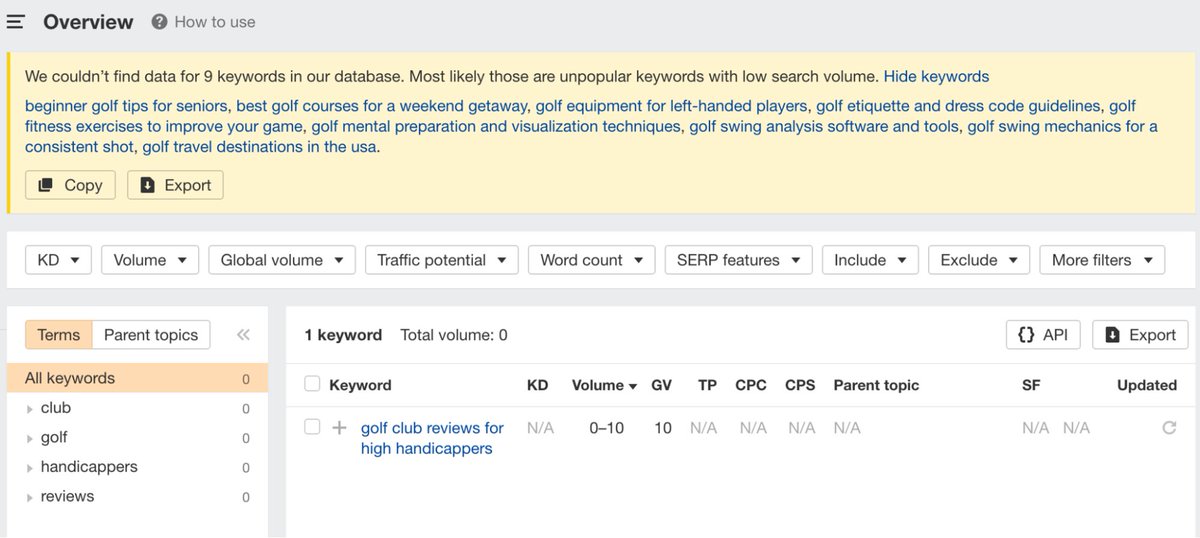
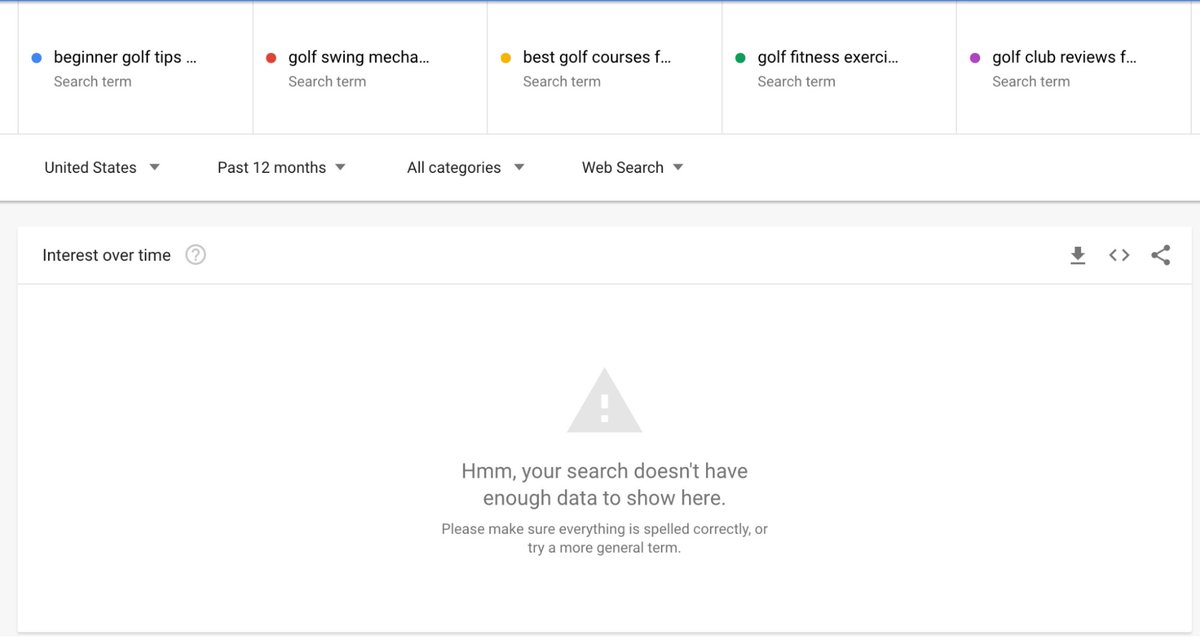
...but throw them into a keyword research tool (or even Google Trends), and you'll see none of them have search demand.
So do your due research before relying on it for such queries. 🔍
...but throw them into a keyword research tool (or even Google Trends), and you'll see none of them have search demand.
So do your due research before relying on it for such queries. 🔍
2️⃣ Creating long-form content
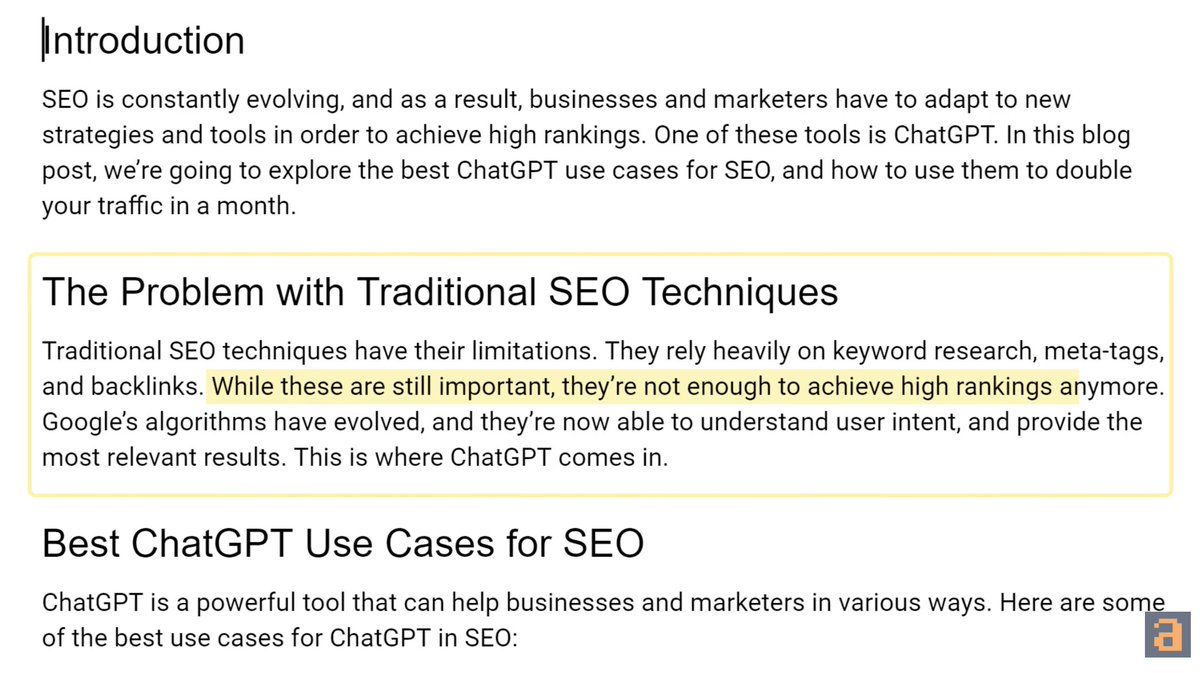
ChatGPT isn't fantastic for generating high quality, long-form content either.
Here's an example command, and a snippet of the corresponding article by ChatGPT:
ChatGPT isn't fantastic for generating high quality, long-form content either.
Here's an example command, and a snippet of the corresponding article by ChatGPT:

2️⃣ Creating long-form content (cont'd)
TL;DR: ChatGPT can write a full article and you'll likely get a readable piece—but filled with boilerplate content.
In essence, it would be unlikely to satisfy search intent for a given topic.
TL;DR: ChatGPT can write a full article and you'll likely get a readable piece—but filled with boilerplate content.
In essence, it would be unlikely to satisfy search intent for a given topic.
3️⃣ Search intent classification
In order to identify search intent, you need to consider:
- The SERPs,
- The top ranking pages’ content, and
- Things like SERP features.
But ChatGPT *doesn't* have SERP data.
We put this to the test in a small experiment:
In order to identify search intent, you need to consider:
- The SERPs,
- The top ranking pages’ content, and
- Things like SERP features.
But ChatGPT *doesn't* have SERP data.
We put this to the test in a small experiment:
3️⃣ Search intent classification (cont'd)
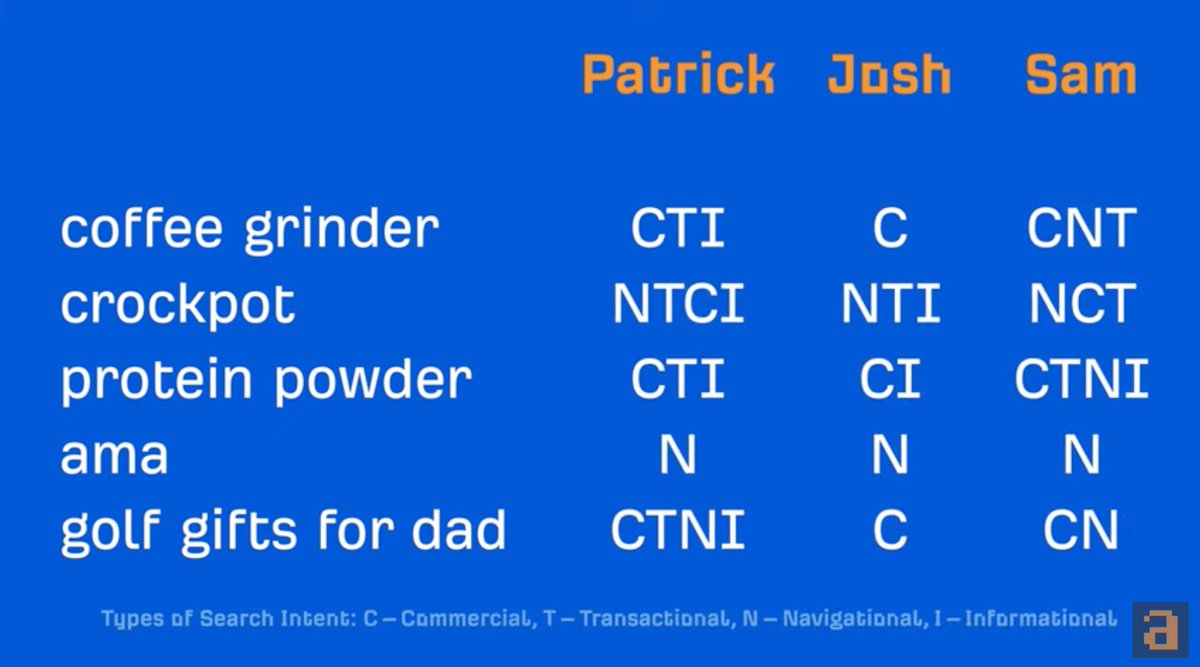
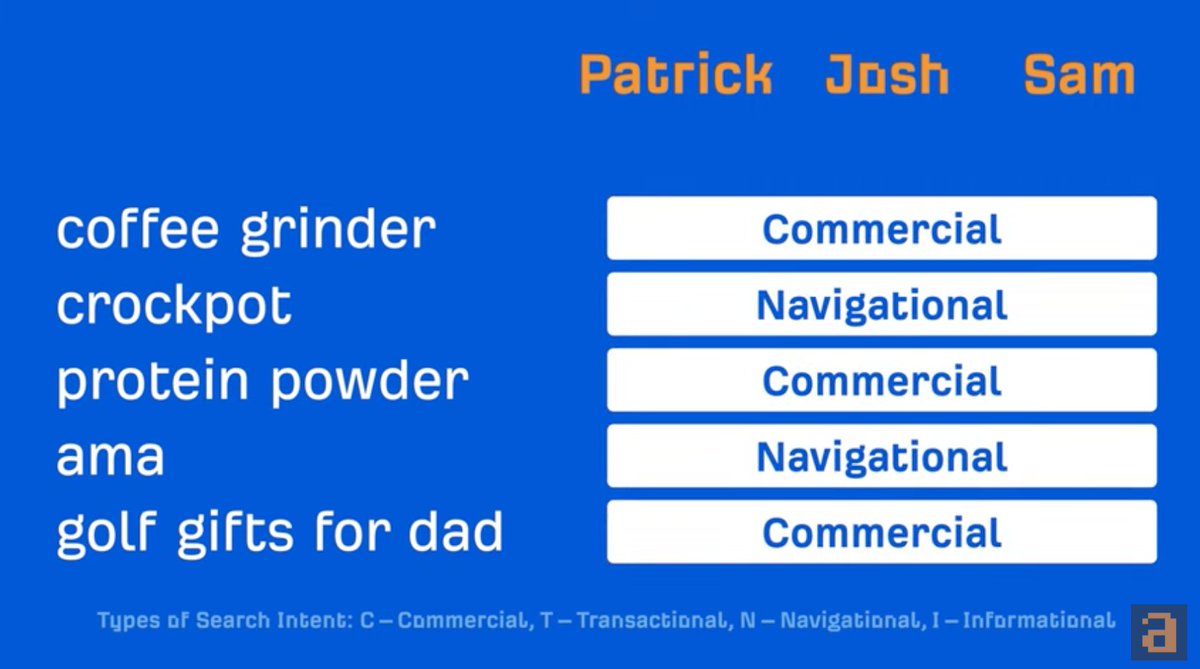
@patrickstox, @JoshuaCHardwick and @samsgoh assigned a 'search intent bucket' to these keywords 🔽
Their opinions varied, but they chose the same *dominant* intent.
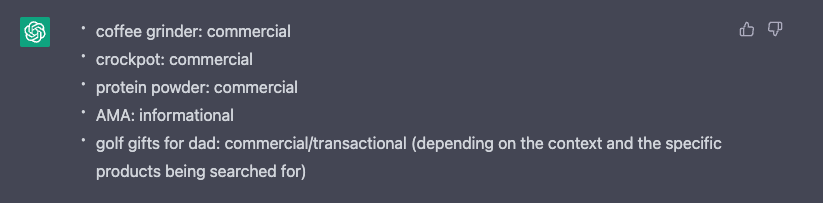
When ChatGPT was put to the test, it scored 3/5 for the same keywords.
@patrickstox, @JoshuaCHardwick and @samsgoh assigned a 'search intent bucket' to these keywords 🔽
Their opinions varied, but they chose the same *dominant* intent.
When ChatGPT was put to the test, it scored 3/5 for the same keywords.
3️⃣ Search intent classification (cont'd)
But it can't study the SERPs, so ChatGPT didn't realize that "AMA" (an acronym with multiple meanings) is dominantly navigational.
It isn't great at identifying keywords with local intent too. Save your time and use Google for this task.
But it can't study the SERPs, so ChatGPT didn't realize that "AMA" (an acronym with multiple meanings) is dominantly navigational.
It isn't great at identifying keywords with local intent too. Save your time and use Google for this task.
And there you have it—the best and worst ways to use ChatGPT.
Want more great content like this? Sign up for our free weekly newsletter on all things SEO ✏️✨
ahrefs.com
Want more great content like this? Sign up for our free weekly newsletter on all things SEO ✏️✨
ahrefs.com
Loading suggestions...