
🧵 How to use Etherscan, one of crypto's most powerful tools:
2/ Block Explorers
Ethereum is a series of "blocks" in a "chain" that are filled with transactions, and these transactions are a public record of how value flows throughout the network.
Etherscan is a block explorer that gives users visibility into the data stored on Ethereum.
Ethereum is a series of "blocks" in a "chain" that are filled with transactions, and these transactions are a public record of how value flows throughout the network.
Etherscan is a block explorer that gives users visibility into the data stored on Ethereum.
3/ Landing Page
We first see some basic stats about ETH and two columns for the latest blocks and transactions (txns).
Each block is numerically ordered, beginning with block 0 which was mined on July 30, 2015.
Each txn has a unique "hash" or 64 hexadecimal character ID.
We first see some basic stats about ETH and two columns for the latest blocks and transactions (txns).
Each block is numerically ordered, beginning with block 0 which was mined on July 30, 2015.
Each txn has a unique "hash" or 64 hexadecimal character ID.

4/ Diving Into The Blocks
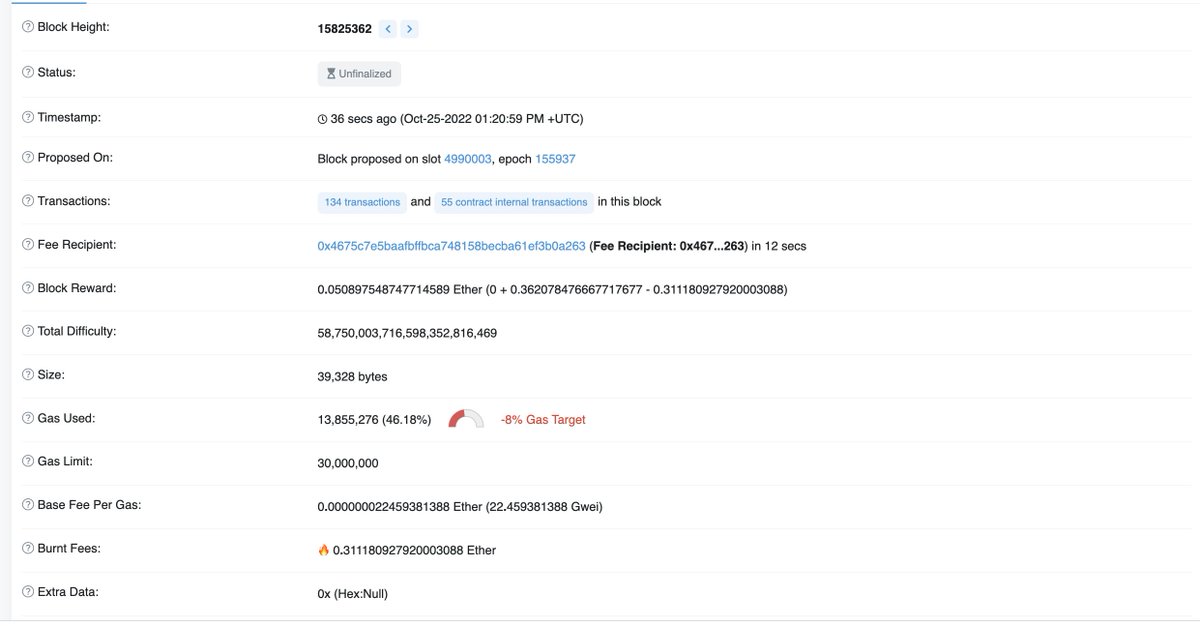
The block number is called the block height, referring to its position in the "chain" of blocks.
Each block has a series of characteristics: time it was mined, the block reward, the amount of ETH fees that were burned, and more.
The block number is called the block height, referring to its position in the "chain" of blocks.
Each block has a series of characteristics: time it was mined, the block reward, the amount of ETH fees that were burned, and more.
5/ Diving Into The Blocks II
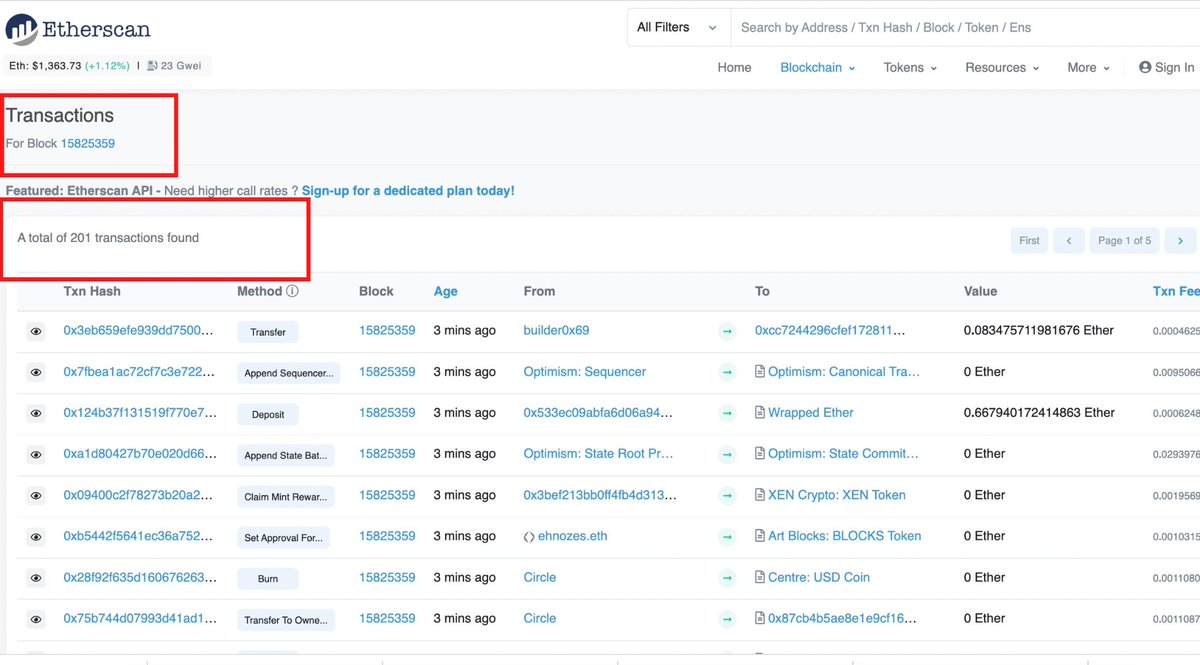
We also see block contains 201 txns.
A txn can be a simple ETH transfer or a more complex action like minting an NFT, executing a DEX trade, or depositing tokens into a liquidity pool.
We also see block contains 201 txns.
A txn can be a simple ETH transfer or a more complex action like minting an NFT, executing a DEX trade, or depositing tokens into a liquidity pool.
6/ A Simple Transfer Txn
Below is a transfer where Wallet A sends Wallet B some amount of ETH. In this case, 1.43 ETH is transferred from Coinbase to a fresh wallet (0xc4).
We can also see when the txn occurred, what block it is in, and the gas fee. Just $0.44 to transfer ETH!
Below is a transfer where Wallet A sends Wallet B some amount of ETH. In this case, 1.43 ETH is transferred from Coinbase to a fresh wallet (0xc4).
We can also see when the txn occurred, what block it is in, and the gas fee. Just $0.44 to transfer ETH!

7/ Basics Of A Txn
So we know each txn has a unique ID and various data points about where ETH was sent. Groups of txns are packaged together and mined in blocks.
With the basics of a txn under our belt, let's take a look at a more complex txn.
So we know each txn has a unique ID and various data points about where ETH was sent. Groups of txns are packaged together and mined in blocks.
With the basics of a txn under our belt, let's take a look at a more complex txn.
8/ DEX trade txn
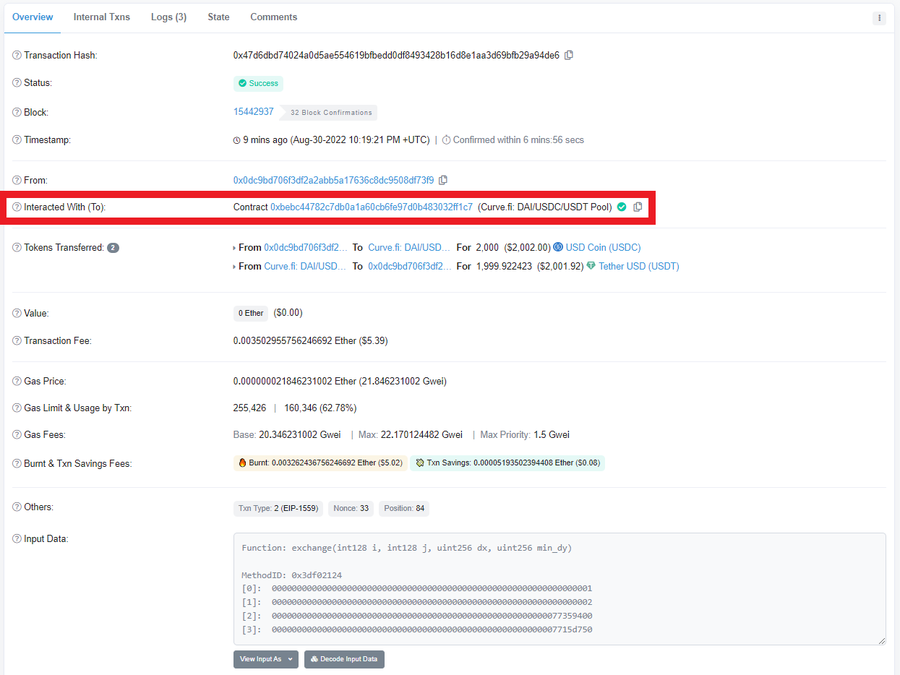
In a more complex txn, the From field is still the signing wallet (0x0d), but the To is commonly the contract that the wallet interacted with.
In this case, the user swaps 2000 USDC for 1999.92 USDT via the Curve 3pool, so the To field = 3pool (USDC-USDT-DAI).
In a more complex txn, the From field is still the signing wallet (0x0d), but the To is commonly the contract that the wallet interacted with.
In this case, the user swaps 2000 USDC for 1999.92 USDT via the Curve 3pool, so the To field = 3pool (USDC-USDT-DAI).
9/
USDC is first transferred from 0x0d to the 3pool and then the USDT is sent back to 0x0d.
Notice that the value field is 0 ETH because USDC was sent to the To field address, not ETH.
Also note the txn cost $5.39, higher than our simple transfer. More complexity = more gas.
USDC is first transferred from 0x0d to the 3pool and then the USDT is sent back to 0x0d.
Notice that the value field is 0 ETH because USDC was sent to the To field address, not ETH.
Also note the txn cost $5.39, higher than our simple transfer. More complexity = more gas.

10/
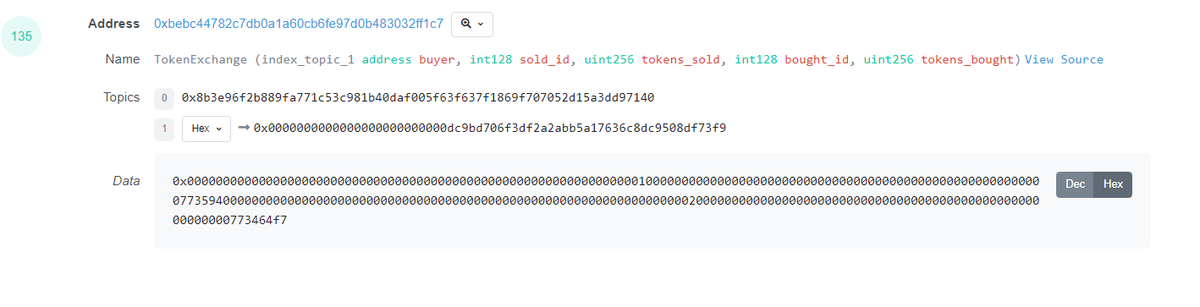
Scrolling over the event logs, we can see how the txn interacts with the pool contract. Etherscan does all the hard work for us and decodes the data from hex code (second img).
Once decoded, we can see which tokens are being bought and sold and the size of each transfer!
Scrolling over the event logs, we can see how the txn interacts with the pool contract. Etherscan does all the hard work for us and decodes the data from hex code (second img).
Once decoded, we can see which tokens are being bought and sold and the size of each transfer!

11/ Extracting Alpha
Finally, the fun part. Now that we know what is stored in a txn and how to read it, we can use the knowledge to create an edge. Now it's time to follow the smart money.
Two simple ways:
• Watching key contracts
• Watching whale wallets
Finally, the fun part. Now that we know what is stored in a txn and how to read it, we can use the knowledge to create an edge. Now it's time to follow the smart money.
Two simple ways:
• Watching key contracts
• Watching whale wallets
12/ Extracting Alpha II
While key contracts vary for each protocol, critical DeFi infrastructure is always worth monitoring. Remember, whales need liquidity...
The three deepest DEX pools in DeFi:
• Curve ETH/stETH
• Curve 3pool
• Uniswap DAI/USDC
While key contracts vary for each protocol, critical DeFi infrastructure is always worth monitoring. Remember, whales need liquidity...
The three deepest DEX pools in DeFi:
• Curve ETH/stETH
• Curve 3pool
• Uniswap DAI/USDC
13/ Extracting Alpha III
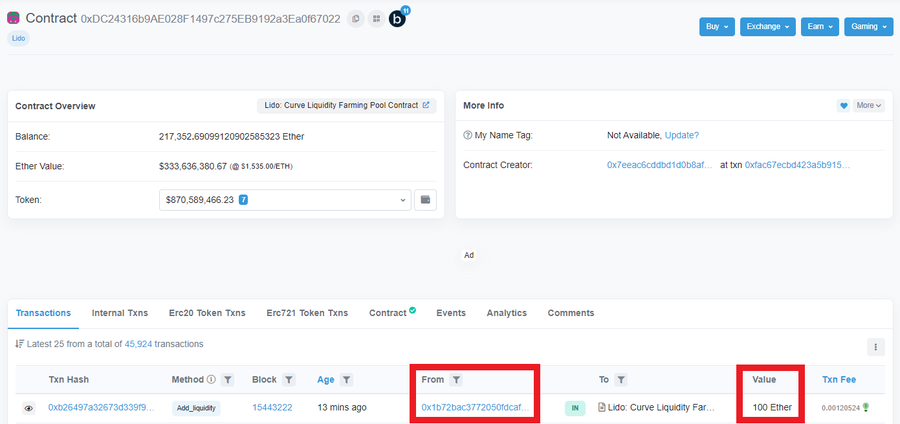
The Curve ETH/stETH pool is simply a smart contract, so we can enter the address in Etherscan. We immediately see a 100ETH deposit from 0x1b!
Who funds this wallet? What other assets do they own?
The Curve ETH/stETH pool is simply a smart contract, so we can enter the address in Etherscan. We immediately see a 100ETH deposit from 0x1b!
Who funds this wallet? What other assets do they own?
14/ Extracting Alpha IV
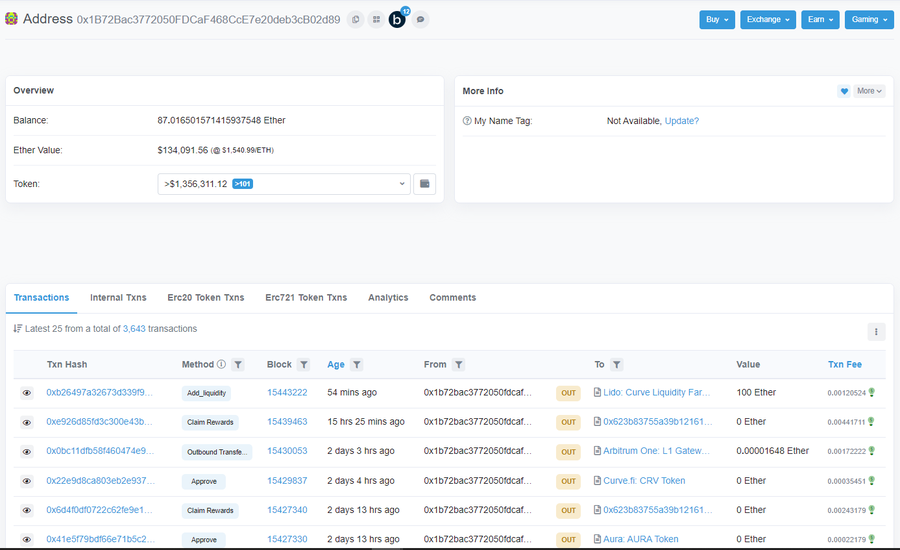
We can see it holds another 87 ETH and over $1.35M in ERC-20 tokens.
Note that this does not reflect the true net worth of this wallet as Etherscan only tracks the value currently held by the wallet. Whales generally LP assets to generate yield.
We can see it holds another 87 ETH and over $1.35M in ERC-20 tokens.
Note that this does not reflect the true net worth of this wallet as Etherscan only tracks the value currently held by the wallet. Whales generally LP assets to generate yield.
15/ Extracting Alpha V
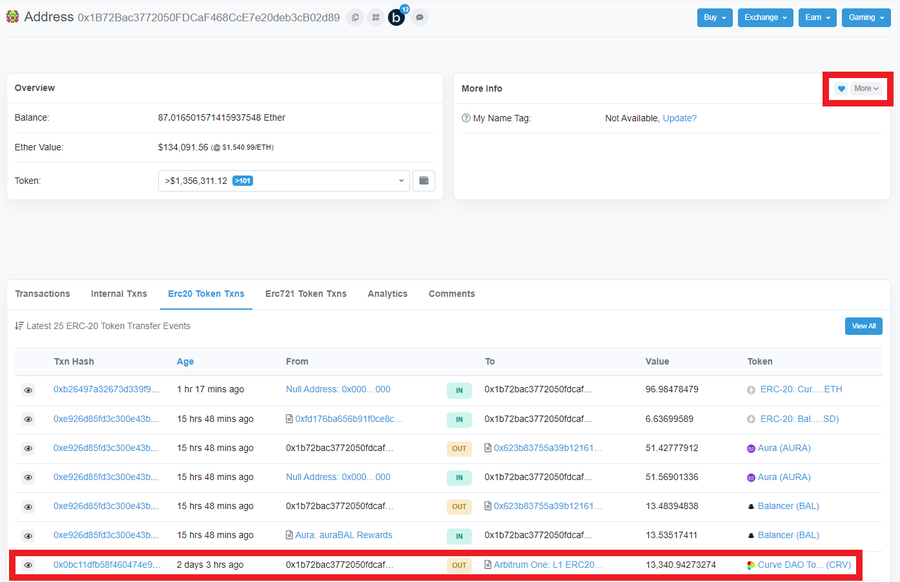
0x1b sent 13.3k CRV tokens to Arbitrum.
Expanding the "Erc20 Token Txns" tab shows us which tokens this wallet has been trading. If the wallet is consistently making profitable trades, add it to your watchlist and set up notifications.
0x1b sent 13.3k CRV tokens to Arbitrum.
Expanding the "Erc20 Token Txns" tab shows us which tokens this wallet has been trading. If the wallet is consistently making profitable trades, add it to your watchlist and set up notifications.
16/ Final Thoughts
Etherscan is an incredibly powerful tool, and this thread only scratches the surface of what can be done.
However, mastering these skills allows you to compound the learning with other data tools, such as SQL.
Etherscan is an incredibly powerful tool, and this thread only scratches the surface of what can be done.
However, mastering these skills allows you to compound the learning with other data tools, such as SQL.
Loading suggestions...