

LinkedIn is used to screen applicants by 87% of recruiters.
You have very little chance of being invited to an interview if your LinkedIn profile is absolutely horrible.
Mega Thread 🧵
You have very little chance of being invited to an interview if your LinkedIn profile is absolutely horrible.
Mega Thread 🧵
In order to increase your chances of getting an interview invitation, we'll create a LinkedIn profile that doesn't just "don't suck."
Alright, let's make a better LinkedIn profile.
Alright, let's make a better LinkedIn profile.
1. Profile Photo
What catches a recruiter's eye right away when they land on your profile page?
Your profile image.
If it's a meme, a "weird selfie," or some other random internet image, that's bad. The majority of recruiters will consider it "not professional" for this reason
What catches a recruiter's eye right away when they land on your profile page?
Your profile image.
If it's a meme, a "weird selfie," or some other random internet image, that's bad. The majority of recruiters will consider it "not professional" for this reason
What are your options?
Take a professional photograph.
Here are recommendation for choosing a quality image.
- Use a picture with a high resolution.
- A minimum of 60% of the frame should be occupied by your face.
- Be the only person visible in the image.
Take a professional photograph.
Here are recommendation for choosing a quality image.
- Use a picture with a high resolution.
- A minimum of 60% of the frame should be occupied by your face.
- Be the only person visible in the image.

2. Background Banner
A background banner is the next thing that attracts the attention of recruiters. That large image that is above your profile picture.
Include a picture that relates to your job. Your sector should be clearly stated in your banner.
Here is a Good example:
A background banner is the next thing that attracts the attention of recruiters. That large image that is above your profile picture.
Include a picture that relates to your job. Your sector should be clearly stated in your banner.
Here is a Good example:

3. Headline
The "Headline" section contains numerous errors made by developers. In their headline, they use the words "Software Engineer," "Programmer," "Developer," "Future IT Specialist," or any combination of these.
What makes it an error?
The "Headline" section contains numerous errors made by developers. In their headline, they use the words "Software Engineer," "Programmer," "Developer," "Future IT Specialist," or any combination of these.
What makes it an error?
It doesn't reveal anything about who you are or what you do. Describe your area of expertise. Write about it if you use ReactJS as a web developer. Include your most important skills in the headline.
Example of bad headlines:
- Software Engineer
- Developer
Example of bad headlines:
- Software Engineer
- Developer
Example of good headlines:
Senior Full Stack Software Engineer (Vue/ReactJS/ExpressJS)
Backend Developer (Java/php)
Furthermore, avoid mentioning that you are a junior developer. Many businesses are on the lookout for middle or senior level developers.
Senior Full Stack Software Engineer (Vue/ReactJS/ExpressJS)
Backend Developer (Java/php)
Furthermore, avoid mentioning that you are a junior developer. Many businesses are on the lookout for middle or senior level developers.
Therefore, by stating that you are a junior in your headline, you eliminate any chance of receiving an interview invitation.
First, get to the interview, and then let interviewers decide what level you are at.
First, get to the interview, and then let interviewers decide what level you are at.
4. About
It's interesting to read the "About" section. The text is only displayed in the first three lines. You must click the "see more" button to view the entire "About" section.
What does it say, exactly?
It's interesting to read the "About" section. The text is only displayed in the first three lines. You must click the "see more" button to view the entire "About" section.
What does it say, exactly?
You should grab recruiters attention with these 3 lines.
You should think about them as your sales pitch. Two sentence sales pitch that sells the idea that you have the potential to do the job.
You should think about them as your sales pitch. Two sentence sales pitch that sells the idea that you have the potential to do the job.
Write something about yourself that will encourage the recruiter to DM you right away. Your strongest suit could be discussed in the first sentence. If you have one, the second sentence might be about it. Make sure 3 lines can fit them.
You are free to write anything you want after these three lines. As long as it serves the purpose of creating a LinkedIn profile, that is. However, I advise applying your abilities here.
Example of bad about:
Vue JS developer. Skills: JS, Vue, HTML, CSS
Example of bad about:
Vue JS developer. Skills: JS, Vue, HTML, CSS
Example of good about:
Coding on VueJS and dreaming on VueJS. Help companies to build complex web applications serving 1,000,000+ users with VueJS and modern technologies.
Skills: Vue, Vuetify, JavaScript, HTML, CSS
Coding on VueJS and dreaming on VueJS. Help companies to build complex web applications serving 1,000,000+ users with VueJS and modern technologies.
Skills: Vue, Vuetify, JavaScript, HTML, CSS
5. Featured
In the “Featured” section, you should place the web link to your achievements.
A good example of what to feature:
- Blog post that got a lot of attention and related to your job position.
- GitHub profile.
In the “Featured” section, you should place the web link to your achievements.
A good example of what to feature:
- Blog post that got a lot of attention and related to your job position.
- GitHub profile.
A bad example of what to feature:
- Photo of certificate HTML Basics
- Link to a random article that is not related to you
If you don’t have any achievements, place this section empty.
- Photo of certificate HTML Basics
- Link to a random article that is not related to you
If you don’t have any achievements, place this section empty.
6. Experience
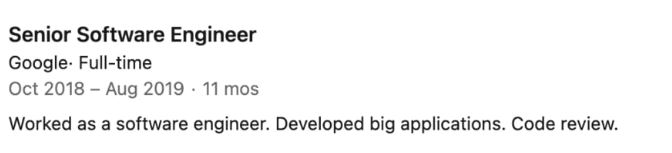
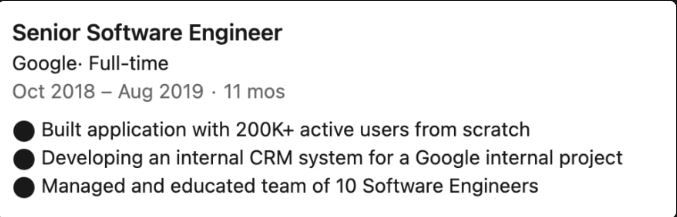
Write about all of your experience in the "Experience" section. However, keep in mind that recruiters do not have the time to read the entire job description. Keep it brief. You should list your accomplishments in 2–5 bullet points.
Exp of bad experience section:
Write about all of your experience in the "Experience" section. However, keep in mind that recruiters do not have the time to read the entire job description. Keep it brief. You should list your accomplishments in 2–5 bullet points.
Exp of bad experience section:
Example of good experience section:
Your accomplishments are the most important part of this section. Nothing as a developer sells you more than your successes. Think about them.
Your accomplishments are the most important part of this section. Nothing as a developer sells you more than your successes. Think about them.
7. Education
List every college or university you have attended and graduated from in the "Education" section. If you have anything to say about your accomplishments, add a sentence or two. In line with the "Experience" section's job description.
List every college or university you have attended and graduated from in the "Education" section. If you have anything to say about your accomplishments, add a sentence or two. In line with the "Experience" section's job description.
Leave this section blank if you have not attended or graduated from any educational institution.
8. Skills
In the “Skills” section, add all technical skills you know with different variations.
For example, if you know CSS, add skills: CSS3.
If you know JavaScript, add skills: JavaScript, JS (ES6/ES7/ES8).
Your Goal should be to use as many keywords as you can here.
In the “Skills” section, add all technical skills you know with different variations.
For example, if you know CSS, add skills: CSS3.
If you know JavaScript, add skills: JavaScript, JS (ES6/ES7/ES8).
Your Goal should be to use as many keywords as you can here.
Why?
Nowadays, some recruiters use different automation tools to speed up the recruitment process. One of these tools is LinkedIn profile scrapers.
What they do is:
- Take a look at your profile
- Look for certain keywords.
Nowadays, some recruiters use different automation tools to speed up the recruitment process. One of these tools is LinkedIn profile scrapers.
What they do is:
- Take a look at your profile
- Look for certain keywords.
- If they discover certain keywords, send a "welcome message" or job description to your messages.
Frequently, skill variations are specific keywords.
Frequently, skill variations are specific keywords.
9. Accomplishments
I advise including public accomplishments that demonstrate your strong technical and people skills in the "Accomplishments" section.
Example of good accomplishments:
- Winning at a hackathon
- School/college projects
- Awards
- Patents
I advise including public accomplishments that demonstrate your strong technical and people skills in the "Accomplishments" section.
Example of good accomplishments:
- Winning at a hackathon
- School/college projects
- Awards
- Patents
That's a wrap!
If you enjoyed this thread:
1. Follow me @slow_developer for more of these
2. RT the tweet below to share this thread with your audience
If you enjoyed this thread:
1. Follow me @slow_developer for more of these
2. RT the tweet below to share this thread with your audience
Loading suggestions...