

WALK away if you're a more "go with the flow person". Seriously, do not keep reading. Here we go:
Sheet 1 - Funding Sheet. Identify & Organize all grants/fellowships/funding opportunities, including deadlines, amounts & links. I do this my first month on any job... 2/n
Sheet 1 - Funding Sheet. Identify & Organize all grants/fellowships/funding opportunities, including deadlines, amounts & links. I do this my first month on any job... 2/n

and I add to it as I hear about other opportunities. The Funding sheet is organized by 'year I plan to apply' & when an application is completed, I change the font color to Gray. 3/n
2) Project Sheet - This is a list of all projects I'm juggling or plan to juggle, also a great place to park half-formed ideas for future thought. With each project is a 'list of steps needed to complete'. 4/n

3) 3:6:12:24 Plan originally suggested by @cdokafor! Take 1 & 2 and diagram out what you hope to accomplish in the next 3, 6, 12, and 24 months in those increments. I use a Google sheet so I can also count how many tasks I've given myself (to keep it manageable but I never do)5/n
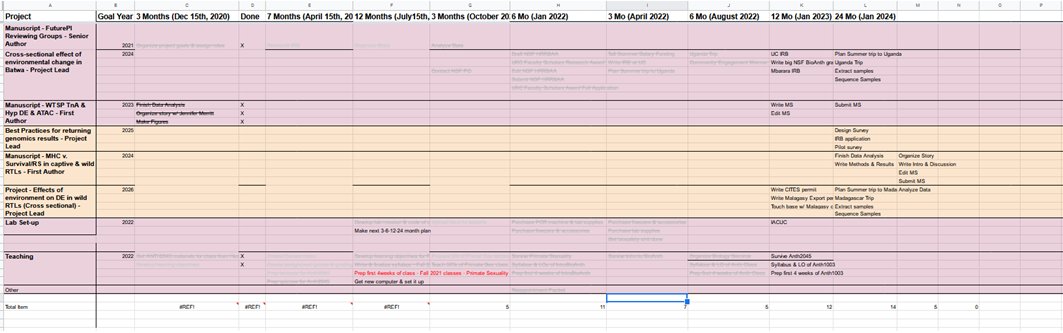
4) The Year Plan - Here's where it gets a bit more nitty-gritty and starts to hit the teaching calendar. All of that was 'research stuff'. But I also teach 3 classes a year. So the year plan is Goals by Month and I revisit it in Jan, April, and August. 6/n

Can you tell I like colors? I try to estimate how many hours each task will take (I've been time-tracking for a while so I can usually do this somewhat accurately) and it's color-coded by size. I told you I was hyper-organized didn't I? Next is everyone's fave tool. 7/n
5) My KanBanFlow Board - This is the thing people see open on my computer & ask about the most. Columns include: Weekly To Do, Do Today, In Progress, & Done (Done is archived so you never lose anything!). Each block = 1 hour of work & it's color-coded by day. Monday=Red, 8/

Tuesday=Orange, Wednesday=Yellow, Thursday=Green, Friday=Blue, Weekend=Purple. White=Do this sometime, don't forget it. Every Friday afternoon, I open my calendar & my Year Plan. First I put in meetings, class, class prep, & my morning runs/doctors appts/etc from my calendar 9/n
Then I add hours of work for deadline things like manuscript reviews or grants. Then I add hours of work for the more nebulous tasks like grant/paper writing, forward course prep, etc. I usually try not to put more than 7-8 hours of planned work per day for a few reasons: 10/n
First, shit always pops up. Colleagues stop by, students email, lab questions come up, etc. Stuff also often takes longer than estimated. You need mental breaks & teaching recovery time. Email takes tons of time. Also, on 'writing' days, I never schedule more than 4-5 hours 11/n
because I run out of writing energy. A pro tip is also don't schedule the last half of Friday b/c that's space for spillover of tasks that didn't get finished earlier. I've really failed at that tip this year. So why do all of this? 12/n
Because it prevents me from missing deadlines or forgetting about projects! It eliminates the uncertainty of "what should I be working on now", "how will I get all of this done?" It allows me to slot in tasks & make sure it's done on time. I can also look at my 'plan' & 13/n
Decide if I have time for a 'new ask'. "Can you review grants in X month?" "Can you finish this paper by X date?" etc. It also serves as a time-tracking record for how I spend my time, which I use in two ways. First, it helps me be more accurate in my estimates of how long 14/n
future tasks will take. I now know how long a 'new grant' v. a recycled grant takes me to write. I know how long introductions take to write for papers, etc. And I can estimate the % of time I'm spending in each 'Faculty job category'. Faculty do Research, Teaching, & Service 15/
At the end of every month, I add up the blocks for each of these categories & estimate how many hours I spent on each category. I'm supposed to be roughly 40-40-20. It helps me keep track of when I'm spending too much time teaching, a well-known new faculty potential pitfall 16/n


Another reason to do this kind of longer-term planning is to keep your long-term career vision up-to-date & clear. What kinds of projects do you want to do & what resources will they need? Most research needs years of planning & building. 17/n
Yes, this is a LOT. But once you set up the first two, the rest doesn't actually take that much time per week. Less than 20 minutes per week & maybe half a day in January, April, and August. The Friday meeting & KanBanBoard are the most critical parts to me. 18/
But the whole process helps me make sure I'm on track with goals - project goals, career goals, teaching goals, whatever. Hope you found this interesting and not too terrifying! 19/19
Ah yes! Another benefit! At the end of each month it’s easy to update my CV and writing my annual performance eval is pretty easy! Same for grad students filling out their annual committee updates.
Another benefit of this system, particularly the long-term planning, is it gives you permission to say to yourself "I will worry about this later because I plan to DO it later." You can give yourself permission to NOT worry about the less urgent stuff.
Ok more details on the time-tracking - So to track how many hours I spend on things, I generally just add up the number of 'blocks' dedicated to a task on my KanBan board at the end of each month because 1 block = 1 hr of work 1/n
and you aren't allowed to move the block over to Done if you don't actually do at least 50 minutes. Like you can't mess around online for 30 minutes and call that an hour 😂. BUT that only gives you a retrospective picture at the end of the month. Inspired by @NCFDD, 2/n
I also started using the free version of Toggl to real-time track what I'm doing, which allows me to get an immediate view of what I'm spending my time on - research, teaching, or service (pics in next tweet). Caveat: I DON'T look at the actual times, just the proportions. Why?3/
I don't look at the actual hours because research shows that you can only do 'brain' work for ~20-30 hours a week. And I only count that time. So look at the proportions! And this week says 35 hours because I worked Sunday. DONT DO THAT. but it helps me see if I'm overdoing it 4/


in one particular area like teaching. 4/4
Didn't manage to link these threads -
TO BE CLEAR - this system will not help you survive if external forces have dumped an overload of work on you. All the organization in the world will not solve being handed too many tasks. But for faculty who teach or do research, often perfectionism or
our own inability to say no to things or to identify our priorities can add to our stress levels in unproductive ways. This system is supposed to help with THAT. With identifying what to prioritize and help you align what you're spending your time on with what will get you tenure
Also, this system is not a magic bullet! Nor should everyone adopt all parts of it. Take what you like & discard the rest! Or take none of it, I won't be offended :). And lest you think this solved my #newPI stress, it...did not. But it does help me keep track of shit.
OH and another point I forgot - the time-tracking is helping me see 'progress' towards a goal. In 2021, I spent 60-70% of my time teaching, 5% on service, and 25-35% on research. In 2022, it's much closer to 45% teaching, 40% research, 15% service. Much closer to my goal.
So part of using this kind of system is to realize that your career is a work-in-progress. And that course-correction takes time. But seeing the redflags can really help and my goal is 'improvement', not perfection.
Genuinely I forgot the most important part of the Friday planning session and the daily schedule: it reduces decision fatigue! In science/academia, everything feels urgent & in the moment it’s hard to decide what to work on today or this hour. This system eliminates that.
What should I work on? Let me check my board. And then you trust the process. It prevents a lot of jumping between tasks trying to get it all done at once bc the board says you’re not supposed to be working on that now. And you do the planning Friday bc
That’s when you have the clearest vision of what you got done this week, what you need to build on next week, and it sets you up to start strong on Monday.
Amazing question: do I add blocks to the KanBanBoard if something takes longer than expected? YES I do! It’s a living document. This vet visit was a surprise! And I usually leave the original planned colors for each task if I have to move it to a new day so I can see what worked

Loading suggestions...