

HOW TO APPLY AND GET FINANCIAL AID ON COURSERA.
A detailed step-by-step guide 🧵
1/15
A detailed step-by-step guide 🧵
1/15
Coursera is a great platform for learning, but it can be quite expensive to access the paid course. Here is a step-by-step guide on how to get started.
Note: This is a long thread 😁 just relax and make sure you drink enough water lol.
#coursera
2/15
Note: This is a long thread 😁 just relax and make sure you drink enough water lol.
#coursera
2/15
Step 1: Create an account on Coursera. This should be done using a browser, not the coursera app, you might get an error message.
coursera.org
3/15
coursera.org
3/15
Step 2: Pick a course or a specialisation of your choice, when searching for courses you can either be specific or broad. For the Google data analytics professional course here is the link.
coursera.org
4/15
coursera.org
4/15
Step 3: Click on the “financial aid available” option. Here things get a little complicated lol, you have to be wise 😎. As shown below it doesn't look like a link ( werey dey disguise) 😂.
5/15
5/15

Step 4: It will take you to another page, but if you already have the app installed on your device, it might launch on the app. To avoid this just open on a new tap, then sign in with the previous login detail you created in the first step or just sign up if you haven't.
6/15
6/15

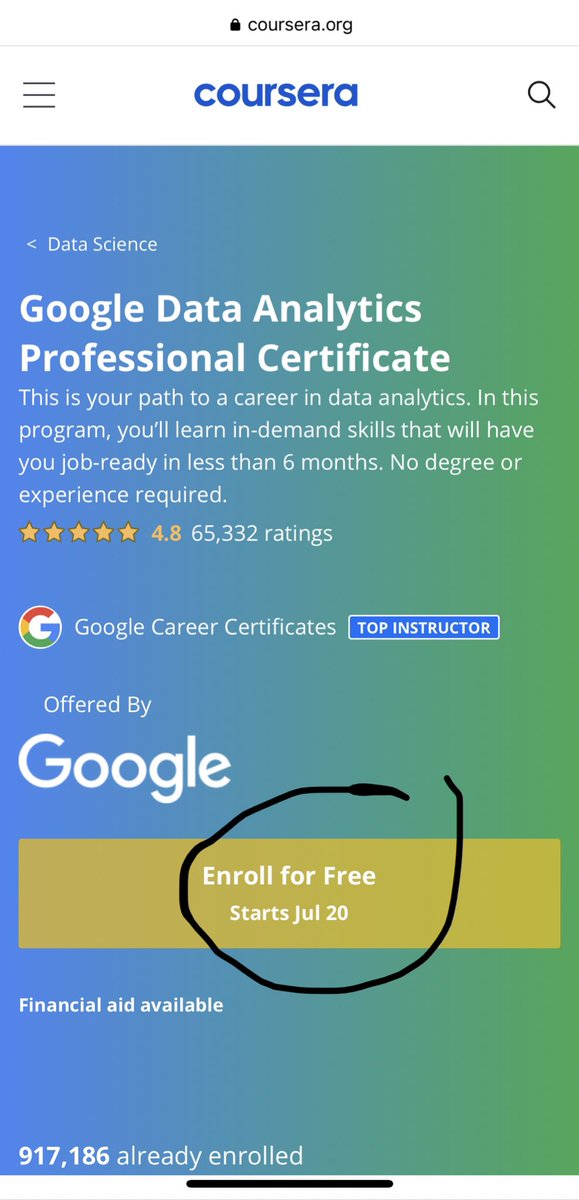
Step 5: It will take you back to the main page, click on financial aid again to continue. But resist the urge to click on “Enroll for free”, it's a trap 😆 guys the free is not free, it only lasts for 7 days after which you will be required to pay🌝.
7/15
7/15
Step 6: Next, Tap on “continue to the application”. As you can see boldly written, applications take at least 15 days to get reviewed. So you have to wait 😏, but don't be idle.
8/15
8/15

Step 7: Follow the instructions and do exactly as shown below. Check the two boxes and type “I agree to the terms above”.
9/15
9/15

Fill out the form. For your annual income type $100 or less (whichever you refer to). Employment status; Student or unemployed. How much can you afford to pay? type $0.
For the first essay, tell them a brief about yourself,demonstrate your passion for data analytics...
10/15
For the first essay, tell them a brief about yourself,demonstrate your passion for data analytics...
10/15

But you are financially unable to afford the course due to reasons such as unemployment, family background, school etc.
For the second essay, tell them how taking the course will help you boost your career, and how you will add value to your community and the world...
11/15
For the second essay, tell them how taking the course will help you boost your career, and how you will add value to your community and the world...
11/15

With the knowledge, you've gotten. Talk about your career goals in data analytics or anything generally to demonstrate your passion for taking the course.
For the third question, don't accept a loan but you will explain to them why you are not opting for the loan offer.
12/15
For the third question, don't accept a loan but you will explain to them why you are not opting for the loan offer.
12/15

In all of these, be genuine and be as original as possible.
Submit your application and wait for 2weeks for your application to be approved.
Note: Make sure you apply for financial aid 8times for all 8 modules...
13/15
Submit your application and wait for 2weeks for your application to be approved.
Note: Make sure you apply for financial aid 8times for all 8 modules...
13/15
In the Google data analytics Professional course, or any specialisation certificate course you plan to enrol for. Because the first financial aid covers only the first course. Do this to avoid waiting for another 2weeks for all courses to be approved.
14/15
14/15
To apply for all modules in the course, make sure you click on each module and apply the same way. Just copy and paste your essays. 💪 you are good to go.
In the video below I used the IBM data analytics course to illustrate how it's done.
I hope it helps 🤗🤗.
15/15
In the video below I used the IBM data analytics course to illustrate how it's done.
I hope it helps 🤗🤗.
15/15

If you find this useful, Like, Retweet and Follow, to reach a wider audience, you might just be helping someone who needs this🙏.
#DataAnalytics #DataScience #howtogetfinancialaid
#DataAnalytics #DataScience #howtogetfinancialaid
Loading suggestions...