

Trying to master JavaScript, in your web development journey? 💪🏻
Get started with the fundamentals: Variables and Data Types (🧵):
Get started with the fundamentals: Variables and Data Types (🧵):
💡Your Development Environment (1/n):
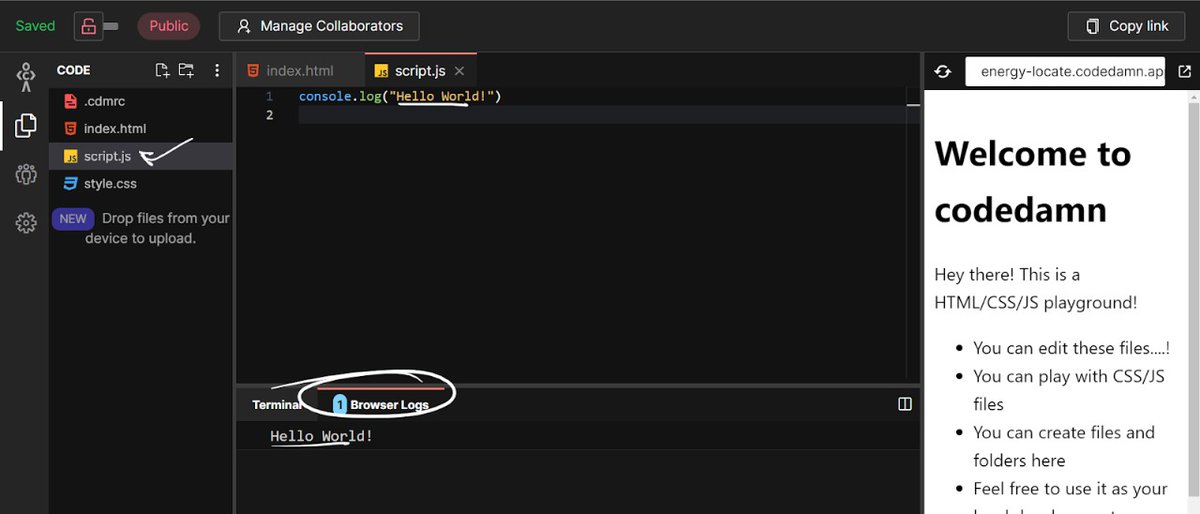
To get started, fire up an HTML codedamn playground and navigate to “script.js”. No need to install anything locally. You can write the code in “script.js” & see the output on the window on the right or on the Browser Logs tab below.
To get started, fire up an HTML codedamn playground and navigate to “script.js”. No need to install anything locally. You can write the code in “script.js” & see the output on the window on the right or on the Browser Logs tab below.
💡The Situation (2/n):
Let us assume an identity.
Your task is to store this information in a JavaScript program. Let us see how you can do that!
Let us assume an identity.
Your task is to store this information in a JavaScript program. Let us see how you can do that!

💡Storing the Name, Age
& Birthplace (3/n):
When you think about the name & place of birth (text values), you can assume that they are going to be the same.
The age, however, is a number that will change every year. Based on this, we will store the values in “script.js”.
& Birthplace (3/n):
When you think about the name & place of birth (text values), you can assume that they are going to be the same.
The age, however, is a number that will change every year. Based on this, we will store the values in “script.js”.
(4/n)
➡️ In code line 1:
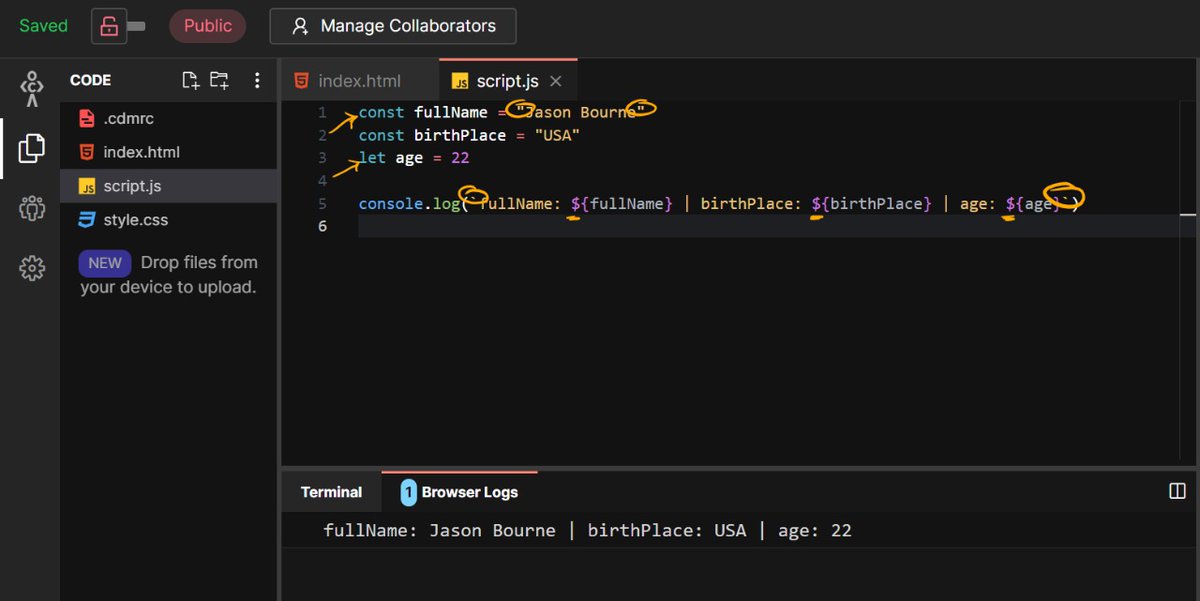
const fullName = "Jason Bourne"
Since name isn't going to change, we keep it constant (“const").
“fullName” is the name of the variable that stores the value “Jason Bourne”. A variable is anything holding some value.
➡️ In code line 1:
const fullName = "Jason Bourne"
Since name isn't going to change, we keep it constant (“const").
“fullName” is the name of the variable that stores the value “Jason Bourne”. A variable is anything holding some value.
(5/n)
“=”, the assignment operator, assigns (read as, sets) the value of “fullName” to “Jason Bourne”.
“Jason Bourne” is the actual value you wanted to store. The double quotes around it tell Javascript, that what you are storing is a text value or a String value.
“=”, the assignment operator, assigns (read as, sets) the value of “fullName” to “Jason Bourne”.
“Jason Bourne” is the actual value you wanted to store. The double quotes around it tell Javascript, that what you are storing is a text value or a String value.
(6/n)
➡️ In code line 3:
let age = 22
“const” is used to define something that is meant to remain the same like, “fullName”, and “age” is something that will change. For age, we are using “let” which helps you define variables that can change their values.
➡️ In code line 3:
let age = 22
“const” is used to define something that is meant to remain the same like, “fullName”, and “age” is something that will change. For age, we are using “let” which helps you define variables that can change their values.
(7/n)
➡️ In code line 5, you have:
console.log('fullName: ${fullName}|birthPlace: ${birthPlace}|age: ${age}')
Browser Logs:
fullName: Jason Bourne | birthPlace: USA | age: 22
“console.log()” basically prints anything you put inside the brackets on the Browser Logs tab.
➡️ In code line 5, you have:
console.log('fullName: ${fullName}|birthPlace: ${birthPlace}|age: ${age}')
Browser Logs:
fullName: Jason Bourne | birthPlace: USA | age: 22
“console.log()” basically prints anything you put inside the brackets on the Browser Logs tab.
(8/n)
The browser log tabs display the 3 variables you had stored.
${fullName} → “Jason Bourne”
${birthPlace} → “USA”
${age} → 22
Rest of the output is just text
The browser log tabs display the 3 variables you had stored.
${fullName} → “Jason Bourne”
${birthPlace} → “USA”
${age} → 22
Rest of the output is just text
(9/n)
The things inside the bracket are also enclosed between ` `. These are called backticks.
If you use backticks, anything inside ${...} will be replaced by the variable value you put in the curly braces.
This format is called string template literals.
The things inside the bracket are also enclosed between ` `. These are called backticks.
If you use backticks, anything inside ${...} will be replaced by the variable value you put in the curly braces.
This format is called string template literals.
💡Further Details on Variable & Data Types (10/n):
Difference between “let” & “const”
You might be wondering what if Jason has a middle name Harrison that he wants to add to the variable?
Difference between “let” & “const”
You might be wondering what if Jason has a middle name Harrison that he wants to add to the variable?
(11/n)
One approach obviously is to just go and edit the “fullName” variable. But if you had a hundred records like these, it would become a tedious task to first locate Jason and then update the “fullName” variable.
Wouldn’t it be simple to just do the following:
One approach obviously is to just go and edit the “fullName” variable. But if you had a hundred records like these, it would become a tedious task to first locate Jason and then update the “fullName” variable.
Wouldn’t it be simple to just do the following:

(12/n)
It certainly would be. But you had declared name as a constant, isn’t that right? That simply means that you can’t change its value! Check out the browser logs tab. You will see an error:
It certainly would be. But you had declared name as a constant, isn’t that right? That simply means that you can’t change its value! Check out the browser logs tab. You will see an error:

(13/n)
The only way to do this is to declare “fullName” using “let” and not “const”. So does that mean we can modify age? Absolutely!
I hope the difference between “let” and “const” is now crystal clear.
The only way to do this is to declare “fullName” using “let” and not “const”. So does that mean we can modify age? Absolutely!
I hope the difference between “let” and “const” is now crystal clear.

💡Declaring and Initializing Variables (14/n)
➡️ In line 1:
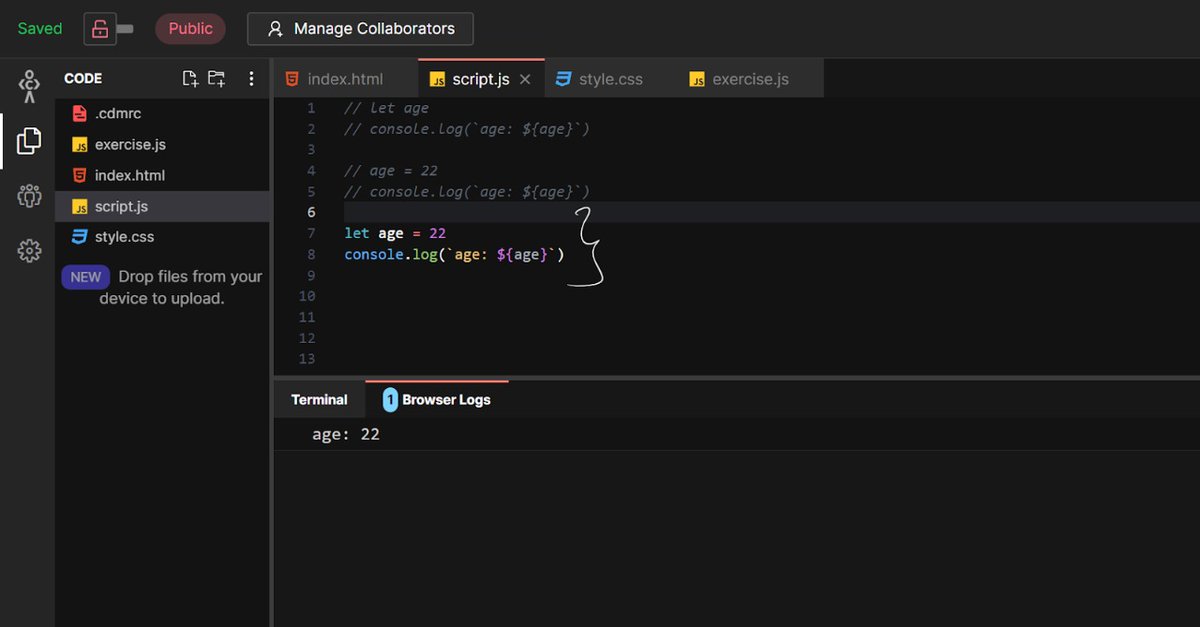
You create a variable named “age”. You do not give it a value of 22. In this step, when you create a variable but don’t assign it a value, is called declaring the variable.
➡️ In line 1:
You create a variable named “age”. You do not give it a value of 22. In this step, when you create a variable but don’t assign it a value, is called declaring the variable.

(15/n)
➡️ In line 2:
On printing age to the console, you get the value as “undefined” because, when a variable is declared, but not given a value, JavaScript assigns it a default value of “undefined”. It simply signifies that the programmer is yet to provide a value.
➡️ In line 2:
On printing age to the console, you get the value as “undefined” because, when a variable is declared, but not given a value, JavaScript assigns it a default value of “undefined”. It simply signifies that the programmer is yet to provide a value.
(16/n)
➡️ In line 4:
When you assign a value of 22 to age, you have initialized the variable “age” with 22. It is not “undefined” anymore, but holds the number 22, which is what gets printed in the logs as well.
You can declare & initialize a variable in the same line.
➡️ In line 4:
When you assign a value of 22 to age, you have initialized the variable “age” with 22. It is not “undefined” anymore, but holds the number 22, which is what gets printed in the logs as well.
You can declare & initialize a variable in the same line.
(17/n)
However, declaring and initializing a variable in the same line is mandatory if you are using “const”.
However, declaring and initializing a variable in the same line is mandatory if you are using “const”.

(18/n)
But what if you use “let” & do not want that it is assumed as “undefined”? That is where “null” datatype comes in. If you use “null” you are explicitly saying that the variable doesn’t contain any value. Continuing the age example, it would look something like below:
But what if you use “let” & do not want that it is assumed as “undefined”? That is where “null” datatype comes in. If you use “null” you are explicitly saying that the variable doesn’t contain any value. Continuing the age example, it would look something like below:

(19/n)
Awesome! ✨ You learned about “let”, and "const", along with data types like Number, String, null and undefined! To read the full blog by @rishabhs_twt head over to: codedamn.com
Awesome! ✨ You learned about “let”, and "const", along with data types like Number, String, null and undefined! To read the full blog by @rishabhs_twt head over to: codedamn.com
(n/n)
In the next one, you will learn more about the Object Data Type and a few JS Operators. Until then stay tuned & share this thread. Don't forget to keep practicing on codedamn playgrounds! 💻
In the next one, you will learn more about the Object Data Type and a few JS Operators. Until then stay tuned & share this thread. Don't forget to keep practicing on codedamn playgrounds! 💻
Loading suggestions...