

How to change Directory In Shell Scripts?
• Can You Change Directory In Bash Script?
• Can I Change Directory In A Bash Script?
• Can We Use Cd Command In Shell Script?
Let's find it out in this thread🧵↓
• Can You Change Directory In Bash Script?
• Can I Change Directory In A Bash Script?
• Can We Use Cd Command In Shell Script?
Let's find it out in this thread🧵↓
For convenience, there are times you may want to run a shell script that changes your current working directory to another directory.
For example, if you frequently visit your projects directory(~/Projects) and want to quickly navigate there, you can write a Bash script to do so.
In this thread, I'll explain to you how you can do this with the cd command. I'll will also explain some of the complexities of how cd behaves along the way.
🐧 A Common Problem
Let's start with a script that navigates to the ~/Projects directory. I'll call it chdir .sh:
Let's start with a script that navigates to the ~/Projects directory. I'll call it chdir .sh:

Let's understand our code:
• cd /home/traw/Projects - allows you to change your current working directory to ~/Projects.
• pwd - will print working directory.
• echo $$ - $$ is a Bash internal variable that contains the Process ID (PID) of the shell running your script.
• cd /home/traw/Projects - allows you to change your current working directory to ~/Projects.
• pwd - will print working directory.
• echo $$ - $$ is a Bash internal variable that contains the Process ID (PID) of the shell running your script.
🐧 Running our script
As we can see, running our script produces the expected output of /home/traw/Projects as well as the shell's process ID.
As we can see, running our script produces the expected output of /home/traw/Projects as well as the shell's process ID.

Now, let's check what directory we're in now that we've run the script.

You clearly you can see our directory hasn't changed. This is not what we expected because the current directory has not been changed to /home/traw/Projects. So, what may be the problem?
Let's look at our shells' process ID:
Let's look at our shells' process ID:
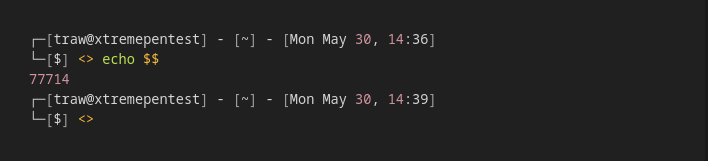
We can clearly see that the process ID of the shell we're in (PID 77714) and the shell script (PID 118922) are totally different.
This is a normal behaviour. The script is excecuted in a seperated indepented shell (subshell/childshell). This separate shell exits at the end of the script, leaving the parent shell, which we are currently in, unaffected.
Now the question is, how can we overcome this problem? Well, continue to read
🐧 Running Scripts in Parent Shell
To allow our script to excecute commands in the current shell (parent shell) we can use the source command.
To allow our script to excecute commands in the current shell (parent shell) we can use the source command.
The source command executes commands within the current shell context instead of creating a new shell to execute them. The source command has a shortcut alias, called the dot operator (.).
Great! So we can run bash script in the current shell.
Let's try out:
Great! So we can run bash script in the current shell.
Let's try out:

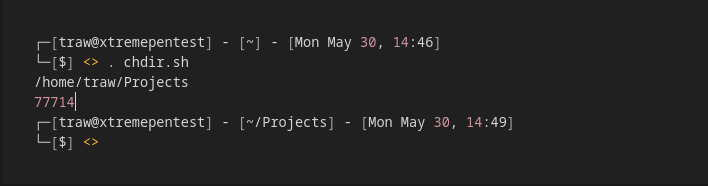
From the above snippet you can clearly see that the PID of the script is that of the parent shell that executed it.
Let’s also verify that the directory we’re in has now changed:
Let’s also verify that the directory we’re in has now changed:

Nice! So far, we've shown that we can run shell scripts in the current shell by using source.
Alternatively, we could have used the short-form . operator.
Alternatively, we could have used the short-form . operator.
🐧 Using Bash Functions
Creating a Bash script for each directory is a pain. Instead, we could incorporate several Bash functions into a single script:
Creating a Bash script for each directory is a pain. Instead, we could incorporate several Bash functions into a single script:

Now if we source the file:
So we can use the functions within that script in our current terminal.
🐧 Using Alias
We can improve our Bash functions even further by using the built-in alias command. An alias is easier to use than a function because it requires less typing.
So we can use the functions within that script in our current terminal.
🐧 Using Alias
We can improve our Bash functions even further by using the built-in alias command. An alias is easier to use than a function because it requires less typing.

Let's convert our functions into their alias variants:
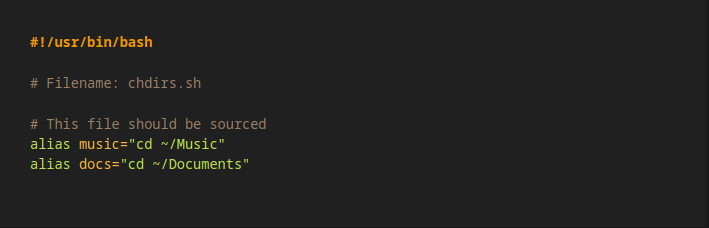
In comparison to the bash functions we wrote previously, we can see how concise this is. Furthermore, we can use the alias in the same way that we have used the functions.
That's it!
In this thread, we've seen several ways to use the cd command from within Bash.
In this thread, we've seen several ways to use the cd command from within Bash.
First, we discovered that running a shell script starts its own process. Finally, we looked at how we could improve our Bash scripts by using functions and the alias command.
Thank you for making it this far & hopefully you found this thread helpful
Feedback is really appreciated💜
Feedback is really appreciated💜
Check me out @xtremepentest if you liked this thread!! I'm gonna be tweeting more about Linux, shell scripting, networking, security etc.
Loading suggestions...