

An Introduction to JSON
🧵👇
🧵👇

👋 Hi, I'm Hassib, a Software Engineer with 4+ years of experience in coding JavaScript.
In this thread, you'll learn:
• What is JSON?
• What is JSON used for?
• Why JSON?
• JSON Syntax
• Data types in JSON
• How to Send or Receive JSON data in JavaScript?
Let's dive in!
In this thread, you'll learn:
• What is JSON?
• What is JSON used for?
• Why JSON?
• JSON Syntax
• Data types in JSON
• How to Send or Receive JSON data in JavaScript?
Let's dive in!
What is JSON?
• JSON stands for JavaScript Object Notation. It's a lightweight format for storing and transporting data similar to XML or YAML.
• It is used widely across the internet for almost every single API, config files, and many other places.
{ 1 / 11 }
• JSON stands for JavaScript Object Notation. It's a lightweight format for storing and transporting data similar to XML or YAML.
• It is used widely across the internet for almost every single API, config files, and many other places.
{ 1 / 11 }
• JSON is based on a subset of the JavaScript Programming Language Standard initially specified by Douglas Crockford, the writer of "JavaScript: The Good Parts"
• It is easier to read and write than something like XML because it has a much cleaner syntax.
{ 2 / 11 }
• It is easier to read and write than something like XML because it has a much cleaner syntax.
{ 2 / 11 }
• JSON is a text format that is entirely language-independent but uses conventions familiar to programmers of the C-family of languages, including C, C++, C#, Java, JavaScript, Perl, Python, etc.
• Code for parsing JSON exists in many languages.
{ 3 / 11 }
• Code for parsing JSON exists in many languages.
{ 3 / 11 }
JSON Syntax
• Data is in name/value pairs
• Data is separated by commas
• Curly braces hold objects
• Square brackets hold arrays
• Keys & string values should be wrapped in double quotes
Look at the example below that how a common JSON object looks like:
{ 4 / 11 }
• Data is in name/value pairs
• Data is separated by commas
• Curly braces hold objects
• Square brackets hold arrays
• Keys & string values should be wrapped in double quotes
Look at the example below that how a common JSON object looks like:
{ 4 / 11 }

Data types can be used in JSON.
• Number
• String
• Null
• Object (JSON Object)
• Boolean
• Array
{ 5 / 11 }
• Number
• String
• Null
• Object (JSON Object)
• Boolean
• Array
{ 5 / 11 }
🚫 JSON values cannot be one of the following data types:
• Function
• Date
• undefined
{ 6 / 11 }
• Function
• Date
• undefined
{ 6 / 11 }
JSON has eclipsed XML as the preferred data interchange format for web applications and services. Here’s why:
1. Easy mapping into data structures
2. Almost all programming languages have libraries or functions that can read and write structures of JSON
{ 7 / 11 }
1. Easy mapping into data structures
2. Almost all programming languages have libraries or functions that can read and write structures of JSON
{ 7 / 11 }
Cont.
3. Simple and compact
4. It was made to be user-friendly for both people and computers
5. It’s flexible
{ 8 / 11 }
3. Simple and compact
4. It was made to be user-friendly for both people and computers
5. It’s flexible
{ 8 / 11 }
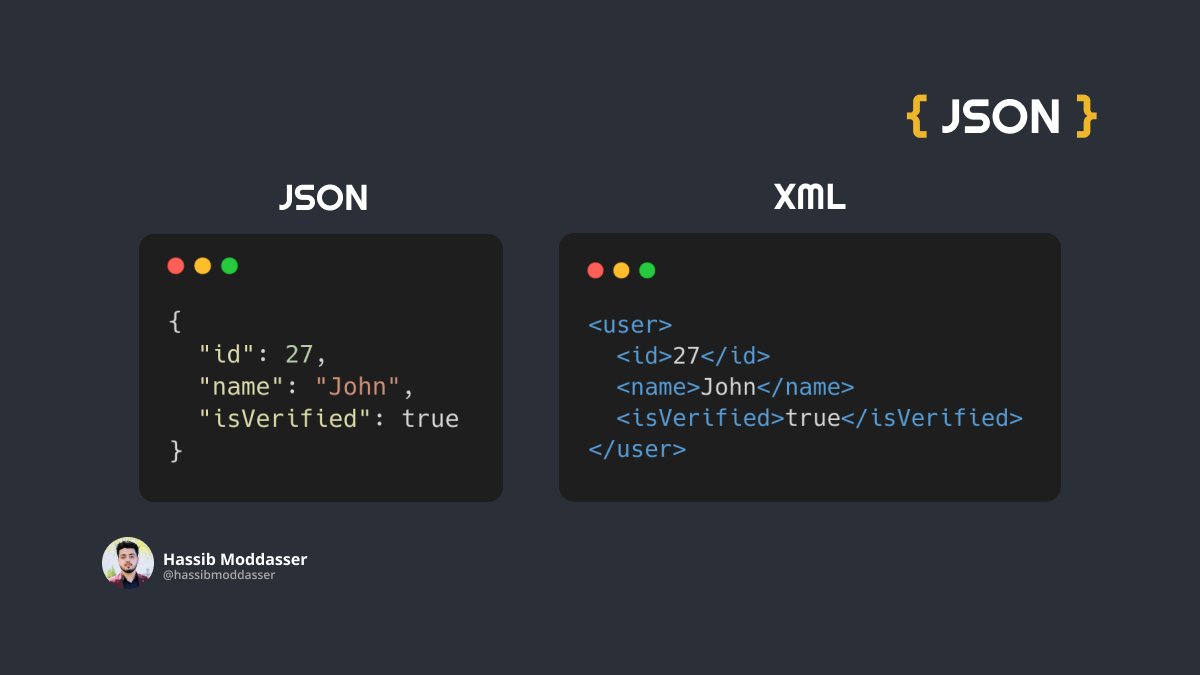
Look at the example below that how a common JSON object looks like vs. its XML markup:
Note: XML is a markup language much like HTML but designed to store and transport data.
{ 9 / 11 }
Note: XML is a markup language much like HTML but designed to store and transport data.
{ 9 / 11 }
How to parse received JSON data?
When receiving data from an API, that data is always a string. To use it, you should parse the data with the `JSON.parse` method, and the data becomes a JavaScript object.
Look at the example below:
{ 10 / 11 }
When receiving data from an API, that data is always a string. To use it, you should parse the data with the `JSON.parse` method, and the data becomes a JavaScript object.
Look at the example below:
{ 10 / 11 }

How to send JSON data to an API?
When sending data to an API or web server, the data must be a string.
You can convert a JavaScript object using the `JSON.stringify` method into a string to send it to an API or a web server.
Look at the example below:
{ 11 / 11 }
When sending data to an API or web server, the data must be a string.
You can convert a JavaScript object using the `JSON.stringify` method into a string to send it to an API or a web server.
Look at the example below:
{ 11 / 11 }

Give it a Retweet and share it with your friends if you think this might be helpful! 💛🙏
Make sure to follow me @hassibmoddasser for more excellent content! 😉
Make sure to follow me @hassibmoddasser for more excellent content! 😉
جاري تحميل الاقتراحات...