

⚡ All about CSS Transitions & Animations ⚡

✧ CSS concepts covered in this thread 🧵⇩
- CSS Animations
- CSS Transitions
- Keyframes
- Difference between Transition & Animation Property
Let's go!! ⇩
- CSS Animations
- CSS Transitions
- Keyframes
- Difference between Transition & Animation Property
Let's go!! ⇩
📌 What is CSS Animation?
⬘ CSS Animation property allows to us animate HTML elements & CSS properties without using JavaScript!
⬙ It consists of two components a style for CSS animation and a set of keyframes that indicate the start and end states of the animation's style.
⬘ CSS Animation property allows to us animate HTML elements & CSS properties without using JavaScript!
⬙ It consists of two components a style for CSS animation and a set of keyframes that indicate the start and end states of the animation's style.
➳ CSS Animation Properties
- animation-name
- animation-duration
- animation-timing-function
- animation-delay
- animation-count
- animation-direction
- animation-fill-mode
- animation play-state
- animation-name
- animation-duration
- animation-timing-function
- animation-delay
- animation-count
- animation-direction
- animation-fill-mode
- animation play-state
➳ Instead of defining them individually, you can use the shorthand!
animation: name ⇝ duration ⇝ timing-function ⇝ delay ⇝ count ⇝ direction ⇝ fill-mode ⇝ play-state
animation: name ⇝ duration ⇝ timing-function ⇝ delay ⇝ count ⇝ direction ⇝ fill-mode ⇝ play-state
📌 You can have an overview of all the CSS Animation Properties through this Cheatsheet!
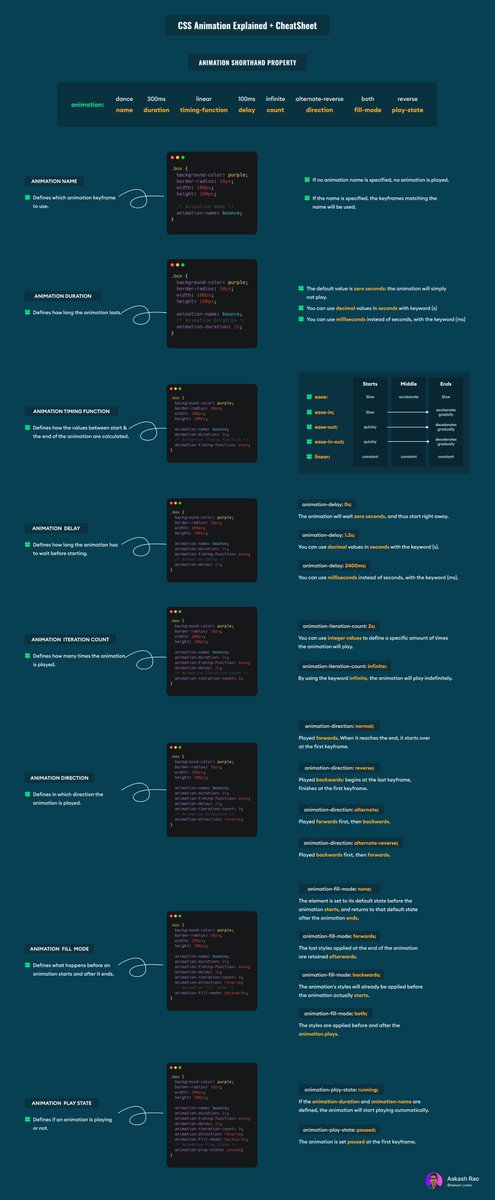
You can access all of my Cheatsheets in high quality from Github Repository.
If you like it please give it a star⭐. Thanks for the support. 💜
github.com
If you like it please give it a star⭐. Thanks for the support. 💜
github.com

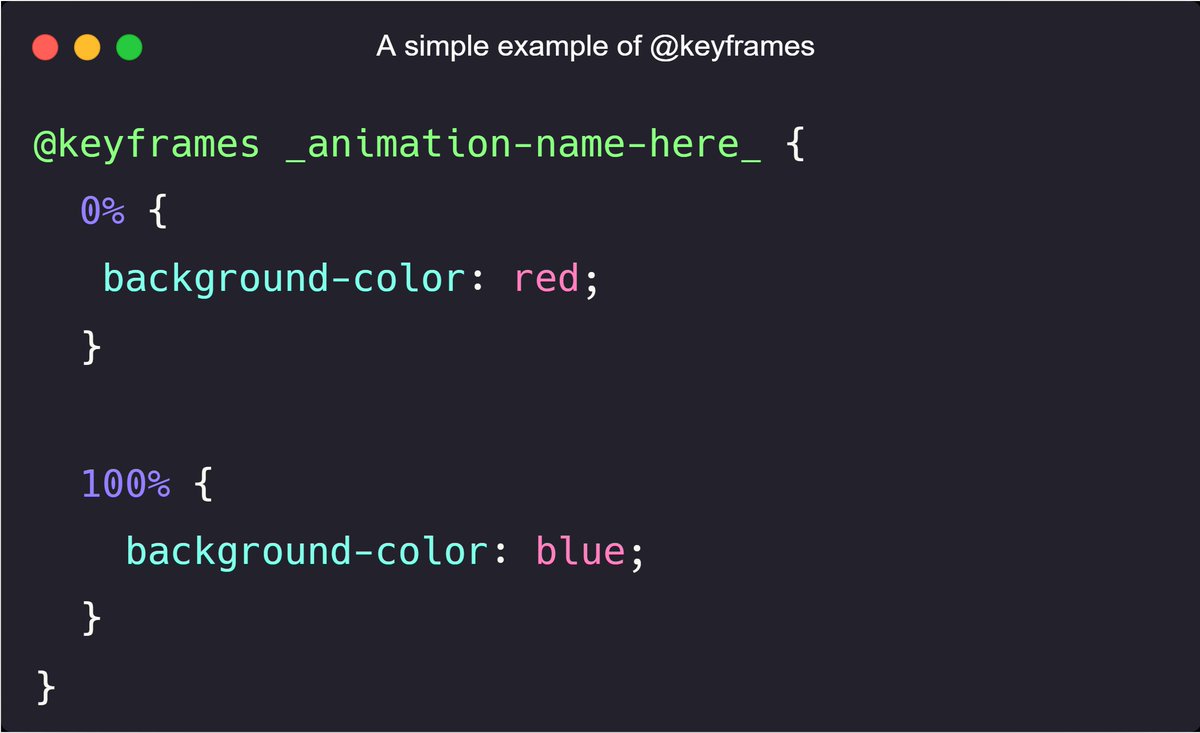
➳ Now as you know the basic properties of Animation property let's try to understand, What is a @𝗸𝗲𝘆𝗳𝗿𝗮𝗺𝗲𝘀 in CSS?
⬘ The @𝗸𝗲𝘆𝗳𝗿𝗮𝗺𝗲𝘀 is a container where we write our animation code.
⬖ Here we define when & which properties or values have to be changed.
⬘ The @𝗸𝗲𝘆𝗳𝗿𝗮𝗺𝗲𝘀 is a container where we write our animation code.
⬖ Here we define when & which properties or values have to be changed.
⬗ We can specify when style change will happen in percent or with keywords "from" and "to", which is the same as 0% and 100%
⬙ 0% is the beginning of the animation, and 100% is when animation is complete
𝗡𝗼𝘁𝗲: For better browser support we should use 0% and 100% selectors
⬙ 0% is the beginning of the animation, and 100% is when animation is complete
𝗡𝗼𝘁𝗲: For better browser support we should use 0% and 100% selectors
📌 Now as we collected all the elements for the recipe for animation! Let's finally cook it.
➳ Let's try to break & code a bouncing ball animation.
codepen.io
➳ Let's try to break & code a bouncing ball animation.
codepen.io

➳ Let's first try to break & code the animation property for our bouncing ball!

➳ Let's now break down the actual animation code inside our @𝗸𝗲𝘆𝗳𝗿𝗮𝗺𝗲𝘀 container!

📌 What are CSS Transitions?
⬘ CSS transitions are very similar to animations that allow us to change property values smoothly, but they always need to be triggered! [ex: hover or element being loaded]
⬙ Transitions cannot loop [Yes they are designed to run only once!]
⬘ CSS transitions are very similar to animations that allow us to change property values smoothly, but they always need to be triggered! [ex: hover or element being loaded]
⬙ Transitions cannot loop [Yes they are designed to run only once!]
➳ CSS Transition Properties
- transition-delay
- transition-duration
- transition-property
- transition-timing-function
Again there, we have a shorthand! ⇩
transition: delay ⇝ duration ⇝ property ⇝ timing-function
- transition-delay
- transition-duration
- transition-property
- transition-timing-function
Again there, we have a shorthand! ⇩
transition: delay ⇝ duration ⇝ property ⇝ timing-function
➳ transition-delay
⬘ Defines how long the transition has to wait before starting.
➳ transition-duration
⬘ Defines how long the transition lasts.
⬘ Defines how long the transition has to wait before starting.
➳ transition-duration
⬘ Defines how long the transition lasts.
➳ transition-property
⬘ Defines which properties will transition. Here is a list of all the properties which can be transitioned! [𝗥𝗲𝗳𝗲𝗿𝗲𝗻𝗰𝗲-taken by MDN Web Docs]
➳ transition-timing-function
⬘ Defines how long the transition lasts.
⬘ Defines which properties will transition. Here is a list of all the properties which can be transitioned! [𝗥𝗲𝗳𝗲𝗿𝗲𝗻𝗰𝗲-taken by MDN Web Docs]
➳ transition-timing-function
⬘ Defines how long the transition lasts.

📌 Let's see a quick example of CSS transition property!
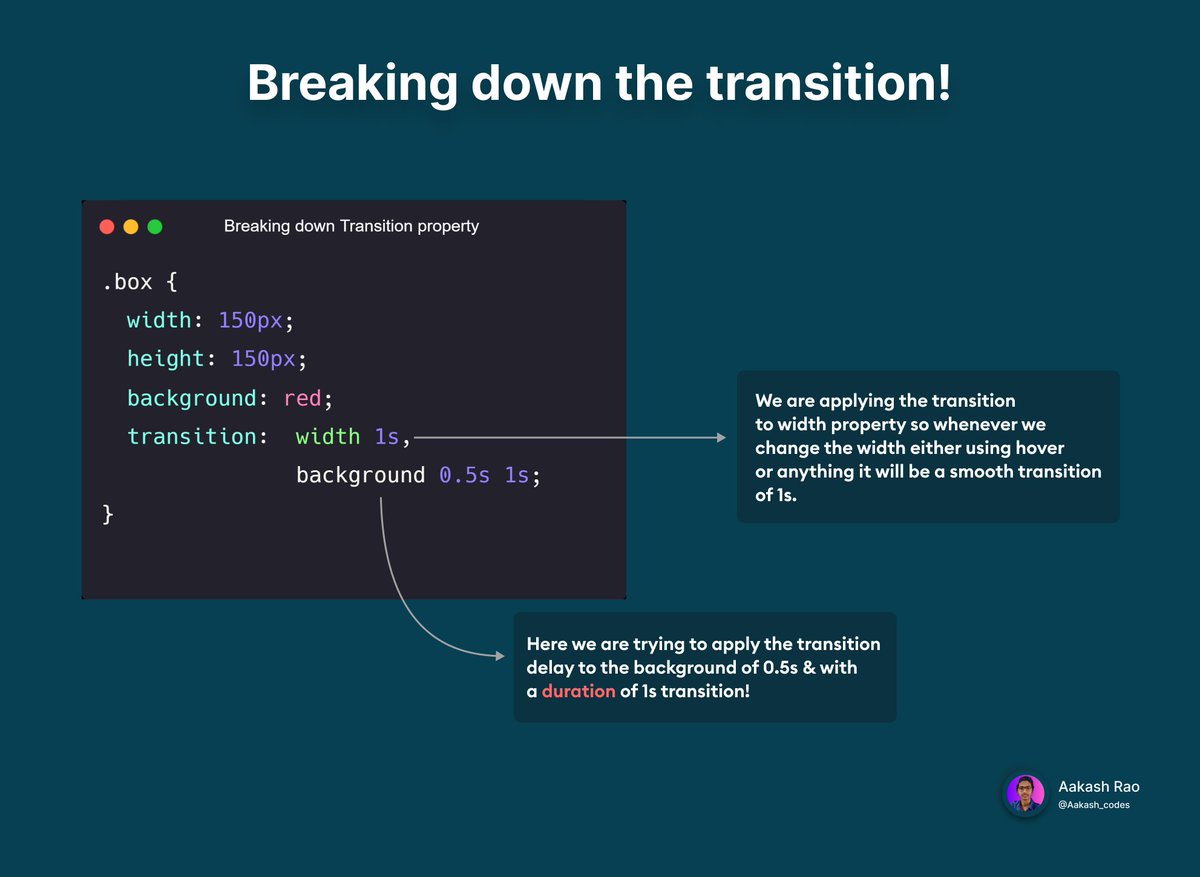
➳ You can access the Codepen to check if you want for understanding transition property!
codepen.io
codepen.io
📌 Let's summarize here!
- Animations have no problem in looping. [ Transitions cannot loop ]
- The animation just start. They don’t need any kind of external trigger source. [ Transitions need a trigger!! ]
- Animations have no problem in looping. [ Transitions cannot loop ]
- The animation just start. They don’t need any kind of external trigger source. [ Transitions need a trigger!! ]
- Animation allows you to define Keyframes that vary from one state to another. [ Transitions animate an object from one point to another. ]
- The animations are hard to work in JavaScript. [ Transitions are easy to work in JavaScript. ]
- The animations are hard to work in JavaScript. [ Transitions are easy to work in JavaScript. ]
🏁 Final Words
✧ I hope you get a good understanding of Animations & Transitions in CSS!
✧ What's next? You can try & play with CSS both of them & try some cool stuff. 🙌
✧ I hope you get a good understanding of Animations & Transitions in CSS!
✧ What's next? You can try & play with CSS both of them & try some cool stuff. 🙌
💭 Feedbacks
✧ After reading through the entire thread, have you learned something worth it?
✧ What improvements will you suggest?
I will be happy to hear from you. Feedback from you would help me share better content in the future.
✧ After reading through the entire thread, have you learned something worth it?
✧ What improvements will you suggest?
I will be happy to hear from you. Feedback from you would help me share better content in the future.
📌 If you are interested in following this series ⇩
⇝ Follow @Aakash_codes ✓
⇝ To never miss anything, keep your 🔔 ON.
⇝ Share it with your friends if they are interested!
Thanks for the support 💜
Here is the complete infographic for series ⇩
⇝ Follow @Aakash_codes ✓
⇝ To never miss anything, keep your 🔔 ON.
⇝ Share it with your friends if they are interested!
Thanks for the support 💜
Here is the complete infographic for series ⇩
جاري تحميل الاقتراحات...