

The grep command is powerful utility for searching text within files in the Linux command line.
Here are 10 grep command usage examples that every Linux user, sysadmin and developer should be familiar with.
A thread 🧵👇
Here are 10 grep command usage examples that every Linux user, sysadmin and developer should be familiar with.
A thread 🧵👇
If you're wondering, grep stands for global regular expression print.
You can use grep to search in files, or combine it with pipes to filter the output of another command.
You can use grep to search in files, or combine it with pipes to filter the output of another command.
Once you've mastered it, you'll find it quite useful in your day-to-day work as a Linux user.
In the examples that follow, I will use a file called 'quotes.txt' to demonstrate how to use the commands.
This file's contents are listed below:
pastebin.com
In the examples that follow, I will use a file called 'quotes.txt' to demonstrate how to use the commands.
This file's contents are listed below:
pastebin.com

{1} Finding all occurrences of a string in the given file.
This example we tell grep to search for (God) and we provide the place to look for it (quotes.txt)
If there are spaces in the string you want to search, you must put quotes around it:
This example we tell grep to search for (God) and we provide the place to look for it (quotes.txt)
If there are spaces in the string you want to search, you must put quotes around it:

{2} Filtering/Searching output of another command
As previously stated, grep can be used to filter/search the output of another command. We may replicate the functionality shown above by using:
As previously stated, grep can be used to filter/search the output of another command. We may replicate the functionality shown above by using:

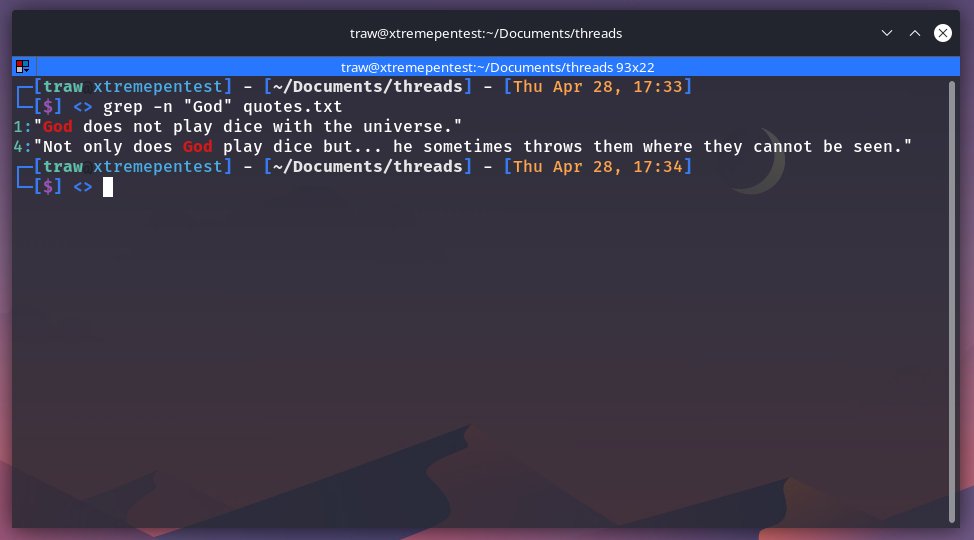
{3} Display Line Numbers Containing Matches
Using the -n option together with grep it will show the line numbers:
Using the -n option together with grep it will show the line numbers:
{4} Making grep search case insensitive
Grep search is case sensitive by default. You want the search to be case insensitive you can use -i flag.
Grep search is case sensitive by default. You want the search to be case insensitive you can use -i flag.

{5} Using regular expressions
The search string can be a regular expression, which makes grep quite strong. However, I will not go into detail on how to use regex with grep in this thread.
The search string can be a regular expression, which makes grep quite strong. However, I will not go into detail on how to use regex with grep in this thread.

You can boost the power of your search by employing a regex pattern. There is a special option -e that allows you to use a regex pattern. Option -E enables the use of extended regex patterns.

{6} Displaying all the lines that DO NOT match the given pattern.
Another thing you might find useful is to use the -v option to reverse the result, eliminating the lines that match a specific string:
Another thing you might find useful is to use the -v option to reverse the result, eliminating the lines that match a specific string:

{7} Find Exact Match Words
If you search for the phrase 'ice,' grep will also return lines containing the words 'dice' or 'prejudice.'
Fortunately, grep has option -w: which allows it search and match the exact whole words only.
If you search for the phrase 'ice,' grep will also return lines containing the words 'dice' or 'prejudice.'
Fortunately, grep has option -w: which allows it search and match the exact whole words only.

{8} Searching in all files recursively
With the grep option -r, you can execute a recursive search. It will look for the specified pattern in all files in the current directory and its sub-directories
With the grep option -r, you can execute a recursive search. It will look for the specified pattern in all files in the current directory and its sub-directories

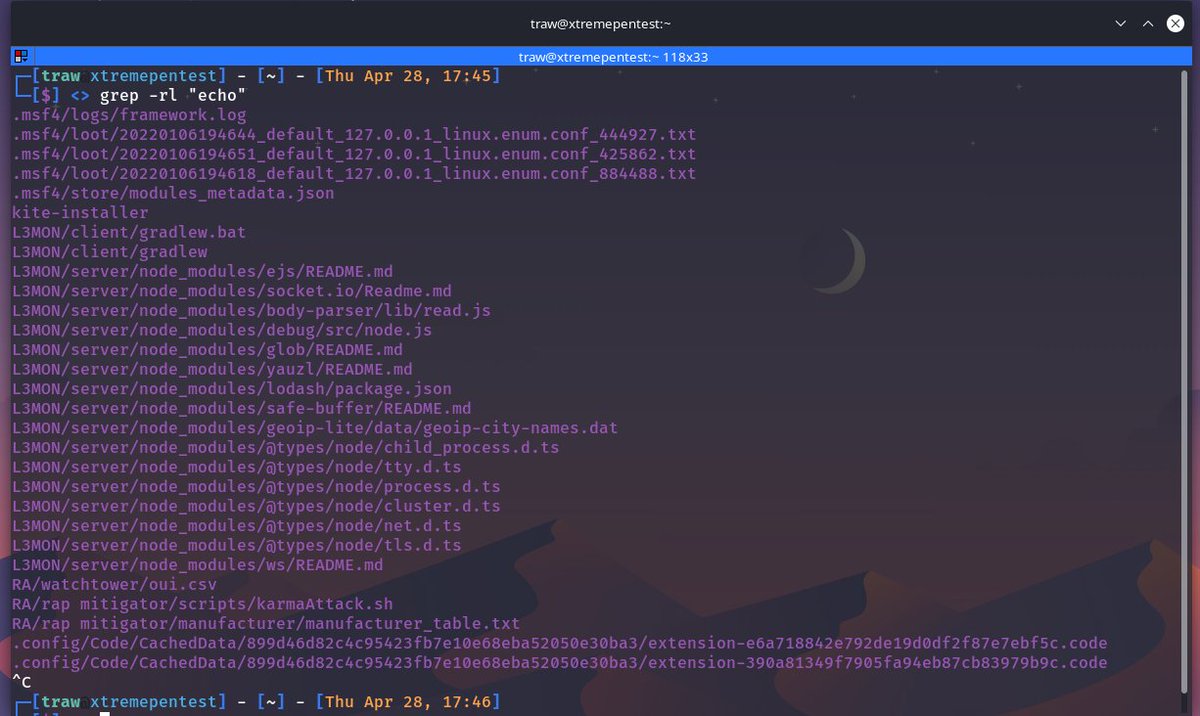
{9} Print only names of FILEs with selected lines
Grep displays the matching lines by default. If you only want to know which files contain the string, use the following command:
Grep displays the matching lines by default. If you only want to know which files contain the string, use the following command:
{10} Print only names of FILEs with no selected lines
If you only want to know which files do contain the string, use the following command:
If you only want to know which files do contain the string, use the following command:

Those were some simple examples for using grep.
If you read its man page, you will notice plenty of additional parameters and uses for this handy command.
If you read its man page, you will notice plenty of additional parameters and uses for this handy command.
If you found this thread valuable:
1. Toss me a follow for more threads on Linux and Security → @xtremepentest
2. RT the first tweet so other Linux folks can find it too.
1. Toss me a follow for more threads on Linux and Security → @xtremepentest
2. RT the first tweet so other Linux folks can find it too.
Loading suggestions...