

2️⃣ / 5️⃣0️⃣ The Ultimate JavaScript Projects Series!
🎉 Modal or Popup Window (PART-1)
A Thread🧵👇
🎉 Modal or Popup Window (PART-1)
A Thread🧵👇
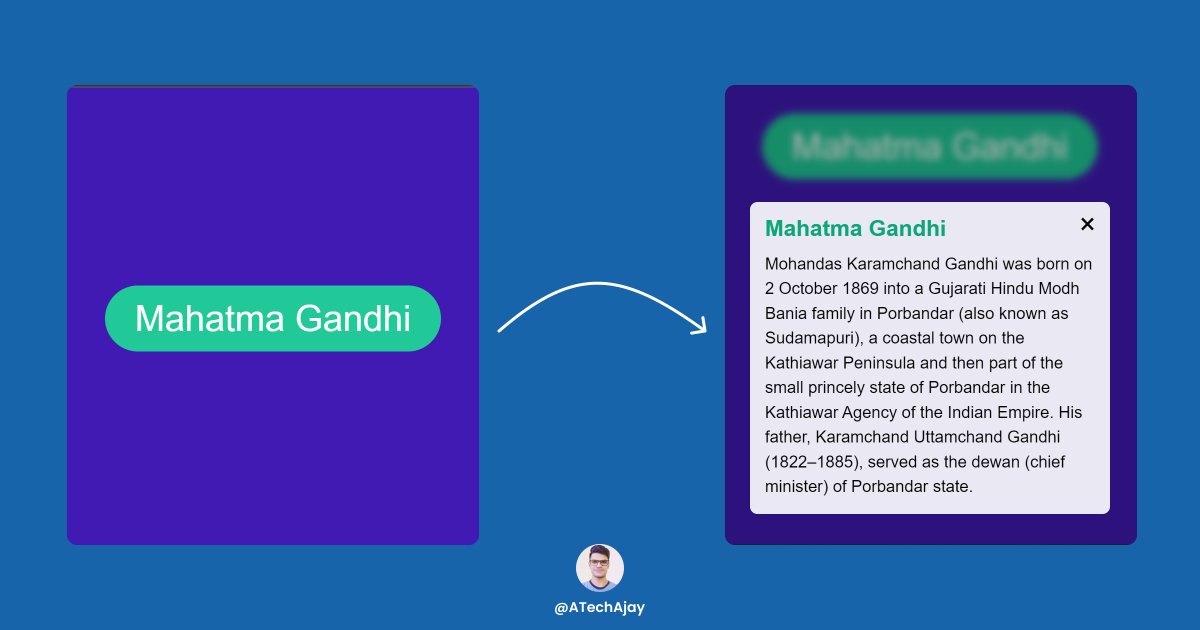
📌 Learning from this project?
① How to remove the class from the element.
② How to add class to the element.
③ Keyboard event.
📌 3 ways to close the modal
1. Close button
2. Escape key
3. Click outside from the content of the modal
① How to remove the class from the element.
② How to add class to the element.
③ Keyboard event.
📌 3 ways to close the modal
1. Close button
2. Escape key
3. Click outside from the content of the modal
⛔ I am not going to discuss HTML and CSS code, you can just copy and paste from the codepen link or you can design as your requirement.
📌 But HTML code is important for the selection using JavaScript, so you see it in the image👇
📌 But HTML code is important for the selection using JavaScript, so you see it in the image👇

📌BTW, we have to create all elements of the modal and just we have to manipulate that modal using JavaScript.
💡Simple Logic
⇾ Initially, the content of the modal will be hidden by default.
⇾ But when we click on this button 👇 then the content of the modal will be visible.
💡Simple Logic
⇾ Initially, the content of the modal will be hidden by default.
⇾ But when we click on this button 👇 then the content of the modal will be visible.

💡 In short
⇾ When we click on the button then the "hidden-modal" class will be removed from the content of the modal.
⇾ There are 2 classes in the content of the modal.
1. modal-content
2. hidden-modal
⇾ When we click on the button then the "hidden-modal" class will be removed from the content of the modal.
⇾ There are 2 classes in the content of the modal.
1. modal-content
2. hidden-modal
1. modal-content: Modal content is designed by using this class.
2. hidden-modal: But this class has only one line of code that is "display: none",
📌 If we remove the "hidden-modal" class then the content of the modal will be visible.
2. hidden-modal: But this class has only one line of code that is "display: none",
📌 If we remove the "hidden-modal" class then the content of the modal will be visible.
📌 Or, if we click on the Close button or Escape key or Outside from the content of the modal then the "hidden-modal" will be added.
⇾ We can close the modal using 3 ways.
1. Using the close button
2. Using the Escape key
3. And click outside from the content of the modal.
⇾ We can close the modal using 3 ways.
1. Using the close button
2. Using the Escape key
3. And click outside from the content of the modal.
🛠 In short
✨ To visible the modal = we have to remove the hidden class
✨ To hide the modal = we have to add the hidden class
✨ To visible the modal = we have to remove the hidden class
✨ To hide the modal = we have to add the hidden class
📌 Now in this project, we have to select 4 HTML elements.
1. Open button
2. Content of the modal
3. Close button
4. Blur background
1. Open button
2. Content of the modal
3. Close button
4. Blur background
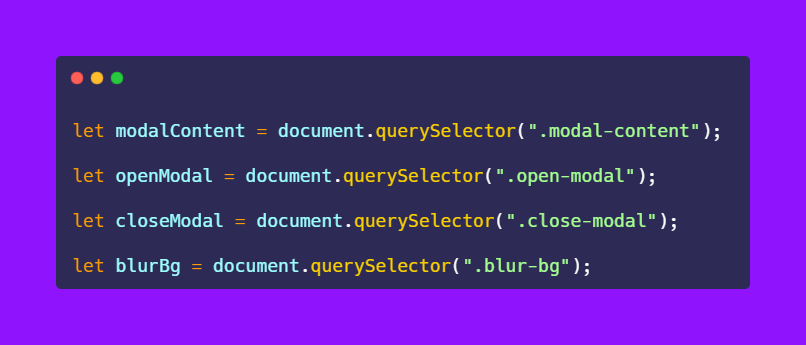
⇾ So now when we click on the open button then the "hidden-modal" class will be removed.
⇾ Well, we can add or remove the class using the "classList" property.
⇾ Well, we can add or remove the class using the "classList" property.
📌 What is classList?
⇾ The classList property returns the CSS class names of an element.
⇾ Or, it returns the DOMTokenList.
⇾ DOMTokenList is the collection of the class.
⇾ classList is the read-only property and has methods as well.
⇾ The classList property returns the CSS class names of an element.
⇾ Or, it returns the DOMTokenList.
⇾ DOMTokenList is the collection of the class.
⇾ classList is the read-only property and has methods as well.
⇾ Or, the classList property has methods which used to manipulate the class of an element.
📌 Methods of the classList
⇾ add( ) :- Add one or more class to the element.
⇾ remove ( ) :- Remove one or more classes from the element.
📌 Methods of the classList
⇾ add( ) :- Add one or more class to the element.
⇾ remove ( ) :- Remove one or more classes from the element.
⇾ contains ( ) :- Returns true if the element contains the given class otherwise returns false.
⛔ And many more methods of classList property, which we will discuss in the upcoming projects.
⛔ And many more methods of classList property, which we will discuss in the upcoming projects.
① How to remove the class from the element.
⇾ We can remove the class to the element using the remove() method of the classList property.
⇾ But it happens when we click on the open button.
⇾ So we have to listen to an event which is a "click" event on the open button.
⇾ We can remove the class to the element using the remove() method of the classList property.
⇾ But it happens when we click on the open button.
⇾ So we have to listen to an event which is a "click" event on the open button.
📌 Also, we have a blurred background and have 2 classes as well.
1. blur-bg (Blur bg design using this class)
2. hidden-blur (display: none)
⇾ Now again we have to remove this "hidden-blur" class when we click on the open button.
1. blur-bg (Blur bg design using this class)
2. hidden-blur (display: none)
⇾ Now again we have to remove this "hidden-blur" class when we click on the open button.
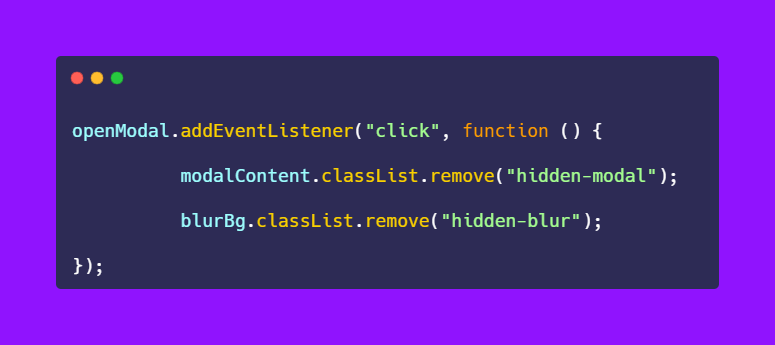
🎉 Congratulations your modal is successfully opened.
⚠ Now we have to implement the close button in the next thread.
⛔ In the next thread, we will learn
💡 3 ways to close the modal
⚠ Now we have to implement the close button in the next thread.
⛔ In the next thread, we will learn
💡 3 ways to close the modal
👀 Codepen link:
codepen.io
codepen.io
That's all for now, we will meet in the next thread!
But if you like make sure to:
1. Follow me @ATechAjay
2. Retweet the first tweet.
3. Turn on the notification to never miss these amazing tweets.
Thank you so much for staying to the end of this thread.
But if you like make sure to:
1. Follow me @ATechAjay
2. Retweet the first tweet.
3. Turn on the notification to never miss these amazing tweets.
Thank you so much for staying to the end of this thread.
📌 Here is the final part of this project.
Loading suggestions...