

A Beginner Guide to Git - (Part 2)
a thread...
a thread...
In Part 1: We've covered.
git init
git status
git add
git commit
git remote
git push
When you are trying to push your changes for the first time on the git remote repo, you will use the above set of commands.
Note: Read Part 1 before moving further:
git init
git status
git add
git commit
git remote
git push
When you are trying to push your changes for the first time on the git remote repo, you will use the above set of commands.
Note: Read Part 1 before moving further:
In this Part, we will see a scenario where:
Someone else wants to take your changes, add their changes on top of it and push those changes on the remote git repo.
Someone else wants to take your changes, add their changes on top of it and push those changes on the remote git repo.
git clone
When you want to use a remote repo for the first time, you need to clone it first using the below command.
git clone <remote-repo-url>
Eg:
We've cloned our previously created repository for the first time.
When you want to use a remote repo for the first time, you need to clone it first using the below command.
git clone <remote-repo-url>
Eg:
We've cloned our previously created repository for the first time.

git fetch
The below "git fetch" command retrieves the latest meta-data from the remote repo and updates the same in the local repo.
git fetch origin
It doesn’t do any file transferring. It just checks if there are any changes available or not.
The below "git fetch" command retrieves the latest meta-data from the remote repo and updates the same in the local repo.
git fetch origin
It doesn’t do any file transferring. It just checks if there are any changes available or not.
Note: In the current case it's optional to do git fetch because git clone will automatically update all metadata. But for later usage fetch will be very useful.
git checkout
It helps to create a branch, a branch is your own copy of the remote repo where you will apply your changes and later push your changes to the remote repository.
git checkout -b <branch-name>
In our Eg:
git checkout -b "first-branch"
It helps to create a branch, a branch is your own copy of the remote repo where you will apply your changes and later push your changes to the remote repository.
git checkout -b <branch-name>
In our Eg:
git checkout -b "first-branch"
git diff
We can check the changes made by us, using the below command:
git diff <file-name>
Eg:
We've modified "script.js" in the new branch. Newly added lines will be shown with the "+" prefix and removed lines will be shown with the "-" prefix.
We can check the changes made by us, using the below command:
git diff <file-name>
Eg:
We've modified "script.js" in the new branch. Newly added lines will be shown with the "+" prefix and removed lines will be shown with the "-" prefix.

Now, using the following sequence of commands we can send our modified file to the remote repo:
1. git add
2. git commit
3. git push
After this, our code will be added to the respective remote branch.
Note: Above three commands are already explained in Part 1.
1. git add
2. git commit
3. git push
After this, our code will be added to the respective remote branch.
Note: Above three commands are already explained in Part 1.
git pull
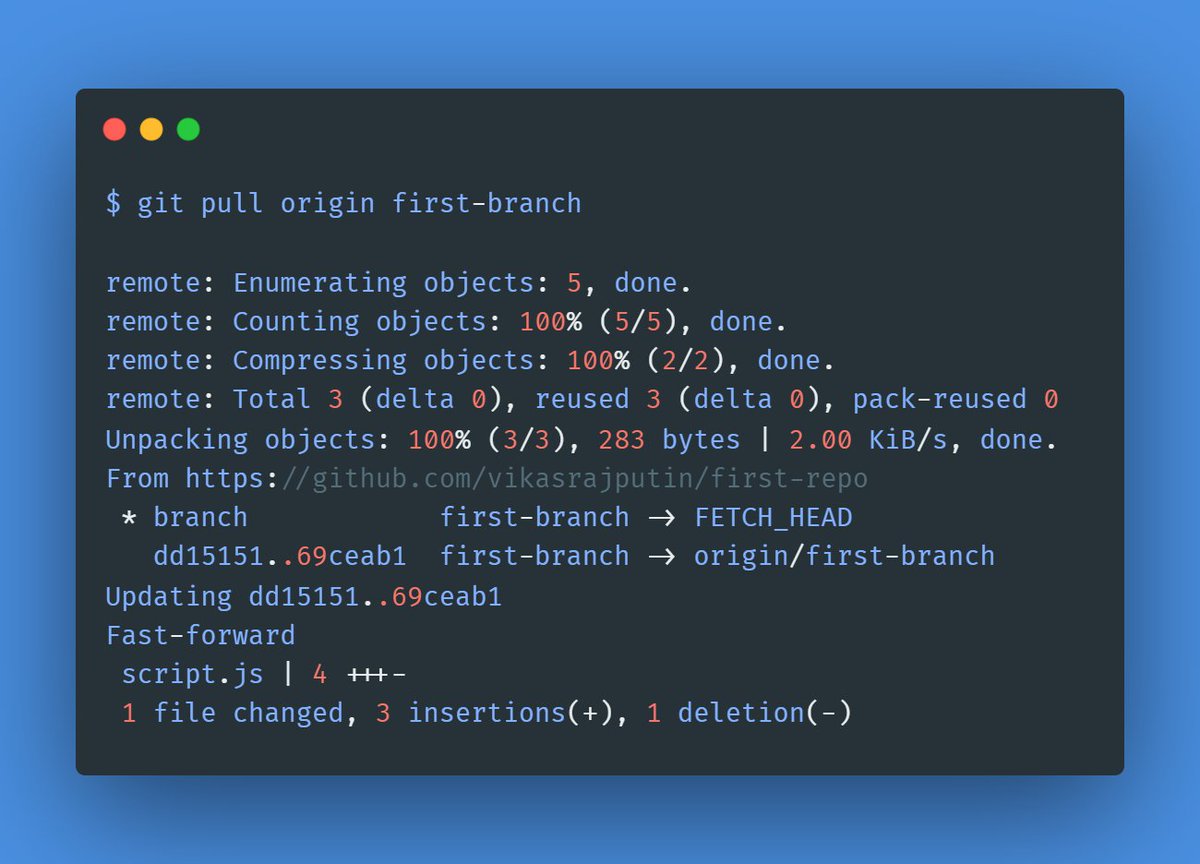
Many times you are working on the same file on which someone else is also working.
In such a case, before pushing our copy we need to get the latest copy of the same file. Add our changes to it and then push, to avoid any conflicts.
Eg:
git pull origin <branch>
Many times you are working on the same file on which someone else is also working.
In such a case, before pushing our copy we need to get the latest copy of the same file. Add our changes to it and then push, to avoid any conflicts.
Eg:
git pull origin <branch>
Pull Request:
Many times you're not allowed to directly merge your changes to the destination branch.
For eg: If your organization has a code review process.
Many times you're not allowed to directly merge your changes to the destination branch.
For eg: If your organization has a code review process.
In such a case, you need to raise a PR, go through the code review process and then merge your changes on the destination branch.
To Create PR:
@latest/pull-requests/collaborating-with-pull-requests/proposing-changes-to-your-work-with-pull-requests/creating-a-pull-request" target="_blank" rel="noopener" onclick="event.stopPropagation()">docs.github.com
After Review Merge PR:
@latest/pull-requests/collaborating-with-pull-requests/incorporating-changes-from-a-pull-request/merging-a-pull-request" target="_blank" rel="noopener" onclick="event.stopPropagation()">docs.github.com
Congratulations your changes are now in destination branch!
To Create PR:
@latest/pull-requests/collaborating-with-pull-requests/proposing-changes-to-your-work-with-pull-requests/creating-a-pull-request" target="_blank" rel="noopener" onclick="event.stopPropagation()">docs.github.com
After Review Merge PR:
@latest/pull-requests/collaborating-with-pull-requests/incorporating-changes-from-a-pull-request/merging-a-pull-request" target="_blank" rel="noopener" onclick="event.stopPropagation()">docs.github.com
Congratulations your changes are now in destination branch!
Thanks for your valuable time!
Namaste, I'm Vikas!
Every Mon, Wed & Fri - I write threads on
Java, Javascript & Fullstack Development.
To read all my future threads follow @vikasrajputin
Any Query or Suggestions?
Put them in the comments below.
Happy Coding!
Namaste, I'm Vikas!
Every Mon, Wed & Fri - I write threads on
Java, Javascript & Fullstack Development.
To read all my future threads follow @vikasrajputin
Any Query or Suggestions?
Put them in the comments below.
Happy Coding!
**Correction**
Before "git push", you should use "git pull" to take the latest changes from the remote repo, add your changes to it, and then do "git push" to avoid conflicts.
Before "git push", you should use "git pull" to take the latest changes from the remote repo, add your changes to it, and then do "git push" to avoid conflicts.
جاري تحميل الاقتراحات...