

What is systemd and why should Linux users care about it?
Everything about "systemd" !!
A Mega Thread 👇
Everything about "systemd" !!
A Mega Thread 👇
What is systemd ?
systemd is the glue that holds Linux systems together. systemd is a collection of building blocks, which handle services, processes, logging, network connectivity and even authentication.
systemd is the glue that holds Linux systems together. systemd is a collection of building blocks, which handle services, processes, logging, network connectivity and even authentication.
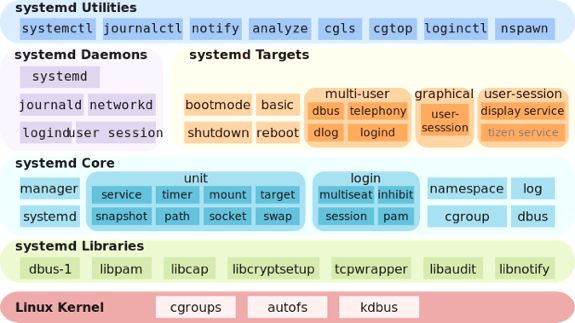
systemd handles the boot process for Linux systems. As an init implementation, it has a PID of 1 like other init systems, such as System V, Upstart.
It was designed as a replacement for SystemV and LSB-style startup scrips, which were prevalent since 1980s.
It was designed as a replacement for SystemV and LSB-style startup scrips, which were prevalent since 1980s.
Components-
systemd- The system and service manager
systemctl- A command line tool to interact with systemd
journald- A unified logging framework
logind- A daemon that handles user logins & seats
resolved, timesyncd, & networkd, which r responsible for nw connection, dns resolv
systemd- The system and service manager
systemctl- A command line tool to interact with systemd
journald- A unified logging framework
logind- A daemon that handles user logins & seats
resolved, timesyncd, & networkd, which r responsible for nw connection, dns resolv
What’s init?
An init program is usually the first to start and the last to stop. It initializes & terminates programs and services crucial to d operation of Linux systems.
It’s also a daemon process that runs during the entire lifetime of all programs in the system.
An init program is usually the first to start and the last to stop. It initializes & terminates programs and services crucial to d operation of Linux systems.
It’s also a daemon process that runs during the entire lifetime of all programs in the system.
System V init-
This is the traditional init system (also pronounced as “sys five”). It consists of several scripts that start various services expected to run on a runlevel. In System V, the state of a Linux machine at any particular stage points to a runlevel.
This is the traditional init system (also pronounced as “sys five”). It consists of several scripts that start various services expected to run on a runlevel. In System V, the state of a Linux machine at any particular stage points to a runlevel.

SysV Limitations -
It has a lot of deficiencies that make startup time slower. Since shell scripts execute line-by-line, system execution isn’t parallelized.
If there is an error with a script’s execution, it would have to time-out before d next script in line gets executed.
It has a lot of deficiencies that make startup time slower. Since shell scripts execute line-by-line, system execution isn’t parallelized.
If there is an error with a script’s execution, it would have to time-out before d next script in line gets executed.
Upstart-
Ubuntu’s implementation of d init system. It solves d problems associated with SysV. Rather than execute scripts during a runlevel, upstart manages d system state by reacting to events. An event occurs when a hot-plug device is connected/removed from the machine.
Ubuntu’s implementation of d init system. It solves d problems associated with SysV. Rather than execute scripts during a runlevel, upstart manages d system state by reacting to events. An event occurs when a hot-plug device is connected/removed from the machine.

Why systemd?
It is capable of starting svcs in parallel, which speeds up d boot process. It is also capable of handling hot-plug devices such as starting up svcs on demand at d occurrence of an event (like upstart)
It makes svc mgmt easier by placing their processes in a cgroup
It is capable of starting svcs in parallel, which speeds up d boot process. It is also capable of handling hot-plug devices such as starting up svcs on demand at d occurrence of an event (like upstart)
It makes svc mgmt easier by placing their processes in a cgroup
Here, spawned processes are made members of their parent cgroup (named after d service). These processes are not capable of leaving their cgroup until their parent terminates them. This prevents d creation of zombie processes.

What are systemd units?
systemd provides a dependency system bn various entities called “units”. Units encapsulate various objects that are relevant for system boot-up & maintenance.
A unit type is a type of task that’s relevant to the management of a Linux system.
systemd provides a dependency system bn various entities called “units”. Units encapsulate various objects that are relevant for system boot-up & maintenance.
A unit type is a type of task that’s relevant to the management of a Linux system.

Unit files are found in three different places:
/etc/systemd/system: Local configuration
/run/systemd/system: Runtime configuration
/lib/systemd/system: Distribution-wide configs
/usr/lib/systemd/system/: Contains default systemd unit configs as per contained in the rpm
/etc/systemd/system: Local configuration
/run/systemd/system: Runtime configuration
/lib/systemd/system: Distribution-wide configs
/usr/lib/systemd/system/: Contains default systemd unit configs as per contained in the rpm
There are 11 types of units in systemd. I will mention d most common ones.
1. Service units: This unit defines how to manage service daemons controlled by systemd. Unit files of this service end with .service.
1. Service units: This unit defines how to manage service daemons controlled by systemd. Unit files of this service end with .service.
2. Socket units: This contains info abt local inter-process communication or nw sockets in a Linux system.
3. Target units: This is used to provide sync amongst unit files during boot-up. It can also be used as a medium to extend scope by specifying their targets to othr targets
3. Target units: This is used to provide sync amongst unit files during boot-up. It can also be used as a medium to extend scope by specifying their targets to othr targets
4. Device units: This unit describes devices that need exposure to systemd by udev and sysfs filesystem.
5. Mount units: This defines a mount point for attaching filesystems controlled by systemd.
6. Automount units: This provides automount capabilities.
5. Mount units: This defines a mount point for attaching filesystems controlled by systemd.
6. Automount units: This provides automount capabilities.
7. Timer units: This unit (like cron) defines a timer controlled by systemd. It schedules d activation of other units.
8. Swap units: This describes a memory swap partition.
9. Path units: This can define a path dat activates other sevices wen files within d path r modified.
8. Swap units: This describes a memory swap partition.
9. Path units: This can define a path dat activates other sevices wen files within d path r modified.
10. Slice units: Now this is a special unit. It’s used in conjunction with cgroups to group processes, daemons, services into one hierarchical tree for the management of resources.
11. Scope units: This manages externally created processes. See man 5 systemd.scope.
11. Scope units: This manages externally created processes. See man 5 systemd.scope.
All unit files begin with a section marked [Unit] which contains basic information and dependencies, for example:
[Unit]
Description=D-Bus System Message Bus
Documentation=man:dbus-daemon(1)
Requires=dbus.socket
[Unit]
Description=D-Bus System Message Bus
Documentation=man:dbus-daemon(1)
Requires=dbus.socket
![All unit files begin with a section marked [Unit] which contains basic information and dependencies,...](https://pbs.twimg.com/media/FFb5lF1VQAII0JB.png)
Diff between unit dependencies Requires, Wants and Conflicts -
Requires: A list of units that this unit depends on, which is started wen this unit is started
Wants: A weaker form of Requires: d units listed r started but d current unit is not stopped if any of them fail
Requires: A list of units that this unit depends on, which is started wen this unit is started
Wants: A weaker form of Requires: d units listed r started but d current unit is not stopped if any of them fail
Conflicts: A negative dependency: the units listed are stopped when this one is started and, conversely, if one of them is started, this one is stopped
The keywords Before & After determine d order in which they r started. The order of stopping is just d reverse of d start order:
Before: This unit should be started before the units listed
After: This unit should be started after the units listed
Before: This unit should be started before the units listed
After: This unit should be started after the units listed
In d following example, d After directive makes sure that d web server is started after d nw:
[Unit]
Description=Lighttpd Web Server
After=network.target
In d absence of Before/After directives, d units will be started or stopped in parallel wid no particular ordering.
[Unit]
Description=Lighttpd Web Server
After=network.target
In d absence of Before/After directives, d units will be started or stopped in parallel wid no particular ordering.
What is a Service in systemd?
It is a daemon that can be started & stopped, equivalent to a SysV service. for eg, ssh.service.
A service unit has a [Service] section that describes how it should be run.
These are the cmds to run when starting the service & restarting it.
It is a daemon that can be started & stopped, equivalent to a SysV service. for eg, ssh.service.
A service unit has a [Service] section that describes how it should be run.
These are the cmds to run when starting the service & restarting it.

Let’s talk a bit about the directives of the Service section:
Type: This defines services by their process and daemonizing behavior.
ExecStart: This directive set the path and arguments of the executable command for the unit.
Type: This defines services by their process and daemonizing behavior.
ExecStart: This directive set the path and arguments of the executable command for the unit.
ExecStartPre: This specifies an additional cmd that executes before ExecStart.
ExecStartPost: This configures d path to cmds that will be executed after ExecStart.
ExecReload: This defines a cmd to reload d svc file.
Restart: systemd restarts d svc when this point is reached.
ExecStartPost: This configures d path to cmds that will be executed after ExecStart.
ExecReload: This defines a cmd to reload d svc file.
Restart: systemd restarts d svc when this point is reached.
Targets -
A target is another type of unit which groups svcs (or other types of unit). Its a type of unit that only hs dependencies. Targets hv names ending in .target, for eg, multi-user.target.
A target is a desired state, which performs d same role as SysV runlevels.
A target is another type of unit which groups svcs (or other types of unit). Its a type of unit that only hs dependencies. Targets hv names ending in .target, for eg, multi-user.target.
A target is a desired state, which performs d same role as SysV runlevels.

Basic Unit Management -
Start the service:
systemctl start nginx.service
Start the service:
systemctl start nginx.service

Check the status of the Service -
systemctl status nginx.service
systemctl status nginx.service

Stop the Service -
systemctl stop nginx.service
systemctl stop nginx.service

Restart the service -
systemctl restart nginx.service
systemctl restart nginx.service

To attempt to reload the service without interrupting normal functionality -
systemctl reload nginx.service
systemctl reload nginx.service

Enabling or Disabling Units -
By default, most systemd unit files are not started automatically at boot. To configure this functionality, you need to “enable” to unit.
To enable a service to start automatically at boot, type:
systemctl enable nginx.service
By default, most systemd unit files are not started automatically at boot. To configure this functionality, you need to “enable” to unit.
To enable a service to start automatically at boot, type:
systemctl enable nginx.service

To disable the service at boot time -
systemctl disable nginx.service
systemctl disable nginx.service

Getting an Overview of the System State -
To get all of the unit files that systemd has listed as “active”
# systemctl list-units
To get all of the unit files that systemd has listed as “active”
# systemctl list-units

To list all of the units that systemd has loaded or attempted to load into memory, including those that are not currently active, add the --all switch:
systemctl list-units --all
systemctl list-units --all

To list all of the units installed on the system, including those that systemd has not tried to load into memory, type:
systemctl list-unit-files
systemctl list-unit-files

Using Targets (Runlevels)
To see all of the targets available on your system, type:
systemctl list-unit-files --type=target
To see all of the targets available on your system, type:
systemctl list-unit-files --type=target

To view the default target that systemd tries to reach at boot (which in turn starts all of the unit files that make up the dependency tree of that target), type:
systemctl get-default
systemctl get-default

Change the default target that will be used at boot by using the set-default option:
systemctl set-default multi-user.target
systemctl set-default multi-user.target

To see what units are tied to a target, you can type:
systemctl list-dependencies multi-user.target
systemctl list-dependencies multi-user.target

Stopping or Rebooting the Server -
For some of the major states that a system can transition to, shortcuts are available. For instance, to power off your server, you can type:
systemctl poweroff
For some of the major states that a system can transition to, shortcuts are available. For instance, to power off your server, you can type:
systemctl poweroff
If you wish to reboot the system instead, that can be accomplished by typing:
systemctl reboot
systemctl reboot
You can boot into rescue mode by typing:
systemctl rescue
systemctl rescue
Retweet the thread if you liked it.
Follow me for more such content.
Follow me for more such content.
Loading suggestions...