

FIND GEMS ON TWITTER WITH LESS EFFORT!
We all know that Twitter is an amazing source of information.
Finding out about projects and trends early is absolutely key to maximizing returns.
But with SO MUCH information available, how do you zoom in on what’s useful?
A thread
1/
We all know that Twitter is an amazing source of information.
Finding out about projects and trends early is absolutely key to maximizing returns.
But with SO MUCH information available, how do you zoom in on what’s useful?
A thread
1/

My team and I spend nearly all day, every day researching projects.
Over time we’ve built out some really fancy metrics and tools to identify key trends.
It doesn’t mean we can catch everything (nobody can!)
2/
Over time we’ve built out some really fancy metrics and tools to identify key trends.
It doesn’t mean we can catch everything (nobody can!)
2/
It does mean though that we can invest our time and energies into specific research and not waste it just finding WHAT to research.
In crypto (as most markets) there is a huge amount of value in having asymmetric information
3/
In crypto (as most markets) there is a huge amount of value in having asymmetric information
3/
Of course most people don’t have the time/resources to build and refine the tools and relationships to get this information, so what can they do?
You have 2 options.
4/
You have 2 options.
4/
1 - Spend the whole day on Twitter, scrolling endlessly trying to identify what few things you should be paying attention to in a massive ocean of data.
2 - Filter that data in a way you can easily pick out areas of interest to look into further.
I prefer option 2!
5/
2 - Filter that data in a way you can easily pick out areas of interest to look into further.
I prefer option 2!
5/
I’m going to share a method that gets you 80% of the way there with very little cost or effort.
6/
6/

INTRODUCTION
First of all, you have to have something to search for.
For this part, you will need to scroll Twitter.
But you’re doing that already, aren’t you?
You see interesting things all the time - in posts, comments, retweets etc.
7/
First of all, you have to have something to search for.
For this part, you will need to scroll Twitter.
But you’re doing that already, aren’t you?
You see interesting things all the time - in posts, comments, retweets etc.
7/
But this time, instead of just saying “that’s interesting” and moving on, make a note
This can be something broad, for example “Launchpad” or “Solseason”
Or it can be something specific, for example “$RAY”
It can be an account, or even a list
8/
This can be something broad, for example “Launchpad” or “Solseason”
Or it can be something specific, for example “$RAY”
It can be an account, or even a list
8/
Now you have something you want to check into further, what next?
9/
9/

STEP 1
Make a Google Drive account.
If you don’t already know how - Google it! It’s free and easy.
Sign into the account.
10/
Make a Google Drive account.
If you don’t already know how - Google it! It’s free and easy.
Sign into the account.
10/

STEP 2
Go to #features" target="_blank" rel="noopener" onclick="event.stopPropagation()">digitalinspiration.com
(I have nothing to do with this product except as a user)
There is a free trial.
I would recommend using that first to play around but it’s quite limited.
You can later buy the full version for $60 a year if you like it.
11/
Go to #features" target="_blank" rel="noopener" onclick="event.stopPropagation()">digitalinspiration.com
(I have nothing to do with this product except as a user)
There is a free trial.
I would recommend using that first to play around but it’s quite limited.
You can later buy the full version for $60 a year if you like it.
11/
STEP 3
Open a new “Google Sheets” document.
Go to Add-ons>Tweet Archiver>Create Rule
12/
Open a new “Google Sheets” document.
Go to Add-ons>Tweet Archiver>Create Rule
12/
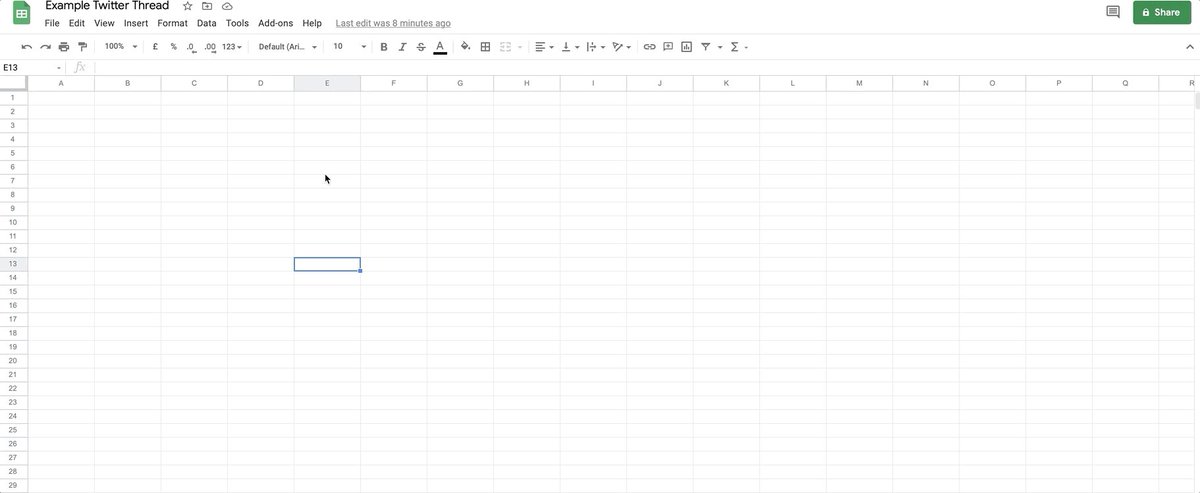
STEP 4
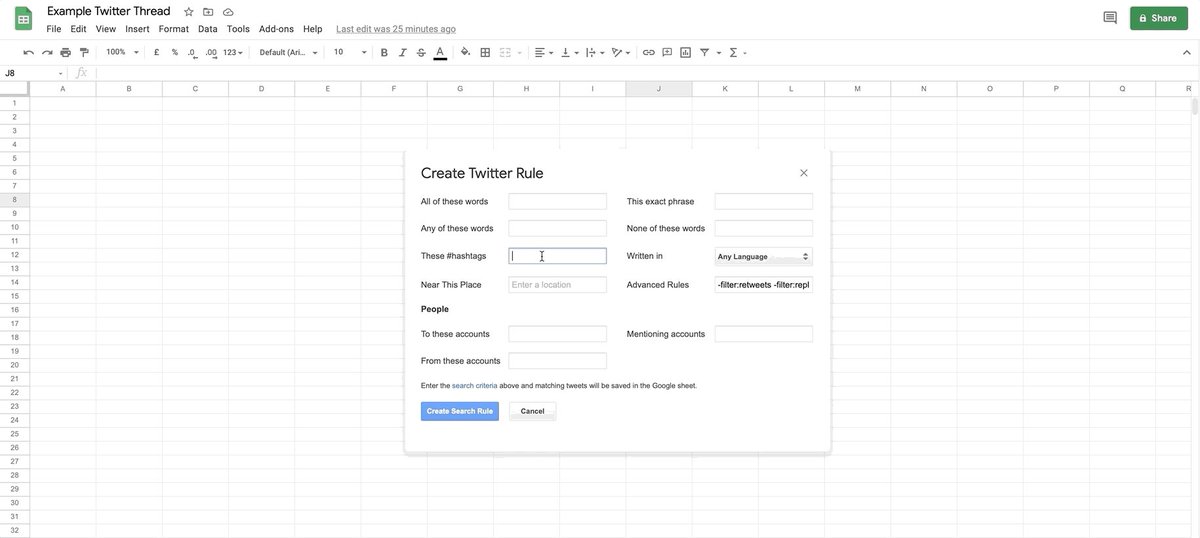
Now comes the fun part, creating the list.
Let’s create a list for “$SOL”
13/
Now comes the fun part, creating the list.
Let’s create a list for “$SOL”
13/
STEP 5
Open the tab containing all of the Tweets that have been found with that $Cashtag
14/
Open the tab containing all of the Tweets that have been found with that $Cashtag
14/

STEP 6
Make the data a bit more readable by wrapping the text and making column D a little bigger.
15/
Make the data a bit more readable by wrapping the text and making column D a little bigger.
15/
Step 7:
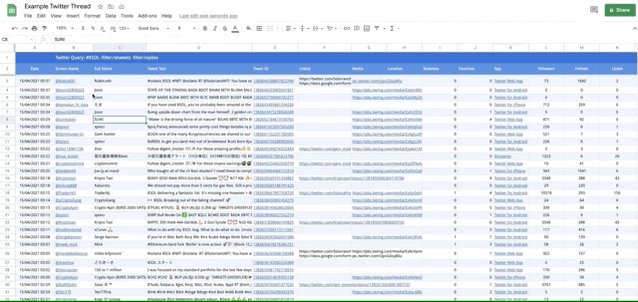
Now you have all the latest Tweets that contain “$SOL”’
What next?!
You can use all kinds of fancy filters and macros to display and organize the data in an easy to digest way but…
16/
Now you have all the latest Tweets that contain “$SOL”’
What next?!
You can use all kinds of fancy filters and macros to display and organize the data in an easy to digest way but…
16/

HINTS
Scroll down and look for:
Big accounts talking about the same thing in short succession. What does this mean? You’ll start to see patterns.
Accounts talking about new projects on the same blockchain and using the $cashtag like “$STEP launching soon on $SOL”
17/
Scroll down and look for:
Big accounts talking about the same thing in short succession. What does this mean? You’ll start to see patterns.
Accounts talking about new projects on the same blockchain and using the $cashtag like “$STEP launching soon on $SOL”
17/
Small accounts, usually 1000 followers or less often post the best, non crowded, alpha because nobody is paying attention to it.
Once you have picked up something new, open a new spreadsheet and start a new search for it.
18/
Once you have picked up something new, open a new spreadsheet and start a new search for it.
18/
This way you can start to drill down deeper and unearth some informational gems that can lead to huge gains.
19/
19/

TIPS FOR SEARCHES
Under “These #hashtags” search for $ and #, for example “$sol sol solana” to throw a wider net initially
Start a new Sheet for each search.
There is a limit to the number of rows and it can get hit very quickly if you have too many searches on one Sheet
20/
Under “These #hashtags” search for $ and #, for example “$sol sol solana” to throw a wider net initially
Start a new Sheet for each search.
There is a limit to the number of rows and it can get hit very quickly if you have too many searches on one Sheet
20/
Pull all Tweets from a Twitter list by going to “Mentioning accounts” and entering List:(list ID) - which can be found from the URL of the list.
The list needs to be “Public” for it to work.
21/
The list needs to be “Public” for it to work.
21/
If you want updates more often than once an hour (i.e. when watching a launch) go to Manage Rules>[find the correct rule]>Run
22/
22/
If you put some time and effort into this you can quickly find out if something you found it worth looking into further, as well as “set and forget” some sheets that you just to keep in the loop.
23/
23/
For example I have sheets right now with “launchpad” and “solseason” I check once a day at the moment.
For more search tips check labnol.org
24/
For more search tips check labnol.org
24/

If you enjoyed this thread and got some value out of it, please do me a favor and LIKE, COMMENT, RETWEET
That will give me some motivation to share more tips with you all.
25/
That will give me some motivation to share more tips with you all.
25/
جاري تحميل الاقتراحات...